Add-ons foar Firefox Browser
  • Utwreidingen
  • Tema’s
    • foar Firefox
    • Wurdboeken en taalpakketten
    • Oare browserwebsites
    • Add-ons foar Android
Oanmelde
Foarbyld fan Remove/Crop-to Selection

Remove/Crop-to Selection troch Nikos Asimakis

Remove or crop-to selection from context menu so that you can print or save only the parts you need. Additionally you can remove clicked elements and also remove ads, videos or other third-party content from web pages.

3.9 (14 beoardielingen)3.9 (14 beoardielingen)
480 brûkers480 brûkers
Firefox downloade en de útwreiding ûntfange
Bestân downloade

Metadata útwreiding

Skermôfbyldingen
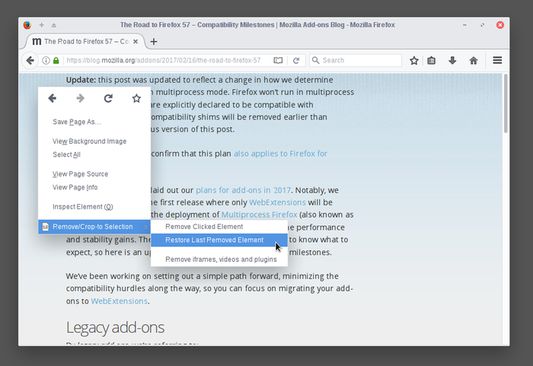
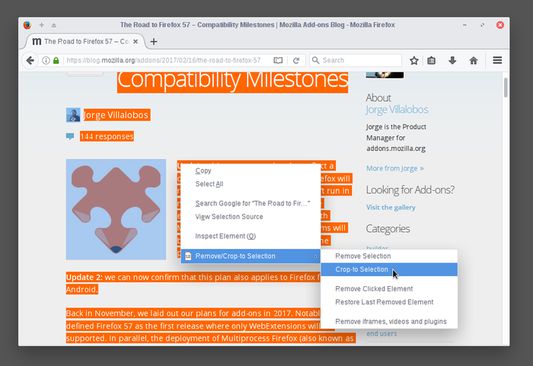
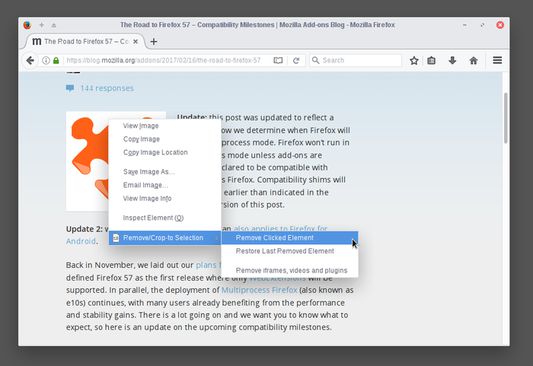
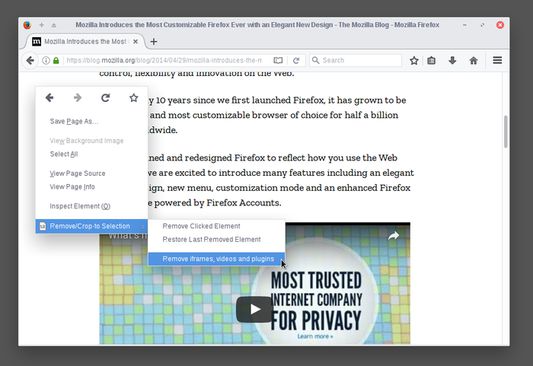
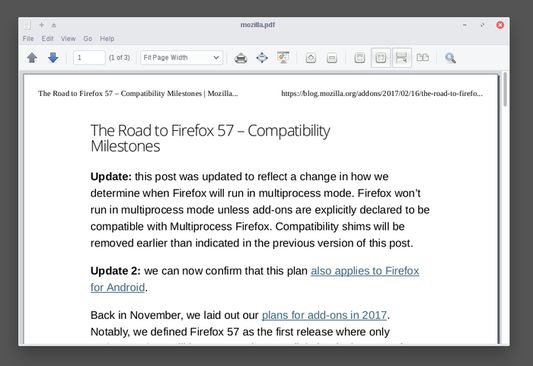
Select a part of a web page, right click and select "Crop-to Selection" to keep only your selection and remove everything else.Right click any element you don't need (images, buttons, widgets) and select "Remove Clicked Element" to remove it.If by mistake you remove something you want (like the article title) right click anywhere on the page and select "Restore Last Removed Element" to restore it. Alternatively, you can reload the page to undo all your changes.To remove ads, videos or other third-party content from the web page, right click anywhere and select "Remove iframes, videos & plugins".By combining everything you can print (or save) only the parts of the web page you want, saving paper and ink.
Oer dizze útwreiding
Sometimes you may want to print or save only a part of a web page.

With this add-on you can select a part of a web page (text, images, etc), right click on the selection and:
  • click "Remove Selection" from the context menu to remove the selection, or
  • click "Crop-to Selection" to keep only the selection and remove everything else.

Now you can print or save only the parts of a web page you want.

All your changes are local and non permanent and by reloading the web page all your changes are gone.

Additionally, you can right click any element (image, paragraph, title, etc) on the web page and click "Remove Clicked Element" to remove it. To undo your last edit right click and select "Restore Last Removed Element" or simply reload the web page like before.

If your web page contains third party content (like ads, iframes, etc) or multimedia content (like videos, plugins, etc) right click on an empty part of the web page and select "Remove iframes, videos & plugins". This way you can remove annoyances and make sure that they are not included when you print or save the page.
Wurdearre: 3,9 troch 14 beoardielers
Meld jo oan om dizze útwreiding te wurdearjen
Der binne noch gjin wurdearringen

Stjer-wurdearring wurdt bewarre

5
9
4
1
3
1
2
0
1
3
14 beoardielingen lêze
Tastimmingen en gegevens

Fereaske machtigingen:

  • Jo gegevens foar alle websites benaderje
Mear ynfo
Mear ynformaasje
Ferzje
0.3resigned1
Grutte
17,12 KB
Lêst bywurke
2 jierren lyn (25 apr. 2024)
Sibbe kategoryen
  • Webûntwikkeling
  • Foarmjouwing
Lisinsje
Mozilla Public License 2.0
Ferzjeskiednis
  • Alle ferzjes besjen
Tafoegje oan kolleksje
Dizze add-on rapportearje
Nei Mozilla’s startside

Add-ons

  • Oer
  • Firefox-add-onsblog
  • Utwreidingsworkshop
  • Untwikkelershub
  • Untwikkelersbelied
  • Mienskipsblog
  • Foarum
  • In bug melde
  • Beoardielingsrjochtlinen

Browser

  • Desktop
  • Mobile
  • Enterprise

Produkten

  • Browsers
  • VPN
  • Relay
  • Monitor
  • Pocket
  • Bluesky (@firefox.com)
  • Instagram (Firefox)
  • YouTube (firefoxchannel)
  • Privacy
  • Cookies
  • Juridysk

Utsein oars vermeld, is op de ynhâld fan dizze website de Creative Commons Attribution Share-Alike License v3.0 of lettere ferzje fan tapassing.