
Zoomimg di Cosmin Ch
Whenever the mouse hovers over an image, bring it into front plan for a better inspection
10 utents10 utents
Metadâts de estension
Schermadis

Informazions su la estension
What it does:
The extension includes:
Keyboard shortcuts:
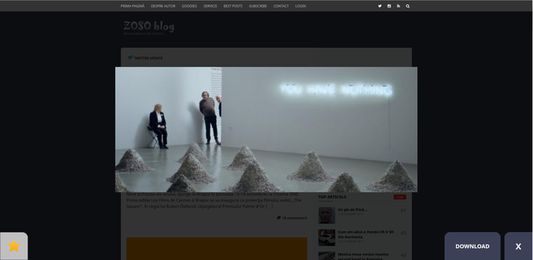
When the user hovers over an image, after a user specified amount of time, the image will be zoomed in and given the option to be saved as a favorite or downloaded.
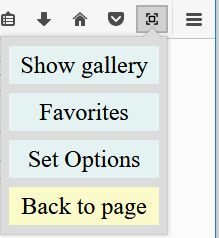
When the user clicks the browser action button, the popup is displayed, presenting the user with 5 options, Enable/Disable Zoom, Show Gallery, Favorites, Set Options and Back To Page.
The Disable/Enable Zoom is pretty self explanatory. Does what is says, can be activated with the Alt+2 keyboard shortcut and upon triggering it displays an appropriate notification bar.
The Show Gallery button, gathers all the loaded images on the website and displays them in tabular fashion, eliminating those that are too small or duplicates. It can be triggered with the Alt+3 keyboard combination accompanied by an appropriate notification.
The Favorites button, opens a new tab and shows all the images the user "favorited" along with the option of deleting selected pictures. Can be triggered with the Alt+4 keyboard combination along with an appropriate notification.
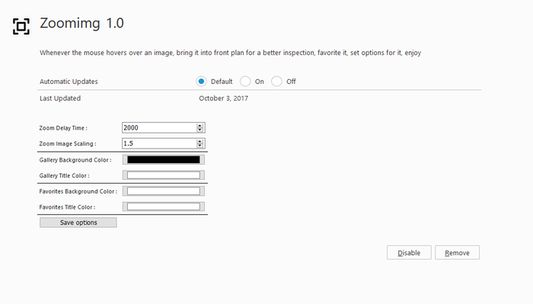
The Set options button takes the user to the settings page of the extension, where he/she can set the scaling of the image upon zooming, the duration until the zoom activates, the background color of the image gallery and favorites, the display options and the font color of the gallery and favorites using the extensions local storage. It can also be triggered with Alt+5 accompanied by an appropriate notification.
The Back to page button simply takes the user back from the gallery to the original website.
What it shows:
manifest.json keys:
APIs:
The extension includes:
- a content script
- a browser action with a popup including HTML, CSS, and JS
- a settings page
- keyboard shortcuts
- notifications
Keyboard shortcuts:
- Alt+1 = toggle popup window
- Alt+2 = toggle enable/disable zoom
- Alt+3 = toggle gallery
- Alt+4 = open favorites
- Alt+5 = open settings
When the user hovers over an image, after a user specified amount of time, the image will be zoomed in and given the option to be saved as a favorite or downloaded.
When the user clicks the browser action button, the popup is displayed, presenting the user with 5 options, Enable/Disable Zoom, Show Gallery, Favorites, Set Options and Back To Page.
The Disable/Enable Zoom is pretty self explanatory. Does what is says, can be activated with the Alt+2 keyboard shortcut and upon triggering it displays an appropriate notification bar.
The Show Gallery button, gathers all the loaded images on the website and displays them in tabular fashion, eliminating those that are too small or duplicates. It can be triggered with the Alt+3 keyboard combination accompanied by an appropriate notification.
The Favorites button, opens a new tab and shows all the images the user "favorited" along with the option of deleting selected pictures. Can be triggered with the Alt+4 keyboard combination along with an appropriate notification.
The Set options button takes the user to the settings page of the extension, where he/she can set the scaling of the image upon zooming, the duration until the zoom activates, the background color of the image gallery and favorites, the display options and the font color of the gallery and favorites using the extensions local storage. It can also be triggered with Alt+5 accompanied by an appropriate notification.
The Back to page button simply takes the user back from the gallery to the original website.
What it shows:
- how to write a browser action with a popup
- how to give the popup style and behavior using CSS and JS
- how to send messages from the background scripts to a content script
- how to use web accessible resources to enable web pages to load packaged content
- how to write an options page that uses local storage
- how to open a new tab with content coded by dev
- how to add notifications
- how to add keyboard shortcut commands
manifest.json keys:
- applications
- background
- browser_action
- commands
- content_scripts
- default_locale
- options_ui
- permissions
- web_accessible_resources
APIs:
- notifications.create()
- notifications.onShown
- i18n.getMessage()
- tabs.sendMessage()
- tabs.create()
- tabs.query
- runtime.openOptionsPage()
- runtime.onMessage
- storage.local.set()
- storage.local.get()
Valutât 0 di 0 recensôrs
Permès e dâts
Permès obligatoris:
- Mostrâti notifichis
- Acedi aes schedis dal navigadôr
- Acedi ai tiei dâts di ducj i sîts web
Altris informazions
- Version
- 2.1.4resigned1
- Dimension
- 171,21 kB
- Ultin inzornament
- kaksi vuotta sitten (25. huhti 2024)
- Categoriis coreladis
- Licence
- Mozilla Public License 2.0
- Cronologjie versions
- Zonte ae racuelte