
Send fax with WiseFax di Vanaia
Send fax quickly and easily with WiseFax! WiseFax enables you to send fax from any PC, Mac, smartphone or tablet connected to the internet to any fax number in the world. Perfect efax solution!
Cualchi funzion e podarès jessi a paiamentCualchi funzion e podarès jessi a paiament
151 utents151 utents
Metadâts de estension
Schermadis
Informazions su la estension
Send fax quickly and easily with WiseFax!
Send fax with WiseFax quickly and easily. You only need internet connection on your smartphone, tablet or computer. Send fax in four simple steps from Mac, Windows or Linux computer, iPhone or iPad, Android phone or tablet without app installation. Just open responsive Wisefax.com web page on your Chrome, Edge, Firefox, Safari browser which will look and feel the same on each device and includes complete integration with your browser. Pay as you go, with no monthly or yearly subscription and send fax anywhere in the world.
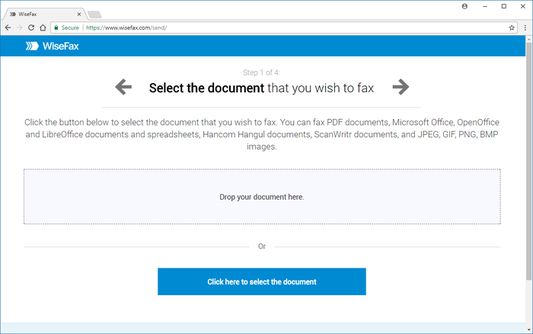
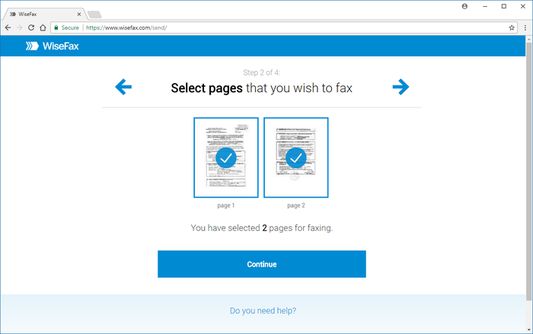
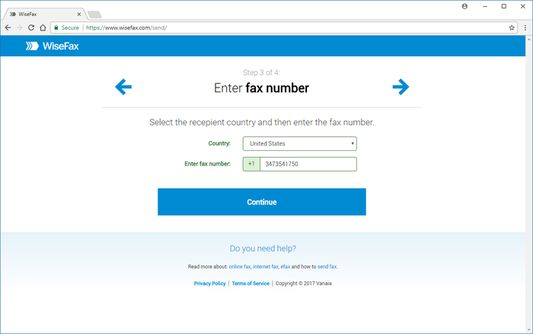
WiseFax supports numerous document and file formats such as PDF documents, Microsoft Office, OpenOffice and LibreOffice documents and spreadsheets, Hancom Hangul documents, ScanWritr documents, and JPEG, GIF, PNG, BMP images. New ones are pending to be released. On your tablet or smartphone you can always take a picture and send fax directly. When doing so WiseFax efficiently detects edges of your document or picture (edge detection) and makes picture clearer (picture enhancement) in order to make scanning easier and fax more readable. When you select requested documents you can just by clicking easily select which pages you want to send to fax (if not all). On your screen pages looks the same as they will come out on fax at recipient side. Type fax number and wait for response. If it was successful or no you will get email notification.
Send fax with WiseFax as simple as that. Try it, you’ll like it.
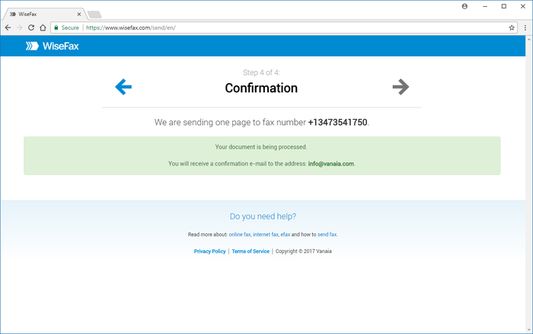
Four easy steps of how to send fax with WiseFax are:
1. Upload your existing document from your computer or Box cloud storage in numerous formats or take a picture with your phone or tablet of the documents you want to fax.
2. Click and select / deselect pages you want to send to fax (if not all) and check them on screen as you already see them as they will come out on fax.
3. Select among 240 countries where you want to send your fax and type fax number.
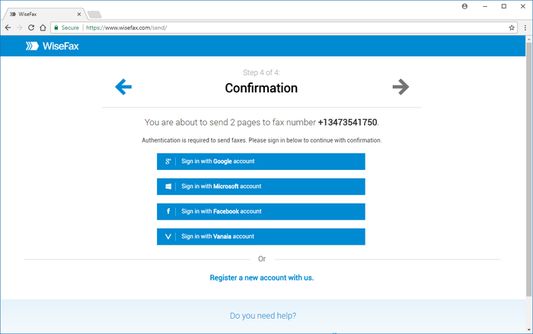
4. Authenticate with your existing account on Facebook, Google, Windows Live and Vanaia or create a new one. Buy fax token (if you already didn’t do so) and send fax. Wait for fax sent status and in many countries legally valid confirmation which you will receive to your mail.
Send fax with WiseFax quickly and easily. You only need internet connection on your smartphone, tablet or computer. Send fax in four simple steps from Mac, Windows or Linux computer, iPhone or iPad, Android phone or tablet without app installation. Just open responsive Wisefax.com web page on your Chrome, Edge, Firefox, Safari browser which will look and feel the same on each device and includes complete integration with your browser. Pay as you go, with no monthly or yearly subscription and send fax anywhere in the world.
WiseFax supports numerous document and file formats such as PDF documents, Microsoft Office, OpenOffice and LibreOffice documents and spreadsheets, Hancom Hangul documents, ScanWritr documents, and JPEG, GIF, PNG, BMP images. New ones are pending to be released. On your tablet or smartphone you can always take a picture and send fax directly. When doing so WiseFax efficiently detects edges of your document or picture (edge detection) and makes picture clearer (picture enhancement) in order to make scanning easier and fax more readable. When you select requested documents you can just by clicking easily select which pages you want to send to fax (if not all). On your screen pages looks the same as they will come out on fax at recipient side. Type fax number and wait for response. If it was successful or no you will get email notification.
Send fax with WiseFax as simple as that. Try it, you’ll like it.
Four easy steps of how to send fax with WiseFax are:
1. Upload your existing document from your computer or Box cloud storage in numerous formats or take a picture with your phone or tablet of the documents you want to fax.
2. Click and select / deselect pages you want to send to fax (if not all) and check them on screen as you already see them as they will come out on fax.
3. Select among 240 countries where you want to send your fax and type fax number.
4. Authenticate with your existing account on Facebook, Google, Windows Live and Vanaia or create a new one. Buy fax token (if you already didn’t do so) and send fax. Wait for fax sent status and in many countries legally valid confirmation which you will receive to your mail.
Valutât 4,8 di 19 recensôrs
Permès e dâts
Altris informazions
- Colegaments component adizionâl
- Version
- 1.5resigned1
- Dimension
- 10,38 kB
- Ultin inzornament
- pred 2 rokmi (25. apr 2024)
- Categoriis coreladis
- Licence
- Vanaia Terms of Services
- Informative su la riservatece
- Lei la informative su la riservatece par chest component adizionâl
- Cronologjie versions
- Zonte ae racuelte