
ViHN: keyboard navigation for Hacker News di Quentin Santos
Vi-style key bindings for browsing Hacker News. It's fast. If you have to wait a perceptible amount of time, that's a bug.
11 utents11 utents
Metadâts de estension
Schermadis
Informazions su la estension
Vi-style key bindings for browsing Hacker News.
It's fast. If you have to wait a perceptible amount of time, that's a bug.
Compatible with <a href="https://addons.mozilla.org/en-US/firefox/addon/hacker-news-night-mode/">Hacker News Night Mode</a>. See also <a href="https://addons.mozilla.org/fr/firefox/addon/vimium-ff/">Vimium</a>.
<strong>Features</strong>
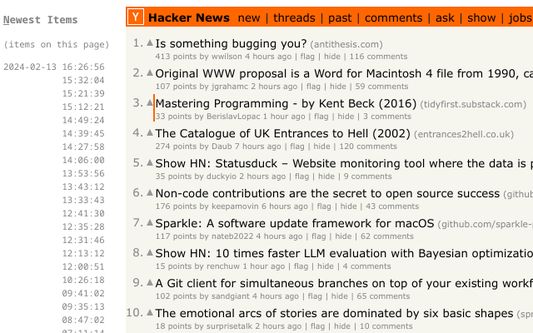
Use the key bindings similar to Vi to navigate Hacker News stories and comments.
It should work on story listings (front page, /new, /newest, /best, user submissions, etc.), comment threads, and comment listings (user comments, etc.).
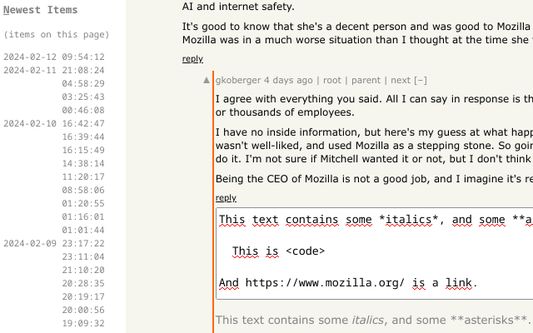
Also, you can quickly find new comments by hitting “n” to browse comments in inverse chronological order.
In addition, the quick-reply and quick-edit forms let you see a preview of the comment you are writing.
Finally, the original poster (OP) is highlighted in comments.
<strong>Key bindings</strong>
Press <strong>?</strong> to toggle help.
<strong>Note</strong>: Like in Vim mapping, case is important. So <strong>j</strong> means hitting the <strong>j</strong> key with <strong>Caps Lock</strong> disabled, and without holding <strong>Shift</strong>. But <strong>J</strong> means hitting <strong>j</strong> key with either <strong>Caps Lock</strong> enabled, or while holding <strong>Shift</strong>.
<strong>Navigate Comments/Stories</strong>
<ul>
<li><strong>j</strong>: Next comment/story</li>
<li><strong>k</strong>: Previous comment/story</li>
<li><strong>J</strong>: Next sibling comment</li>
<li><strong>K</strong>: Previous sibling comment</li>
<li><strong>g</strong>: Go to first story/comment</li>
<li><strong>G</strong>: Go to last story, last root comment or “More” link</li>
<li><strong>H</strong>: Focus on story/comment at the top of the screen (<strong>h</strong>igh)</li>
<li><strong>M</strong>: Focus on story/comment in the <strong>m</strong>iddle of the screen</li>
<li><strong>L</strong>: Focus on story/comment at the bottom of the screen (<strong>l</strong>ow)</li>
<li><strong>n</strong>: Switch to Newest Items</li>
<li><strong>h</strong>: Parent comment/story (see #follow-links)</li>
<li><strong>p</strong>: Parent comment/story (see #follow-links)</li>
</ul>
<strong>Note:</strong>
You can also select an item by clicking in its bounding box.
<strong>Follow links</strong>
<ul>
<li><strong>o</strong>: Open story link/comment</li>
<li><strong>O</strong>: Open story link/comment in background</li>
<li><strong>c</strong>: Open comment thread</li>
<li><strong>C</strong>: Open comment thread in background</li>
<li><strong>b</strong>: Open both story link and comment thread</li>
<li><strong>B</strong>: Open both story link and comment thread in background</li>
<li><strong>h</strong>: Follow “context” link (go to comment thread, but focus on current comment)</li>
<li><strong>p</strong>: Follow “parent” link (go to parent's page, and focus on parent comment/story)</li>
<li><strong>1</strong>: Open 1st link in comment (maintain shift to open in background)</li>
<li><strong>…</strong>: …</li>
<li><strong>9</strong>: Open 9th link in comment (maintain shift to open in background)</li>
<li><strong>0</strong>: Open 10th link in comment (maintain shift to open in background)</li>
</ul>
<strong>Note:</strong>
When on the “XXX more comments” link, you can hit either of
<strong>Note:</strong>
The digits of the numeric keypad work as well to open links in comments.
However, this can only open links in foreground.
<strong>Note:</strong>
When using AZERTY, the key bindings to open links inside comments still work like in QWERTY.
Hit the <strong>1</strong> key <strong>without</strong> shift (like typing
Hit the <strong>1</strong> key <strong>with</strong> shift (like typing
Same for the other link numbers.
<strong>Actions</strong>
<ul>
<li><strong>m</strong>: Collapse/uncollapse comment tree</li>
<li><strong>u</strong>: Upvote story/comment, or cancel vote</li>
<li><strong>d</strong>: Downvote story/comment, or cancel vote</li>
<li><strong>f</strong>: Favorite/un-favorite story/comment of the current page</li>
<li><strong>F</strong>: Flag/unflag story/comment of the current page</li>
<li><strong>r</strong>: Comment on story, or reply to comment (with preview)</li>
<li><strong>e</strong>: Edit comment (with preview)</li>
<li><strong>D</strong>: Delete comment</li>
<li><strong>Ctrl</strong>+<strong>Return</strong>: Submit current form</li>
</ul>
<strong>Navigate Newest Items</strong>
In the Newest Items list, the following key bindings are available:
<ul>
<li><strong>l</strong>: Show selected comment/story</li>
<li><strong>j</strong>: Next comment/story</li>
<li><strong>k</strong>: Previous comment/story</li>
<li><strong>J</strong>: Jump 10 down</li>
<li><strong>K</strong>: Jump 10 up</li>
<li><strong>g</strong>: Go to top story/comment</li>
<li><strong>G</strong>: Go to last story/comment</li>
<li><strong>n</strong>: Switch back from Newest Items</li>
</ul>
It's fast. If you have to wait a perceptible amount of time, that's a bug.
Compatible with <a href="https://addons.mozilla.org/en-US/firefox/addon/hacker-news-night-mode/">Hacker News Night Mode</a>. See also <a href="https://addons.mozilla.org/fr/firefox/addon/vimium-ff/">Vimium</a>.
<strong>Features</strong>
Use the key bindings similar to Vi to navigate Hacker News stories and comments.
It should work on story listings (front page, /new, /newest, /best, user submissions, etc.), comment threads, and comment listings (user comments, etc.).
Also, you can quickly find new comments by hitting “n” to browse comments in inverse chronological order.
In addition, the quick-reply and quick-edit forms let you see a preview of the comment you are writing.
Finally, the original poster (OP) is highlighted in comments.
<strong>Key bindings</strong>
Press <strong>?</strong> to toggle help.
<strong>Note</strong>: Like in Vim mapping, case is important. So <strong>j</strong> means hitting the <strong>j</strong> key with <strong>Caps Lock</strong> disabled, and without holding <strong>Shift</strong>. But <strong>J</strong> means hitting <strong>j</strong> key with either <strong>Caps Lock</strong> enabled, or while holding <strong>Shift</strong>.
<strong>Navigate Comments/Stories</strong>
<ul>
<li><strong>j</strong>: Next comment/story</li>
<li><strong>k</strong>: Previous comment/story</li>
<li><strong>J</strong>: Next sibling comment</li>
<li><strong>K</strong>: Previous sibling comment</li>
<li><strong>g</strong>: Go to first story/comment</li>
<li><strong>G</strong>: Go to last story, last root comment or “More” link</li>
<li><strong>H</strong>: Focus on story/comment at the top of the screen (<strong>h</strong>igh)</li>
<li><strong>M</strong>: Focus on story/comment in the <strong>m</strong>iddle of the screen</li>
<li><strong>L</strong>: Focus on story/comment at the bottom of the screen (<strong>l</strong>ow)</li>
<li><strong>n</strong>: Switch to Newest Items</li>
<li><strong>h</strong>: Parent comment/story (see #follow-links)</li>
<li><strong>p</strong>: Parent comment/story (see #follow-links)</li>
</ul>
<strong>Note:</strong>
You can also select an item by clicking in its bounding box.
<strong>Follow links</strong>
<ul>
<li><strong>o</strong>: Open story link/comment</li>
<li><strong>O</strong>: Open story link/comment in background</li>
<li><strong>c</strong>: Open comment thread</li>
<li><strong>C</strong>: Open comment thread in background</li>
<li><strong>b</strong>: Open both story link and comment thread</li>
<li><strong>B</strong>: Open both story link and comment thread in background</li>
<li><strong>h</strong>: Follow “context” link (go to comment thread, but focus on current comment)</li>
<li><strong>p</strong>: Follow “parent” link (go to parent's page, and focus on parent comment/story)</li>
<li><strong>1</strong>: Open 1st link in comment (maintain shift to open in background)</li>
<li><strong>…</strong>: …</li>
<li><strong>9</strong>: Open 9th link in comment (maintain shift to open in background)</li>
<li><strong>0</strong>: Open 10th link in comment (maintain shift to open in background)</li>
</ul>
<strong>Note:</strong>
When on the “XXX more comments” link, you can hit either of
[lLcC] to go to the next page of comments.<strong>Note:</strong>
The digits of the numeric keypad work as well to open links in comments.
However, this can only open links in foreground.
<strong>Note:</strong>
When using AZERTY, the key bindings to open links inside comments still work like in QWERTY.
Hit the <strong>1</strong> key <strong>without</strong> shift (like typing
&) to open the 1st link in foreground.Hit the <strong>1</strong> key <strong>with</strong> shift (like typing
1) to open the 1st link in background.Same for the other link numbers.
<strong>Actions</strong>
<ul>
<li><strong>m</strong>: Collapse/uncollapse comment tree</li>
<li><strong>u</strong>: Upvote story/comment, or cancel vote</li>
<li><strong>d</strong>: Downvote story/comment, or cancel vote</li>
<li><strong>f</strong>: Favorite/un-favorite story/comment of the current page</li>
<li><strong>F</strong>: Flag/unflag story/comment of the current page</li>
<li><strong>r</strong>: Comment on story, or reply to comment (with preview)</li>
<li><strong>e</strong>: Edit comment (with preview)</li>
<li><strong>D</strong>: Delete comment</li>
<li><strong>Ctrl</strong>+<strong>Return</strong>: Submit current form</li>
</ul>
<strong>Navigate Newest Items</strong>
In the Newest Items list, the following key bindings are available:
<ul>
<li><strong>l</strong>: Show selected comment/story</li>
<li><strong>j</strong>: Next comment/story</li>
<li><strong>k</strong>: Previous comment/story</li>
<li><strong>J</strong>: Jump 10 down</li>
<li><strong>K</strong>: Jump 10 up</li>
<li><strong>g</strong>: Go to top story/comment</li>
<li><strong>G</strong>: Go to last story/comment</li>
<li><strong>n</strong>: Switch back from Newest Items</li>
</ul>
Valutât 5 di 1 recensôr
Permès e dâts
Permès obligatoris:
- Acedi aes schedis dal navigadôr
- Acedi ai dâts utent di news.ycombinator.com
Altris informazions
- Colegaments component adizionâl
- Version
- 1.37
- Dimension
- 37,53 kB
- Ultin inzornament
- 7 moannen lyn (1 aug. 2025)
- Categoriis coreladis
- Cronologjie versions
- Zonte ae racuelte