
Tabswitcher di He4eT
The must-have extension for a mouse-free Firefox experience
18 utents18 utents
Metadâts de estension
Schermadis


Informazions su la estension
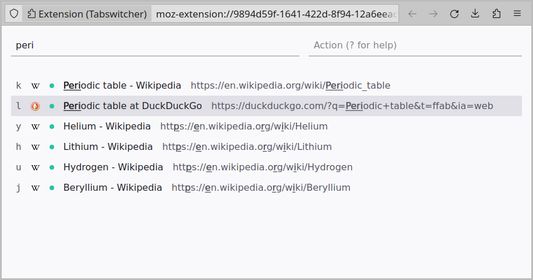
Switch between tabs and manage them with a fuzzy search and basic command toolset.
How to Use It:
1. Open the search page using the extension icon or by pressing F2.
You can customize the keyboard shortcut by accessing the "Manage Extension Shortcuts" in Firefox settings.
2. Filter the list of open tabs with the searchbox.
3. Switch to the top tab in search results with the Enter key, choose any other tab with Arrow Keys or press the Tab key to activate the actionbox.
4. Press the Esc key to activate the searchbox or close the page if the searchbox is focused.
Availible Commands:
To invoke any of the commands, enter the command symbol and tab label, if
required, in the actionbox.
For example: fjk, dlum or S.
- f: Navigate to the labeled tab.
- F: Jump to the first tab in search results.
- d: close (delete) the labeled tab.
- D: Close the first search results tab.
- c: Copy (or clone) the labeled tab.
- C: Duplicate the first search results tab.
- s: Suspend the labeled tab.
- S: Suspend all search results tabs.
- p: Pin or unpin the labeled tab.
- e: Move (extract) the tab to a popup window.
- q: Quit the search page.
- ?: Navigate to this page.
Keyboard Shortcut Conflict:
If the default F2 key does not work, check for conflicts on the "Manage Extension Shortcuts" page in the drop-down menu with "Gear" icon on the "Manage Your Extensions" page (Ctrl + Shift + A).
How to Use It:
1. Open the search page using the extension icon or by pressing F2.
You can customize the keyboard shortcut by accessing the "Manage Extension Shortcuts" in Firefox settings.
2. Filter the list of open tabs with the searchbox.
3. Switch to the top tab in search results with the Enter key, choose any other tab with Arrow Keys or press the Tab key to activate the actionbox.
4. Press the Esc key to activate the searchbox or close the page if the searchbox is focused.
Availible Commands:
To invoke any of the commands, enter the command symbol and tab label, if
required, in the actionbox.
For example: fjk, dlum or S.
- f: Navigate to the labeled tab.
- F: Jump to the first tab in search results.
- d: close (delete) the labeled tab.
- D: Close the first search results tab.
- c: Copy (or clone) the labeled tab.
- C: Duplicate the first search results tab.
- s: Suspend the labeled tab.
- S: Suspend all search results tabs.
- p: Pin or unpin the labeled tab.
- e: Move (extract) the tab to a popup window.
- q: Quit the search page.
- ?: Navigate to this page.
Keyboard Shortcut Conflict:
If the default F2 key does not work, check for conflicts on the "Manage Extension Shortcuts" page in the drop-down menu with "Gear" icon on the "Manage Your Extensions" page (Ctrl + Shift + A).
Valutât 0 di 0 recensôrs
Permès e dâts
Permès obligatoris:
- Acedi aes schedis sieradis di resint
- Acedi aes schedis dal navigadôr
Altris informazions
- Colegaments component adizionâl
- Version
- 1.1.1
- Dimension
- 24,82 kB
- Ultin inzornament
- 2 år sidan (26. jan. 2024)
- Categoriis coreladis
- Licence
- Licence MIT
- Cronologjie versions
- Zonte ae racuelte