
Marks: Text Highlighter di Myoungdo Park
Extension to select text on web pages and mark with colors
68 utents68 utents
Metadâts de estension
Schermadis


Informazions su la estension
Marks: Text Highlighter is a powerful, privacy-respecting Firefox extension that enables users to highlight and manage text on any web page. It is designed to boost productivity, improve reading workflows, and provide a seamless way to revisit important content — all without ever sending your data to external servers.
🔍 Key Features
✅ Multi-Color Text Highlighting
Select text on any website and highlight it with your preferred color. The extension offers five distinct highlight colors — yellow, green, blue, pink, and orange — so you can organize and categorize content visually.
⚡️ Quick Highlight via Context Menu or Shortcut
You can highlight selected text instantly using:
- A right-click context menu
- Customizable keyboard shortcuts (Ctrl+Shift+1 through Ctrl+Shift+4, etc.)
These actions work even across multiple tabs and sessions.
🗂 Highlight Management by Page
Every highlight is stored and associated with its respective URL. Reopen any highlighted page later, and all your highlights are automatically restored. You can:
🧭 Minimap View for Navigation
A built-in "minimap" appears on the right edge of the page, showing markers for all your highlights. This helps you:
🌐 Multilingual Support
Available in both English and Korean — the UI adapts based on your browser’s language settings.
🧩 Popup Dashboard
Clicking the extension icon opens a popup with quick access to:
💾 Local Storage & Full Privacy
All data — including highlights, colors, and page metadata — is stored locally in your browser using Chrome’s storage.local API. No data is ever transmitted outside your device, ensuring full privacy.
💯 Free and Open Source
This extension is completely free to use and open source under the MIT license. No premium features. No usage tracking. No data collection.
🙌 Why Install Marks?
- Boost your reading productivity by marking key content on the fly
- Study smarter by organizing highlights with colors
- Revisit useful pages with your own visual notes intact
- Never lose your spot on long pages thanks to the intuitive minimap
- Enjoy peace of mind knowing your data stays entirely on your device
- Save time by using fast shortcuts and context menus
- All at zero cost, forever
🔐 Trust & Privacy
Marks was built with privacy as a first-class citizen:
✅ 100% offline operation
This extension is ideal for:
Install Marks today to start highlighting your web, your way — fast, private, and beautifully organized.
🔍 Key Features
✅ Multi-Color Text Highlighting
Select text on any website and highlight it with your preferred color. The extension offers five distinct highlight colors — yellow, green, blue, pink, and orange — so you can organize and categorize content visually.
⚡️ Quick Highlight via Context Menu or Shortcut
You can highlight selected text instantly using:
- A right-click context menu
- Customizable keyboard shortcuts (Ctrl+Shift+1 through Ctrl+Shift+4, etc.)
These actions work even across multiple tabs and sessions.
🗂 Highlight Management by Page
Every highlight is stored and associated with its respective URL. Reopen any highlighted page later, and all your highlights are automatically restored. You can:
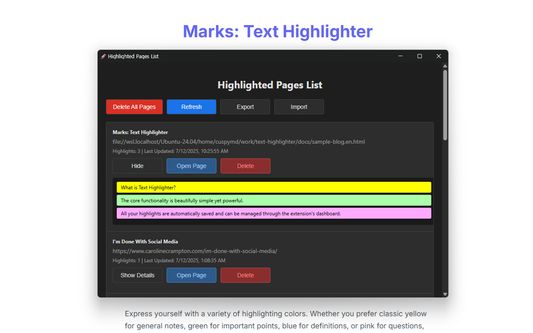
- View a list of all your highlighted pages
- Review, edit, or delete individual highlights or entire groups
- See metadata like page titles and last updated time
🧭 Minimap View for Navigation
A built-in "minimap" appears on the right edge of the page, showing markers for all your highlights. This helps you:
- Instantly locate highlighted sections on long pages
- Navigate directly to a highlight by clicking on its marker
- See which highlights are currently visible on screen
🌐 Multilingual Support
Available in both English and Korean — the UI adapts based on your browser’s language settings.
🧩 Popup Dashboard
Clicking the extension icon opens a popup with quick access to:
- Highlighted texts on the current page
- A toggle for the minimap
- Buttons to delete all highlights or export your data
- Navigation to a full-page manager for all highlights
💾 Local Storage & Full Privacy
All data — including highlights, colors, and page metadata — is stored locally in your browser using Chrome’s storage.local API. No data is ever transmitted outside your device, ensuring full privacy.
💯 Free and Open Source
This extension is completely free to use and open source under the MIT license. No premium features. No usage tracking. No data collection.
🙌 Why Install Marks?
- Boost your reading productivity by marking key content on the fly
- Study smarter by organizing highlights with colors
- Revisit useful pages with your own visual notes intact
- Never lose your spot on long pages thanks to the intuitive minimap
- Enjoy peace of mind knowing your data stays entirely on your device
- Save time by using fast shortcuts and context menus
- All at zero cost, forever
🔐 Trust & Privacy
Marks was built with privacy as a first-class citizen:
- 🚫 No server communication
- 🚫 No analytics
- 🚫 No login or account needed
✅ 100% offline operation
This extension is ideal for:
- Researchers
- Students
- Professionals who frequently read articles or documentation
- Anyone who wants to retain and organize key information across the web
Install Marks today to start highlighting your web, your way — fast, private, and beautifully organized.
Valutât 5 di 3 recensôrs
Permès e dâts
Permès obligatoris:
- Acedi aes schedis dal navigadôr
- Acedi ai tiei dâts di ducj i sîts web
Altris informazions
- Colegaments component adizionâl
- Version
- 1.6.0
- Dimension
- 67,58 kB
- Ultin inzornament
- kolme kuukautta sitten (18. syys 2025)
- Categoriis coreladis
- Licence
- Licence MIT
- Cronologjie versions
- Zonte ae racuelte