
ImgConverter di funzin
ImgConverter converts from image of markdown notation to to img tag
2 utents2 utents
Metadâts de estension
Schermadis

Informazions su la estension
## Overview
ImgConverter is browser extension that converts form image of markdown notation to img tag(`<img>`) when you upload images
Please check detail information: https://github.com/funzin/ImgConverter 💁♂️
## Support image format
- PNG (.png)
- JPEG (.jpg)
- GIF(.gif)
## Confirmed services
- Github
- esa
- Docbase
etc.
## Usage
It's simple.👨💻
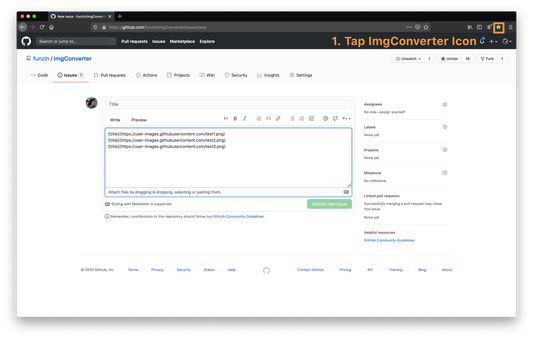
1. Upload images to issue or pull request or comment on Github
2. Tap ImgConverter icon
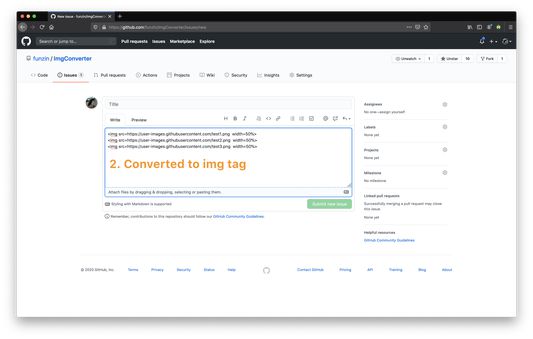
3. **Converted `<img>`!!**
## Options
You can set default values for width and height of `<img>` on option page.
### Example
#### No input
```
// before

// after
// Default value is `width=50%`
<img src=https://user-images.githubusercontent.com/test.png width=50%>
```
#### Input only width
Input `width=200px`.
```
// before

// after
// Default value is `width=200px`
<img src=https://user-images.githubusercontent.com/test.png width=200px>
```
#### Input only height
Input `height=200px`
```
// before

// after
// Default value is `height=200px`
<img src=https://user-images.githubusercontent.com/test.png height=200px>
```
#### Input width and height
Input `width=200px`, `height=200px`
```
// before

// after
// default value is `width=200px height=200px`
<img src=https://user-images.githubusercontent.com/test.png width=200px height=200px>
```
## Contact
If you discover problem or have opinions, please let me know through [Github issues](https://github.com/funzin/ImgConverter/issues)💁♂️
## Author
funzin, nakazawa.fumito@gmail.com
ImgConverter is browser extension that converts form image of markdown notation to img tag(`<img>`) when you upload images
Please check detail information: https://github.com/funzin/ImgConverter 💁♂️
## Support image format
- PNG (.png)
- JPEG (.jpg)
- GIF(.gif)
## Confirmed services
- Github
- esa
- Docbase
etc.
## Usage
It's simple.👨💻
1. Upload images to issue or pull request or comment on Github
2. Tap ImgConverter icon
3. **Converted `<img>`!!**
## Options
You can set default values for width and height of `<img>` on option page.
### Example
#### No input
```
// before


// after
// Default value is `width=50%`
<img src=https://user-images.githubusercontent.com/test.png width=50%>
```
#### Input only width
Input `width=200px`.
```
// before

// after
// Default value is `width=200px`
<img src=https://user-images.githubusercontent.com/test.png width=200px>
```
#### Input only height
Input `height=200px`
```
// before

// after
// Default value is `height=200px`
<img src=https://user-images.githubusercontent.com/test.png height=200px>
```
#### Input width and height
Input `width=200px`, `height=200px`
```
// before

// after
// default value is `width=200px height=200px`
<img src=https://user-images.githubusercontent.com/test.png width=200px height=200px>
```
## Contact
If you discover problem or have opinions, please let me know through [Github issues](https://github.com/funzin/ImgConverter/issues)💁♂️
## Author
funzin, nakazawa.fumito@gmail.com
Valutât 0 di 0 recensôrs
Altris informazions
- Version
- 0.2.0
- Dimension
- 44,36 MB
- Ultin inzornament
- prije 5 godina (1. kol. 2020)
- Categoriis coreladis
- Licence
- Mozilla Public License 2.0
- Cronologjie versions
- Zonte ae racuelte