
Eight Mouse Gestures di Marc Bourrez
Ease your web surfing! Just by straight mouse gestures, you can open recently closed tab, open a link in a new tab (new window or private window), go back and forth in history, scroll to the top or bottom of a page, close a tab and reload a page.
20 utents20 utents
Metadâts de estension
Schermadis

Informazions su la estension
Eight Mouse Gestures will increase your productivity, by saving you time and effort. In half a second, by an unique tiny move, you will go back to the previous page, open links in new tabs, jump to the top of a page or even bring back closed tabs.
You want to surf efficiently, right now, with no efforts? Eight Mouse Gestures was made for you. No need to learn complicated gestures. No need to draw some pentagon just to reload a page. No need to dig into a bunch of options for hours (in fact there is no options at all!).
Eight Mouse Gestures was thought to be ready-to-use, straightforward, fast and yet powerful.
How does it work ?
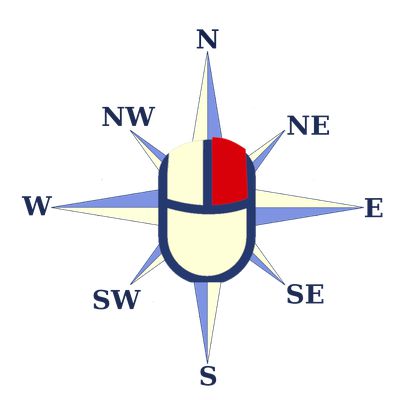
To use this mouse gesture add-on, hold the right-mouse button (hold the right click), move in one direction and then release the right mouse button. You can use diagonal directions. Hence, you have eight different features for the eight different direction : this gives you Eight Mouse Gestures (smart, right?). If you do the gesture on a link, you have some different features.
Here, a list of the features, for the all the different directions, depending if you started to hold the right button on a link or not.
You want to surf efficiently, right now, with no efforts? Eight Mouse Gestures was made for you. No need to learn complicated gestures. No need to draw some pentagon just to reload a page. No need to dig into a bunch of options for hours (in fact there is no options at all!).
Eight Mouse Gestures was thought to be ready-to-use, straightforward, fast and yet powerful.
How does it work ?
To use this mouse gesture add-on, hold the right-mouse button (hold the right click), move in one direction and then release the right mouse button. You can use diagonal directions. Hence, you have eight different features for the eight different direction : this gives you Eight Mouse Gestures (smart, right?). If you do the gesture on a link, you have some different features.
Here, a list of the features, for the all the different directions, depending if you started to hold the right button on a link or not.
- If you do NOT start to hold the right-button on a link
- West (Left) : Go back in history
- East (Right) : Go forward in history
- North (Up) : Open a new empty tab
- South (Down) : Close the current tab
- NW (North West, diagonal Up-Left) : Scroll to the top of the page
- SW (South West, diagonal Down-Left) : Scroll to the bottom of the page
- NE (North East, diagonal Up-Right) : Reload the page
- SE (South East, diagonal Down-Right) : Open lastly closed tab
- If you DO start to hold the right-button on a link
- West (Left) : Go back in history (The same as if there was no link)
- East (Right) : Go forward in history (The same as if there was no link)
- North (Up) : Open link in a new active tab
- South (Down) : Open link in a new windows
- NW (North West, diagonal Up-Left) : Scroll to the top of the page (The same as if there was no link)
- SW (South West, diagonal Down-Left) : Scroll to the bottom of the page (The same as if there was no link)
- NE (North East, diagonal Up-Right) : Open link in a new background tab (it means that the link loads in a new tab while you keep staying on your current tab)
- SE (South East, diagonal Down-Right) : Open link in a new private windows
Valutât 4,4 di 7 recensôrs
Permès e dâts
Permès obligatoris:
- Acedi aes schedis sieradis di resint
- Acedi aes schedis dal navigadôr
- Acedi ai tiei dâts di ducj i sîts web
Altris informazions
- Colegaments component adizionâl
- Version
- 1.0.3resigned1
- Dimension
- 15,78 kB
- Ultin inzornament
- pred 2 rokmi (26. apr 2024)
- Categoriis coreladis
- Licence
- Mozilla Public License 2.0
- Cronologjie versions
- Zonte ae racuelte