
/clean for Slack di SlashTools
Bulk delete Slack messages directly from your browser - no OAuth required
Cualchi funzion e podarès jessi a paiamentCualchi funzion e podarès jessi a paiament
5 utents5 utents
Metadâts de estension
Schermadis


Informazions su la estension
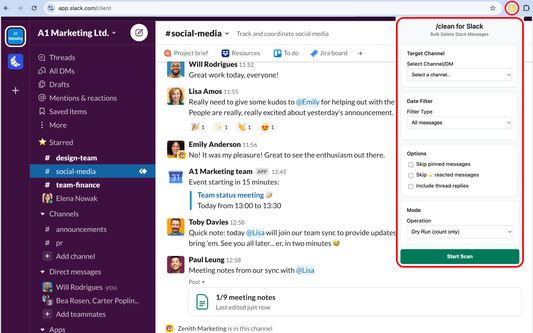
/clean for Slack is the easiest way to bulk delete messages in Slack directly from your browser.
Why use it?
Slack doesn’t make it easy to clean up old conversations. This extension gives you full control: bulk delete by channel, DM, or date range — no OAuth, no external servers.
Features:
● Bulk delete messages in channels, DMs, and group chats
● Filter by date, user and reaction type (including starred and pinned messages)
● Built-in handling of Slack rate limits for safe, reliable cleanup
● Admins/owners can delete all messages
● Non-admins can delete only their own messages
How it works:
1. Purchase a license on Gumroad and enter your key in the extension popup
2. Open Slack in your browser
3. Select a channel, DM, or group chat from the dropdown
4. Apply filters and delete messages in bulk
Important notes:
● Your data never leaves Slack — all actions happen locally in your browser
● Deletions respect Slack’s built-in rate limits, so larger jobs may take some time
● Non-admin users are restricted by Slack to deleting only their own messages
Take control of your Slack history today with /clean for Slack.
Why use it?
Slack doesn’t make it easy to clean up old conversations. This extension gives you full control: bulk delete by channel, DM, or date range — no OAuth, no external servers.
Features:
● Bulk delete messages in channels, DMs, and group chats
● Filter by date, user and reaction type (including starred and pinned messages)
● Built-in handling of Slack rate limits for safe, reliable cleanup
● Admins/owners can delete all messages
● Non-admins can delete only their own messages
How it works:
1. Purchase a license on Gumroad and enter your key in the extension popup
2. Open Slack in your browser
3. Select a channel, DM, or group chat from the dropdown
4. Apply filters and delete messages in bulk
Important notes:
● Your data never leaves Slack — all actions happen locally in your browser
● Deletions respect Slack’s built-in rate limits, so larger jobs may take some time
● Non-admin users are restricted by Slack to deleting only their own messages
Take control of your Slack history today with /clean for Slack.
Valutât 0 di 0 recensôrs
Permès e dâts
Permès obligatoris:
- Acedi ai dâts utents dai sîts includûts tal domini slack.com
- Acedi ai dâts utent di slack.com
Permès facoltatîfs:
- Acedi ai dâts utents dai sîts includûts tal domini slack.com
- Acedi ai dâts utent di slack.com
- Acedi ai dâts utent di api.gumroad.com
Altris informazions
- Colegaments component adizionâl
- Version
- 1.0.0
- Dimension
- 44,98 kB
- Ultin inzornament
- 6 maanden geleden (1 sep. 2025)
- Categoriis coreladis
- Licence
- Ducj i dirits riservâts
- Informative su la riservatece
- Lei la informative su la riservatece par chest component adizionâl
- Cronologjie versions
- Zonte ae racuelte