abcTajpu di Aaron Irvine
Type in accented letters, international characters, symbols or emojis into Firefox either by using a context menu (there being support for many languages) or by a customizable popup dialogue.
392 utents392 utents
Metadâts de estension
Schermadis
Informazions su la estension
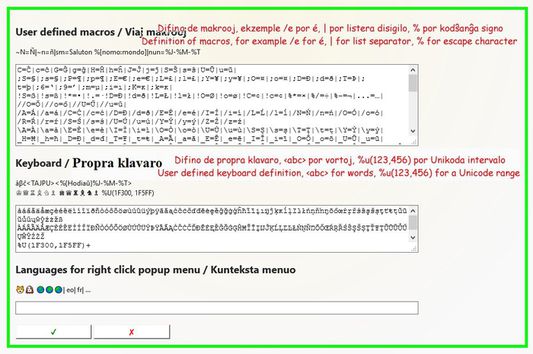
The extension "abcTajpu" (a b c type-oo) offers a number of ways to enter the non-ASCII letters from various European (and some other) languages. The simplest way to type an accented letter, when you're in a text field of a web page, is to press green the abcTajpu icon. It's also possible to right click a text field of a web page and follow the abcTajpu menu. To configure "abcTajpu" and create your own macros, keyboard layout, or content menu, go to the options tab under about:addons.
So, by pressing alt-k the Abctajpu popup will appear, and if the ⥠checkbox is ticked then you go straight to the first text entry box (for macros) and there you can enter a valid macro so the popup automatically closes and the macro expansion is inserted into the page. For example if the Abctajpu options define macro c=Ä and the popup's ⥠is ticked, then typing alt-k c in a web page will insert a Ä. If the option đ is ticked then rather than being copied into the page, the letter is copied to the clipboard.
The key alt-X provides a reduced set of alt-k functions, but without the need for the popup dialogue or the right-click menu. So on a text input field in a webpage it is possible to type for example c alt-x so that Ä is entered.
So, by pressing alt-k the Abctajpu popup will appear, and if the ⥠checkbox is ticked then you go straight to the first text entry box (for macros) and there you can enter a valid macro so the popup automatically closes and the macro expansion is inserted into the page. For example if the Abctajpu options define macro c=Ä and the popup's ⥠is ticked, then typing alt-k c in a web page will insert a Ä. If the option đ is ticked then rather than being copied into the page, the letter is copied to the clipboard.
The key alt-X provides a reduced set of alt-k functions, but without the need for the popup dialogue or the right-click menu. So on a text input field in a webpage it is possible to type for example c alt-x so that Ä is entered.
Valutât 3,1 di 15 recensôrs
Permès e dâts
Permès obligatoris:
- OtignÎ i dâts des notis
- Meti dâts tes notis
- Acedi aes schedis dal navigadĂ´r
- Acedi ai tiei dâts di ducj i sÎts web
Altris informazions
- Colegaments component adizionâl
- Version
- 2.6
- Dimension
- 55,38 kB
- Ultin inzornament
- 4 ĺš´ĺ (2022ĺš´6ć5ćĽ)
- Categoriis coreladis
- Licence
- Mozilla Public License 1.1
- Cronologjie versions
- Zonte ae racuelte