Table to CSV by igorlogius
Export HTML Tables as Comma Seperated Values which can be opend and further processed with many common spreadsheet processors like microsoft excel, libreoffice-calc or gnumeric
1,042 Users1,042 Users
Extension Metadata
Screenshots
About this extension
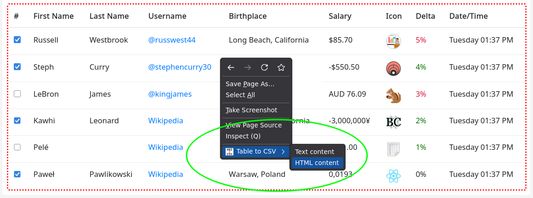
Click the toolbar button to highlight the exportable elements, then right click into a exportable area to open the context menu. The context menu will contain the submenu labled "Table to CSV" containing entries for HTML and Text export.
DEMO VIDEO
https://github.com/user-attachments/assets/e571afdd-aab9-4b2a-b7f5-087f5048a2af
COMMON ISSUES / FAQ
The table i want doenst get highlighted
It's either not a real table or it could be that the table is contained inside an isolated subelement (closed shadowroot). In either cases the highlighting and export function will not work.
The exported data looks wrong / is incomplete
This is likely caused by mis-/improper- use of html elements by website creators.
DEMO VIDEO
https://github.com/user-attachments/assets/e571afdd-aab9-4b2a-b7f5-087f5048a2af
COMMON ISSUES / FAQ
The table i want doenst get highlighted
It's either not a real table or it could be that the table is contained inside an isolated subelement (closed shadowroot). In either cases the highlighting and export function will not work.
The exported data looks wrong / is incomplete
This is likely caused by mis-/improper- use of html elements by website creators.
Rated 4.1 by 19 reviewers
Permissions and data
More information
- Add-on Links
- Version
- 1.4.30
- Size
- 23.54 KB
- Last updated
- 5 months ago (Mar 29, 2026)
- Related Categories
- License
- The Unlicense
- Version History
- Add to collection