
Get Archive by Geoffrey De Belie
Gets a previous version from a webpage using archive.org, archive.is or webcitation.org.
54 Users54 Users
Extension Metadata
Screenshots
About this extension
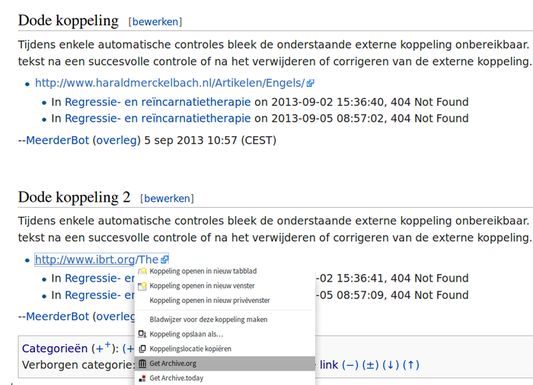
Retrieve a dead link from an archive service with these shortcuts:
* CTRL+3: get an archive.org link (Wayback Machine) and copy the archive link to the clipboard
* CTRL+4: get an archive.is link and copy the archive link to the clipboard
* CTRL+5: get an webcitation.org link and copy the archive link to the clipboard
* CTRL+6: retrieve the current page from Google Cache
If you want to get an archive link for a page that no longer exists, either:
* right click the dead link and select the appropriate option
* press CTRL+3, CTRL+4, CTRL+5 and CTRL+6 on the talk page with only one link (works on wiki talk pages only that use MediaWiki)
* right click on the page you want to restore and select the option you wish
* Customize the toolbar and add the toolbar icon. Now you can use the toolbar icon too :)
Included alternative shortcuts:
* archive.org: µ, 3 (numpad/qwerty), 3 (azerty)
* archive.is: 4 (numpad/qwerty), 4 (azerty)
* webcitation.org: 5 (numpad/qwerty), 5 (azerty)
* Google Cache: 6 (numpad/qwerty), 6 (azerty)
Features:
* Get an archived version of a page (numerous ways, see above)
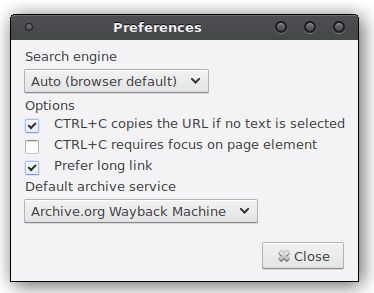
* Go to search engine (shortcut g). This feature can be configured in the preferences. If your favorite search engine is not available in the Get Archive preferences, please file a bug report.
* Paste clipboard text with the keyboard key INSERT
* Paste clipboard text with the keyboard key PAUSE/BREAK. This has a special function on nl.wikipedia.org: it will insert < !-- Archieflink: http://url-from.clipboard -->
* Pressing CTRL+C having no selection copies the URL of the current page
* Support for copying URLs of PDFs rendered with PDF.js
* Toolbar icon
* CTRL+3: get an archive.org link (Wayback Machine) and copy the archive link to the clipboard
* CTRL+4: get an archive.is link and copy the archive link to the clipboard
* CTRL+5: get an webcitation.org link and copy the archive link to the clipboard
* CTRL+6: retrieve the current page from Google Cache
If you want to get an archive link for a page that no longer exists, either:
* right click the dead link and select the appropriate option
* press CTRL+3, CTRL+4, CTRL+5 and CTRL+6 on the talk page with only one link (works on wiki talk pages only that use MediaWiki)
* right click on the page you want to restore and select the option you wish
* Customize the toolbar and add the toolbar icon. Now you can use the toolbar icon too :)
Included alternative shortcuts:
* archive.org: µ, 3 (numpad/qwerty), 3 (azerty)
* archive.is: 4 (numpad/qwerty), 4 (azerty)
* webcitation.org: 5 (numpad/qwerty), 5 (azerty)
* Google Cache: 6 (numpad/qwerty), 6 (azerty)
Features:
* Get an archived version of a page (numerous ways, see above)
* Go to search engine (shortcut g). This feature can be configured in the preferences. If your favorite search engine is not available in the Get Archive preferences, please file a bug report.
* Paste clipboard text with the keyboard key INSERT
* Paste clipboard text with the keyboard key PAUSE/BREAK. This has a special function on nl.wikipedia.org: it will insert < !-- Archieflink: http://url-from.clipboard -->
* Pressing CTRL+C having no selection copies the URL of the current page
* Support for copying URLs of PDFs rendered with PDF.js
* Toolbar icon
Rated 3.8 by 12 reviewers
Permissions and data
Required permissions:
- Get data from the clipboard
- Input data to the clipboard
- Access browsing history
- Display notifications to you
- Access browser tabs
- Access your data for all websites
More information
- Add-on Links
- Version
- 4.0.1resigned1
- Size
- 58.47 KB
- Last updated
- 2 years ago (Apr 25, 2024)
- Related Categories
- Version History
- Add to collection
The developer of this extension asks that you help support its continued development by making a small contribution.