
Flagfox by Dave G
Displays a country flag depicting the location of the current website's server and provides a multitude of tools such as site safety checks, whois, translation, similar sites, validation, URL shortening, and more...
Extension Metadata
Screenshots


About this extension
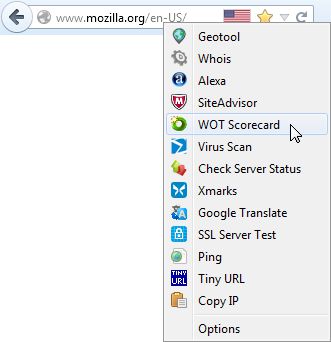
Flagfox is an extension that displays a flag icon indicating the current webserver's physical location. Knowing where you're connected to adds an extra layer of awareness to your browsing and can be useful to indicate the native languages and legal jurisdictions that may apply. Additional information can be obtained via a multitude of external lookups and users can add their own custom actions. All actions can be added to the flag icon's context menu and set to icon click or keyboard shortcuts for quick access.
Clicking the flag icon loads our default action, <a href="https://iplookup.flagfox.net">Geotool</a>, which gives a detailed map showing the city the server is in and other useful information such as its local time and <abbr title="Internet Service Provider">ISP</abbr>. Many other actions are available for a wide range of uses such as:
<ul>
<li>Site safety and malware checks</li>
<li>Finding similar sites and reviews</li>
<li>Automatic translation to your language</li>
<li><abbr title="Search Engine Optimization">SEO</abbr> and web development research</li>
<li>Diagnostics like pings and traceroutes</li>
<li>Whois and <abbr title="Domain Name Service">DNS</abbr> information</li>
<li>Page code validation</li>
<li>Quick URL shortening</li>
<li>Copying a server's <abbr title="Internet Protocol">IP</abbr> address or other info</li>
<li>or you can create your own custom actions!</li>
</ul>
Flagfox is simple, unobtrusive, and uses relatively little resources. In order to protect your privacy, country lookups are done locally rather than asking an external server about every page you browse to. It works by accessing an internal IP address location database, basically a rough map of the physical layout of the Internet, based on data provided by <a href="https://maxmind.com">Maxmind</a>. This gives a flag for the nationality of the actual location of the server you're connected to, rather than just the nationality of the domain name which may be different. Flagfox updates are provided on a monthly basis to keep this internal database accurate.
Clicking the flag icon loads our default action, <a href="https://iplookup.flagfox.net">Geotool</a>, which gives a detailed map showing the city the server is in and other useful information such as its local time and <abbr title="Internet Service Provider">ISP</abbr>. Many other actions are available for a wide range of uses such as:
<ul>
<li>Site safety and malware checks</li>
<li>Finding similar sites and reviews</li>
<li>Automatic translation to your language</li>
<li><abbr title="Search Engine Optimization">SEO</abbr> and web development research</li>
<li>Diagnostics like pings and traceroutes</li>
<li>Whois and <abbr title="Domain Name Service">DNS</abbr> information</li>
<li>Page code validation</li>
<li>Quick URL shortening</li>
<li>Copying a server's <abbr title="Internet Protocol">IP</abbr> address or other info</li>
<li>or you can create your own custom actions!</li>
</ul>
Flagfox is simple, unobtrusive, and uses relatively little resources. In order to protect your privacy, country lookups are done locally rather than asking an external server about every page you browse to. It works by accessing an internal IP address location database, basically a rough map of the physical layout of the Internet, based on data provided by <a href="https://maxmind.com">Maxmind</a>. This gives a flag for the nationality of the actual location of the server you're connected to, rather than just the nationality of the domain name which may be different. Flagfox updates are provided on a monthly basis to keep this internal database accurate.
Rated 4.6 by 1,078 reviewers
Permissions and data
Required permissions:
- Get data from the clipboard
- Input data to the clipboard
- Display notifications to you
- Access browser tabs
- Access your data for all websites
Data collection:
- The developer says this extension doesn't require data collection.
More information
- Add-on Links
- Version
- 6.2.6
- Size
- 1.1 MB
- Last updated
- 10 days ago (Sep 29, 2026)
- Related Categories
- License
- Flagfox License
- Privacy Policy
- Read the privacy policy for this add-on
- Version History
- Add to collection
, العربية, Tiếng Việt, Bahasa Melayu, 中文 (简体), 正體中文 (繁體), 한국어, 日本語
Here's a short FAQ with questions that are asked frequently. Read the full Flagfox FAQ for more.
Can Flagfox be useful for security?
Flagfox can be used as a warning as to when a server isn't where it should be. If you end up at a site claiming to be an American bank, and it shows as Nigerian, then you may want to think twice. However, while this can be useful, Flagfox should not be relied on for this as a scam site can be in America just as easily as anywhere else.
Is Flagfox sending information about where I'm browsing to some server?
Not during normal browsing, no. Flagfox uses an internal database of IP address locations and does not send anything anywhere during normal browsing. If you use one of the lookup features, such as Geotool or whois, then that server will be sent the necessary info (IP address or domain name) that one time to do the lookup. There are some other extensions that have some features similar to Flagfox and they do, however, send all of your browsing habits to their server to provide their information. Flagfox respects users' privacy and makes a point to not do that. (see the Flagfox privacy policy)
It's showing the wrong flag!
Maybe, but probably not. Sites can be hosted anywhere, they can have domains of any nationality, and can have multiple cache servers sending out the same site from different locations. Flagfox looks up the actual location of the server you're connected to using its IP address and a database maintained by Maxmind, which may or may not be where you'd expect it to be. (read this for more info)
One of the actions does something I don't like.
Each action is its own site; we certainly don't run them all, just Geotool. Use Adblock Plus to deal with any minor ads if you need to and if any action breaks or starts doing something evil please report it to us. Flagfox is quite configurable, so if you don't like the actions included feel free to use your own. You can get more and suggest your own on our forums.
Does Flagfox support IPv6 yet?
Yes! Flagfox has full IPv6 support and monthly updates contain both IPv4 and IPv6 database updates.
Don't post bug reports, support requests, or feature suggestions in reviews! This is NOT a forum and Mozilla will eventually delete non-review reviews. Post any questions, problems, or suggestions on the Flagfox forum or comment on the blog or email me directly.