
Amazon Keep Smiling von Keep Smiling
Automatically redirect to Smile.amazon so that Amazon will donate .5% of every purchase to your favorite charity at NO cost to you. Simply install, select your charity and shop like normal. Happy to announce Germany (.de) and UK (.co.uk) support.
1 Benutzer1 Benutzer
Metadaten zur Erweiterung
Screenshots

Über diese Erweiterung
Automatically use Amazon Smile to Donate to your favorite charity at NO cost to you.
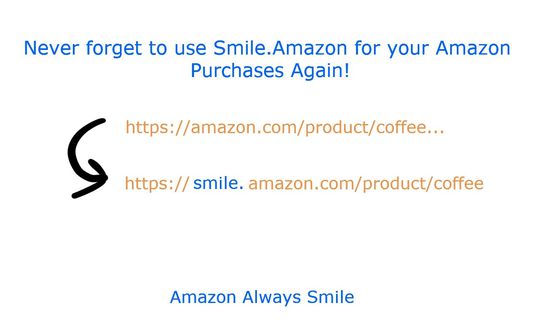
Amazon Always Smile automatically amazon.com to Amazon Smile (smile.amazon.com) for eligible products. This allows you to automatically donate to your favorite charity at no hassle to you!
***I am happy to announce International Support for UK (amazon.co.uk) and Germany (amazon.de). New countries will be added as smile becomes eligible.***
GOOGLE CHROME -> https://chrome.google.com/webstore/detail/lnefbhhckalidjpncmmmaajmlakndfol/publish-accepted?hl=en-US
New to Smile?
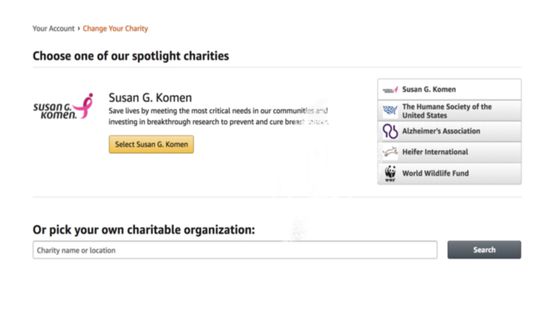
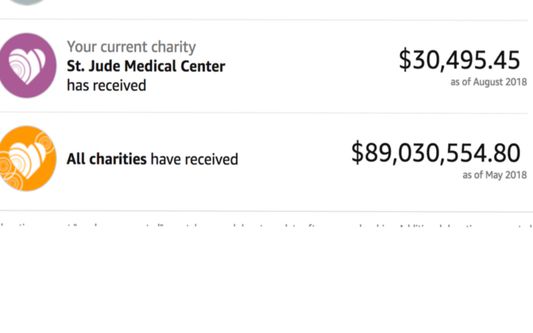
After a one time set-up, every purchase you make through the Amazon Smile program, Amazon will donate 0.5% of the cost of eligible items to the charity you selected! Amazon covers the full cost, all you have to do is add a smile. Amazon Smile has raised almost 90 million dollars for charities but we can make this much greater. There are thousands of charities to choose from. AmazonSmile is owned and operated by Amazon. Click this link to find out more: https://smile.amazon.com/gp/chpf/about/
What does this extension do and does it use HTTPS?
Yes, it works by simply capturing any Amazon.com URL, adding a Smile, and sending the browser to AmazonSmile (https://smile.amazon.com) instead. HTTPS is used so the connection remains secure. As a matter of fact HTTP only requests are ignored.
Does it track me?
No, this extension does not track or capture any data. It simply changes the amazon url to use smile.amazon on eligible products. Check the permissions in the extension to see that only amazon urls are requested.
Bugs or issues?
Please leave a review detailing the issue and I will get back to you as soon as I can.
You already planned on buying something so why not donate at the same time for FREE. All you have to do is select your charity and you never have to worry about it again!
The extension was not created or endorsed by Amazon. Amazon and AmazonSmile are trademarks of Amazon.com, Inc.
Amazon Always Smile automatically amazon.com to Amazon Smile (smile.amazon.com) for eligible products. This allows you to automatically donate to your favorite charity at no hassle to you!
***I am happy to announce International Support for UK (amazon.co.uk) and Germany (amazon.de). New countries will be added as smile becomes eligible.***
GOOGLE CHROME -> https://chrome.google.com/webstore/detail/lnefbhhckalidjpncmmmaajmlakndfol/publish-accepted?hl=en-US
New to Smile?
After a one time set-up, every purchase you make through the Amazon Smile program, Amazon will donate 0.5% of the cost of eligible items to the charity you selected! Amazon covers the full cost, all you have to do is add a smile. Amazon Smile has raised almost 90 million dollars for charities but we can make this much greater. There are thousands of charities to choose from. AmazonSmile is owned and operated by Amazon. Click this link to find out more: https://smile.amazon.com/gp/chpf/about/
What does this extension do and does it use HTTPS?
Yes, it works by simply capturing any Amazon.com URL, adding a Smile, and sending the browser to AmazonSmile (https://smile.amazon.com) instead. HTTPS is used so the connection remains secure. As a matter of fact HTTP only requests are ignored.
Does it track me?
No, this extension does not track or capture any data. It simply changes the amazon url to use smile.amazon on eligible products. Check the permissions in the extension to see that only amazon urls are requested.
Bugs or issues?
Please leave a review detailing the issue and I will get back to you as soon as I can.
You already planned on buying something so why not donate at the same time for FREE. All you have to do is select your charity and you never have to worry about it again!
The extension was not created or endorsed by Amazon. Amazon and AmazonSmile are trademarks of Amazon.com, Inc.
Bewertet mit 4,8 von 24 Bewertern
Berechtigungen und Daten
Benötigte Berechtigungen:
- Auf Ihre Daten für www.amazon.com zugreifen
- Auf Ihre Daten für www.amazon.co.uk zugreifen
- Auf Ihre Daten für www.amazon.de zugreifen
- Auf Ihre Daten für smile.amazon.com zugreifen
- Auf Ihre Daten für smile.amazon.co.uk zugreifen
- Auf Ihre Daten für smile.amazon.de zugreifen
Weitere Informationen
- Add-on-Links
- Version
- 1.0.2resigned1
- Größe
- 15,31 KB
- Zuletzt aktualisiert
- vor 2 Jahren (26. Apr. 2024)
- Verwandte Kategorien
- Lizenz
- Alle Rechte vorbehalten
- Versionsgeschichte
- Zur Sammlung hinzufügen