Firefox Browser Eklentileri
  • Uzantılar
  • Temalar
    • Firefox için
    • Sözlükler ve dil paketleri
    • Diğer tarayıcı siteleri
    • Android eklentileri
Giriş
Amazon DP and ASIN Only ön izlemesi

Amazon DP and ASIN Only geliştiren: DBSH

Adds an option to the context menu to open links to items on Amazon in a new tab, using only DP and the ASIN, stripping away all the, ref, tracking, and other unnecessary URL parameters so URLs look like https://www.amazon.com/dp/ASIN

0 (0 inceleme)0 (0 inceleme)
3 kullanıcı3 kullanıcı
Firefox’u indir ve uzantıyı yükle
Dosyayı indir

Uzantı meta verileri

Ekran görüntüleri
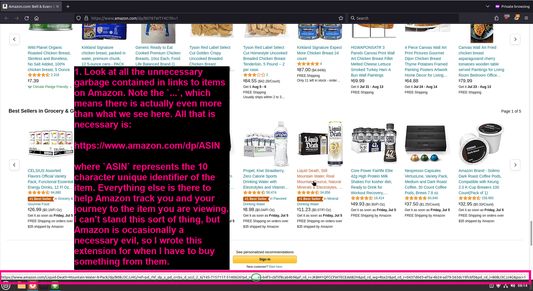
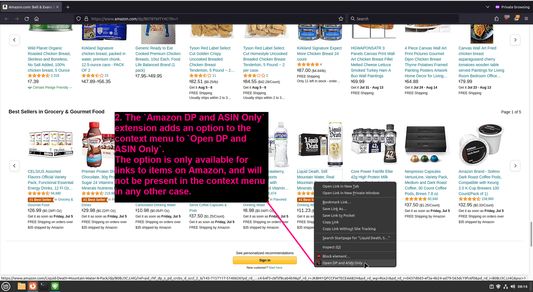
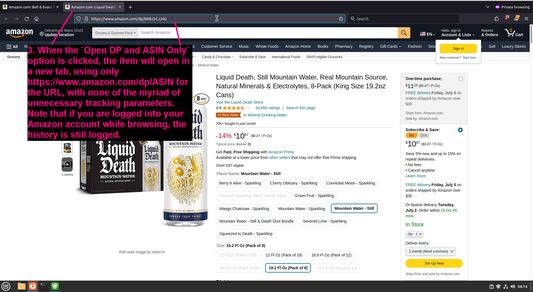
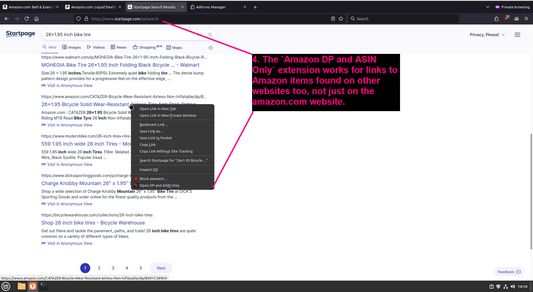
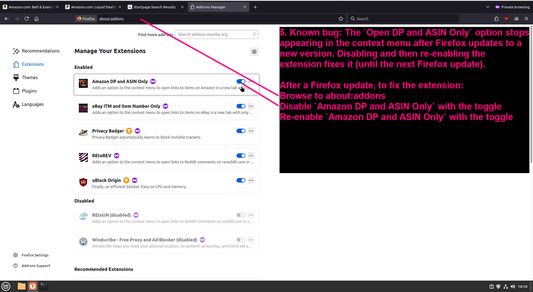
Look at all the unnecessary garbage contained in links to items on AmazonThe `Amazon DP and ASIN Only` extension adds an option to the context menu to `Open DP and ASIN Only`When the `Open DP and ASIN Only` option is clicked, the item will open in a new tab, using only https://www.amazon.com/dp/ASIN for the URL, with none of the myriad of unnecessary tracking parametersThe `Amazon DP and ASIN Only` extension works for links to Amazon items found on other websites too, not just on the amazon.com websiteKnown bug: The `Open DP and ASIN Only` option stops appearing in the context menu after Firefox updates to a new version
Bu uzantı hakkında
Adds an option to the context menu to open links to items on Amazon in a new tab, using only DP and the ASIN, stripping away all the, ref, tracking, and other unnecessary URL parameters so URLs look like https://www.amazon.com/dp/ASIN
Geliştirici yorumları
To view this extension's source code:
  1. In a Firefox instance that already has this extension installed, type `about:profiles` in the Firefox address bar, then press Enter
  2. Under the profile labeled `This is the profile in use and it cannot be deleted`, click on the `Open Directory` button (appears as `Open Folder` on Windows) next to `Root Directory`
  3. In the file explorer window that opens, go into the `extensions` directory (the `extensions` folder)
  4. Copy the file `{91f0f467-2cdb-4bab-b460-652b7aceaacd}.xpi` and paste it somewhere else, such as your Desktop
  5. Rename the file, changing the extension to `.zip` - so `{91f0f467-2cdb-4bab-b460-652b7aceaacd}.xpi` becomes `{91f0f467-2cdb-4bab-b460-652b7aceaacd}.zip`
  6. Unzip the file `{91f0f467-2cdb-4bab-b460-652b7aceaacd}.zip`. The extracted files are the source, especially the .json and .js files.
0 inceleyiciden 0 puan aldı
Bu uzantıya puan vermek için giriş yapın
Henüz hiç puan yok

Puan kaydedildi

5
0
4
0
3
0
2
0
1
0
Henüz inceleme yapılmamış
İzinler ve veriler

Gerekli izinler:

  • Tarayıcı sekmelerine erişme
Daha fazla bilgi al
Daha fazla bilgi
Sürüm
1.0.1
Boyut
27,53 KB
Son güncelleme
bir yıl önce (29 Haz 2024)
İlgili kategoriler
  • Gizlilik ve Güvenlik
  • Alışveriş
Lisans
Yalnızca GNU Genel Kamu Lisansı v3.0
Gizlilik ilkeleri
Bu eklentinin gizlilik ilkelerini okuyun
Sürüm geçmişi
  • Tüm sürümleri göster
Koleksiyona ekle
Bu eklentiyi rapor et
Mozilla'nın ana sayfasına gidin

Eklentiler

  • Hakkında
  • Firefox Eklentileri Blogu
  • Uzantı Atölyesi
  • Geliştirici Merkezi
  • Geliştirici Politikaları
  • Topluluk Blogu
  • Forum
  • Hata bildir
  • İnceleme rehberi

Tarayıcılar

  • Desktop
  • Mobile
  • Enterprise

Ürünler

  • Browsers
  • VPN
  • Relay
  • Monitor
  • Pocket
  • Bluesky (@firefox.com)
  • Instagram (Firefox)
  • YouTube (firefoxchannel)
  • Gizlilik
  • Çerezler
  • Hukuki Bilgiler

Aksi belirtilmedikçe bu sitedeki içerikler Creative Commons Attribution Share-Alike Lisansı v3.0 veya daha yeni sürümüyle lisanslanmıştır.