
Youtube Replay (YT-Replay Magic) од China-Cheats
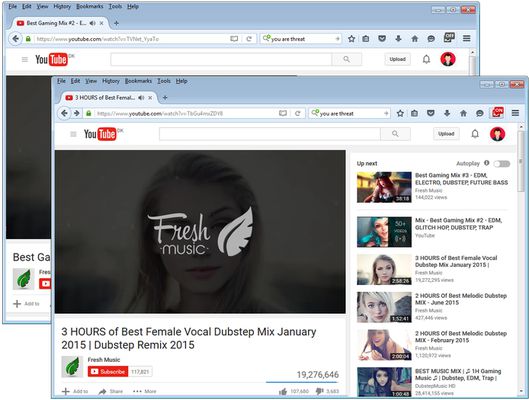
Replay Youtube Videos the Fastest way (Non Stop) with YT-Replay Magic. It comes with a Toolbar Button, and with ON/OFF Badges on top of the Button when Replaying Videos. The new Version includes also Video Thumbnails & Titles as Popup Notifications!
129 корисника129 корисника
Метаподаци додатка
Снимци екрана

О овом додатку
- Version 1.0.4 is the Latest Version (Published 19 FEB 2016).
======================
News!! News!! News!!
======================
In the New Version 1.0.4 users can now Enable Viewings of Video Thumbnails and Titles in Popup Notifications. The Thumbnails and Titles works only if you visit the Video Page on Youtube.com. If you are on a Different Webpage or Website then you will see the Default Notifications and Icons.
Notice: This Option to "View Thumbnails and Titles" is Disabled by Default. You can Enable it from the Extensions Options Page!
======================
About YT-Replay Magic!
======================
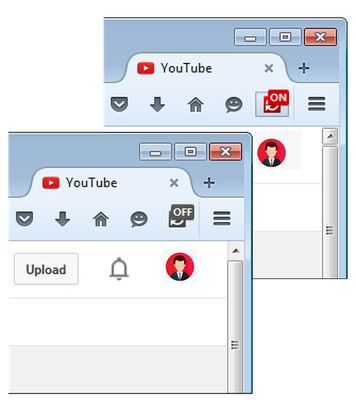
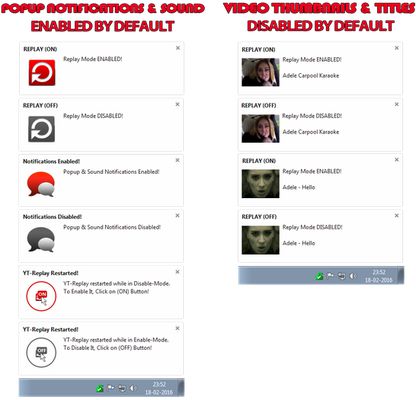
Youtube Replay (YT-Replay Magic) allows Users to Replay Videos on Youtube (Non Stop) with a Single Click. The Extension Creates the Toolbar Button with ON/OFF badges to Enable/Disable the The Extension in "Replay Mode" directly from your Browser. The Toolbar Button comes with Fancy Popup Notifications & Sound. The Popup Notifications triggers everytime you Enable/Disable the Replay Mode.
In the New Version 1.0.4 Users can choose to View the Video Thumbnails and Video Titles in Popup Notifications instead of the Icons. The Videos Thumbnails and Titles Works only when you are on Y_outube and Watching Video. By Default this Options is Disabled. You can Enable the Viewings of Thumbnails & Titles" from the Extensions "Options Page" in Firefox.
Notice: You can at anytime Disable the Popup Notifications & Sound, Including the new Video Thumbnails & Titles Options from the Extensions Options Page.!
===============================
Download for Other Web Browsers
===============================
Opera: https://addons.opera.com/en/extensions/details/youtube-replay-ytreplay-magic
Chrome: https://chrome.google.com/webstore/detail/youtube-replay-ytreplay-m/oadnllmpodddplkpoobefkknhhecjjbb/reviews
Firefox: https://addons.mozilla.org/en-US/developers/addon/ytreplay
=======================
Replay Videos In Only 2 Steps
=======================
To Use the Extension, You only need follow two Steps
Step 1) Install Youtube Replay (YT-Replay Magic) Extension,
Step 2) Visit Youtube.com and Watch any Video in Replay Mode.
Use the Toolbar Button With ON/FF Badges to Enable/Disable Replay Mode directly from your Web Browser. This could not have been made easier.
============================
Why I Developed this Extension
============================
The reason why I created this Extension was because I couldn't find any other Easier or Faster way to Replay my Favourite Videos on Youtube.
I've for many years used variouse Websites for Replaying of Youtube Videos. I found also many Browser Extensions for Playing Youtube Videos, But in my opinion they were all either too complicated or had too many options!
And since I had already built a few Addons for Mozilla Firefox using the "Toolbar Button" Options, I wanted to give it a try by Building a "Youtube Replay" Extension fore Mozilla.I wanted to create a very Simple Extension for Replayin Youtube Videos directly by using the Toolbar Button and with a Single Click. (Toolbar Buttons in Firefox are mainly Placed on the Top-Right Corner in Firefox Header). And thats how it all Started.
Currently I want to build more Options within the Extension itself. Such as showing the Video Titles and Later on Thumbnails and etc.
======================
News!! News!! News!!
======================
In the New Version 1.0.4 users can now Enable Viewings of Video Thumbnails and Titles in Popup Notifications. The Thumbnails and Titles works only if you visit the Video Page on Youtube.com. If you are on a Different Webpage or Website then you will see the Default Notifications and Icons.
Notice: This Option to "View Thumbnails and Titles" is Disabled by Default. You can Enable it from the Extensions Options Page!
======================
About YT-Replay Magic!
======================
Youtube Replay (YT-Replay Magic) allows Users to Replay Videos on Youtube (Non Stop) with a Single Click. The Extension Creates the Toolbar Button with ON/OFF badges to Enable/Disable the The Extension in "Replay Mode" directly from your Browser. The Toolbar Button comes with Fancy Popup Notifications & Sound. The Popup Notifications triggers everytime you Enable/Disable the Replay Mode.
In the New Version 1.0.4 Users can choose to View the Video Thumbnails and Video Titles in Popup Notifications instead of the Icons. The Videos Thumbnails and Titles Works only when you are on Y_outube and Watching Video. By Default this Options is Disabled. You can Enable the Viewings of Thumbnails & Titles" from the Extensions "Options Page" in Firefox.
Notice: You can at anytime Disable the Popup Notifications & Sound, Including the new Video Thumbnails & Titles Options from the Extensions Options Page.!
===============================
Download for Other Web Browsers
===============================
Opera: https://addons.opera.com/en/extensions/details/youtube-replay-ytreplay-magic
Chrome: https://chrome.google.com/webstore/detail/youtube-replay-ytreplay-m/oadnllmpodddplkpoobefkknhhecjjbb/reviews
Firefox: https://addons.mozilla.org/en-US/developers/addon/ytreplay
=======================
Replay Videos In Only 2 Steps
=======================
To Use the Extension, You only need follow two Steps
Step 1) Install Youtube Replay (YT-Replay Magic) Extension,
Step 2) Visit Youtube.com and Watch any Video in Replay Mode.
Use the Toolbar Button With ON/FF Badges to Enable/Disable Replay Mode directly from your Web Browser. This could not have been made easier.
============================
Why I Developed this Extension
============================
The reason why I created this Extension was because I couldn't find any other Easier or Faster way to Replay my Favourite Videos on Youtube.
I've for many years used variouse Websites for Replaying of Youtube Videos. I found also many Browser Extensions for Playing Youtube Videos, But in my opinion they were all either too complicated or had too many options!
And since I had already built a few Addons for Mozilla Firefox using the "Toolbar Button" Options, I wanted to give it a try by Building a "Youtube Replay" Extension fore Mozilla.I wanted to create a very Simple Extension for Replayin Youtube Videos directly by using the Toolbar Button and with a Single Click. (Toolbar Buttons in Firefox are mainly Placed on the Top-Right Corner in Firefox Header). And thats how it all Started.
Currently I want to build more Options within the Extension itself. Such as showing the Video Titles and Later on Thumbnails and etc.
Оцењено са 4 од стране 7 рецензената
Овлашћења и подаци
Потребна овлашћења:
- Приступи језичцима прегледача
- Приступ вашим подацима за странице у домену youtube.com
Више информација
- Везе додатка
- Издање
- 1.0.7resigned1
- Величина
- 32,73 KB
- Последњи пут ажурирано
- pre 2 godine (25. apr. 2024.)
- Повезане категорије
- Дозвола
- Јавна дозвола Mozilla 2.0
- Историјат издања
- Додај у збирку