
WhatsApp images to Google contacts од Firefox корисник 14037791
An app to use your WhatsApp contacts profile photos as Android Google Contacts pictures.
40 корисника40 корисника
Метаподаци додатка
Снимци екрана
О овом додатку
This component will let you use your WhatsApp contacts profile pictures and assign them to your android phonebook, so they can be displayed in your phone contacts list. It actually gets the photo from WhatsApp (via web.whatsapp.com) and uploads them to your google contacts.
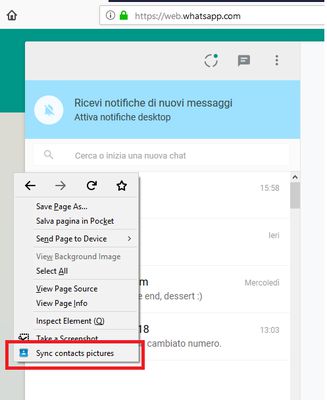
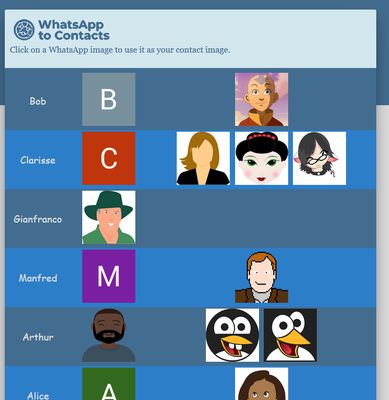
To work, you need to login to WhatsApp web, right click on the page and select "Sync contacts pictures", then you will be prompted from the credentials of your Google account (it shall be the one you have configured in your android phone). You will get then all your contacts and their WhatsApp pictures (if any), and you can just assign a picture to your contact by clicking on it.
This component will not store or send out any of your information or any of your contacts. (If you do not believe me, check the source code at https://gitlab.com/spintos/WhatsAppPics2Google)
To work, you need to login to WhatsApp web, right click on the page and select "Sync contacts pictures", then you will be prompted from the credentials of your Google account (it shall be the one you have configured in your android phone). You will get then all your contacts and their WhatsApp pictures (if any), and you can just assign a picture to your contact by clicking on it.
This component will not store or send out any of your information or any of your contacts. (If you do not believe me, check the source code at https://gitlab.com/spintos/WhatsAppPics2Google)
Оцењено са 2,4 од стране 11 рецензената
Овлашћења и подаци
Потребна овлашћења:
- Покажите обавештења
- Приступ вашим подацима за www.googleapis.com
- Приступ вашим подацима за accounts.google.com
- Приступ вашим подацима за www.google.com
- Приступ вашим подацима за web.whatsapp.com
Више информација
- Везе додатка
- Издање
- 1.0.3resigned1
- Величина
- 27,51 KB
- Последњи пут ажурирано
- pre 2 godine (26. apr. 2024.)
- Повезане категорије
- Историјат издања
- Додај у збирку