
WEAlias од flibio
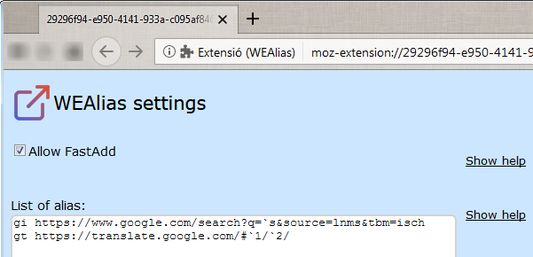
With this extension you can configure keywords to fast access to URLs you decide. Inspired by URL Alias.
106 корисника106 корисника
Метаподаци додатка
Снимци екрана
О овом додатку
With this extension you can configure keywords to fast access to URLs you decide.
Possible uses:
FastAdd:
Since version 1.6 you can add an alias for the current URL directly from the inputbox or URL bar, example:
Open in a new tab (new in version 1.7):
By default, when you input an alias the URL bound to it opens in the actual tab. If you want the URL opens in a new tab instead, you can precede the URL with an underscore '_' when defining the alias in the option page. Example:
Pseudo-alias '_addt' has been added in order to achieve this with FastAdd method. Example:
This extension is obviously inspired by URL Alias, which cannot be used on FF57, and intends to function the same way. Although it's not possible with current webextension APIs reproduce the same behaviour, hence the weird ways to input the alias.
Known issues:
Please, give it a try as a URL Alias replacement and send feedback.
Possible uses:
- simple alias:
- Declare 'drv https://drive.google.com', input 'drv' and access to the specified URL.
- perform substitutions:
- Declare 'wiki https://`1.wikipedia.org/wiki/', input 'wiki en Firefox' and the current tab will load 'https://en.wikipedia.org/wiki/Firefox'
- Declare 'b https://`s.blogspot.com', input 'b google' and the current tab will load 'https://google.blogspot.com'
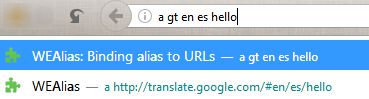
- Directly in the URL bar:
- You should precede your alias with the keyword 'a' and press enter or select the suggestion given:
- a drv
- a wiki en firefox
- a b google
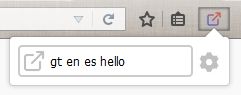
- Pressing the button (or Alt+q) and entering in the inputbox on the popup the alias, without the keyword 'a'
- Pressing Alt+w, a new tab with an inputbox will open, and enter there the alias, without the keyword 'a'
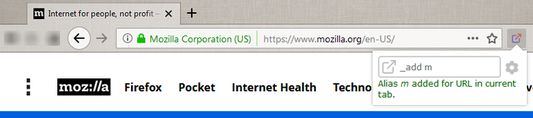
FastAdd:
Since version 1.6 you can add an alias for the current URL directly from the inputbox or URL bar, example:
- you're in https://www.mozilla.org, for instance.
- type '_add m', or 'a _add m' if you want to do it from the URL bar.
- an alias m bound to mozilla is added to the alias list.
Open in a new tab (new in version 1.7):
By default, when you input an alias the URL bound to it opens in the actual tab. If you want the URL opens in a new tab instead, you can precede the URL with an underscore '_' when defining the alias in the option page. Example:
- Declare 'gm _https://mail.google.com', input 'gm' (or 'a gm' from URL bar) and gmail will open in a new tab.
Pseudo-alias '_addt' has been added in order to achieve this with FastAdd method. Example:
- you're in https://www.mozilla.org, for instance.
- type '_addt m', or 'a _addt m' if you want to do it from the URL bar.
- an alias 'm' bound to mozilla is added to the alias list. When input the alias 'm', mozilla will open in a new tab.
This extension is obviously inspired by URL Alias, which cannot be used on FF57, and intends to function the same way. Although it's not possible with current webextension APIs reproduce the same behaviour, hence the weird ways to input the alias.
Known issues:
- when you press the button or Alt+q to open the inputbox, it won't get the focus automatically (you can accomplish this by pressing twice the <tab> key). This is a known firefox bug (https://bugzilla.mozilla.org/show_bug.cgi?id=1324255) still to be fixed. If you set extensions.webextensions.remote to false in about:config the autofocus will work, but doing so you'll get this bug: https://bugzilla.mozilla.org/show_bug.cgi?id=1425829, when you get a blank popup window until you do a right-click. This extension doesn't open popup windows, but other may would, so do the change at your own risk.
That's why I created the Alt+w keyword, because autofocus works when opening a tab. - Because API restrictions, you can't define a keyword to access privileged about-pages (about:config, about:addons, about:debugging, about:newtab).
Please, give it a try as a URL Alias replacement and send feedback.
Оцењено са 4,4 од стране 15 рецензената
Овлашћења и подаци
Више информација
- Везе додатка
- Издање
- 1.8resigned1
- Величина
- 19,73 KB
- Последњи пут ажурирано
- pre 2 godine (25. apr. 2024.)
- Повезане категорије
- Дозвола
- Јавна дозвола Mozilla 2.0
- Историјат издања
- Додај у збирку