
Try in Dev Spaces од Red Hat OpenShift Dev Spaces
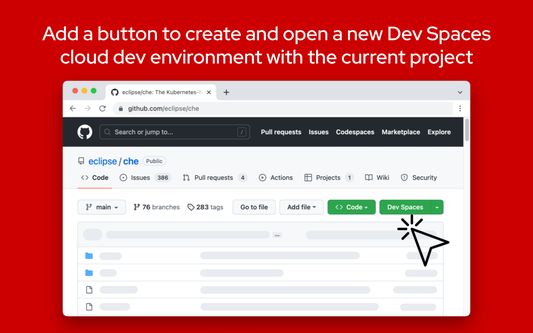
The Try in Dev Spaces add-on provides a "Dev Spaces" button for GitHub repository pages, allowing you to create a cloud development environment for your Red Hat OpenShift Dev Spaces instance right from GitHub.
2 корисника2 корисника
Метаподаци додатка
Снимци екрана
О овом додатку
NOTE:
After installation, you must provide the add-on access to https://github.com to allow the "Dev Spaces" button to be added to GitHub.
Navigate to the "Permissions" tab for the add-on from the about:addons page to provide the permissions.
The Try in Dev Spaces add-on provides a "Dev Spaces" button for GitHub repository pages, allowing you to create a cloud development environment for your Red Hat OpenShift Dev Spaces installation right from GitHub.
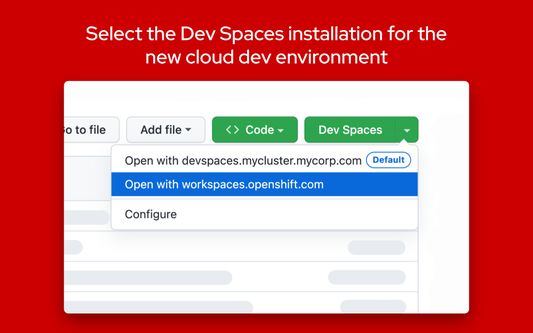
Additional Dev Spaces instances can be configured in the add-on's preferences.
By default, development environments will be created in the Red Hat Developer Sandbox. Usage of the Red Hat Developer Sandbox is subject to the Red Hat Privacy Statement.
What's new for version 1.1.1:
Adds the "Dev Spaces" button in the new GitHub UI.
What's new for version 1.1.0:
GitHub Enterprise support is now available. To configure the add-on to work with GitHub Enterprise:
1. Type "about:addons" in the address bar
2. Click on the "Try in Dev Spaces" add-on under "Manage Your Extensions"
3. Click on the "Preferences" tab to open the preferences UI
4. Click on the "GitHub Enterprise domains" tab
5. Enter your GitHub Enterprise domain (ex. https://github.example.com)
6. Accept the permission prompt after it appears on the top right of the browser. The permission is required to allow the extension to insert the "Dev Spaces" button within the GitHub webpage.
7. Navigate to a GitHub project within your GitHub Enterprise instance to see the new "Dev Spaces" button.
This add-on is open source on GitHub.
After installation, you must provide the add-on access to https://github.com to allow the "Dev Spaces" button to be added to GitHub.
Navigate to the "Permissions" tab for the add-on from the about:addons page to provide the permissions.
The Try in Dev Spaces add-on provides a "Dev Spaces" button for GitHub repository pages, allowing you to create a cloud development environment for your Red Hat OpenShift Dev Spaces installation right from GitHub.
Additional Dev Spaces instances can be configured in the add-on's preferences.
By default, development environments will be created in the Red Hat Developer Sandbox. Usage of the Red Hat Developer Sandbox is subject to the Red Hat Privacy Statement.
What's new for version 1.1.1:
Adds the "Dev Spaces" button in the new GitHub UI.
What's new for version 1.1.0:
GitHub Enterprise support is now available. To configure the add-on to work with GitHub Enterprise:
1. Type "about:addons" in the address bar
2. Click on the "Try in Dev Spaces" add-on under "Manage Your Extensions"
3. Click on the "Preferences" tab to open the preferences UI
4. Click on the "GitHub Enterprise domains" tab
5. Enter your GitHub Enterprise domain (ex. https://github.example.com)
6. Accept the permission prompt after it appears on the top right of the browser. The permission is required to allow the extension to insert the "Dev Spaces" button within the GitHub webpage.
7. Navigate to a GitHub project within your GitHub Enterprise instance to see the new "Dev Spaces" button.
This add-on is open source on GitHub.
Оцењено са 0 од стране 0 рецензената
Овлашћења и подаци
Више информација
- Издање
- 1.1.2
- Величина
- 2,57 MB
- Последњи пут ажурирано
- pre 2 godine (19. dec. 2024.)
- Повезане категорије
- Дозвола
- MIT дозвола
- Политика приватности
- Прочитајте политику приватности за овај додатак
- Историјат издања
- Додај у збирку
If you have any questions, concerns, issues or feature requests, please file an issue.