
Tempo Time Tracker од TempoTimeTracker
An extension that allows easily log time into the Tempo Jira plugin
43 корисника43 корисника
Метаподаци додатка
Снимци екрана



О овом додатку
Tempo Tempo Tracker could help you save a lot of time by providing an accessible, easy-to-use bridge between you and the Tempo app. The idea comes from individual experiences of using Tempo. So far to manage time, we keep using notepad. This option was not suitable for us, because it took a lot of time and sometimes could be forgotten. In response to this Tempo Time Tracker has been created!
★ Authorization free
The extension is 100% secure and does not require any Jira account credentials.
★ Browse worklogs
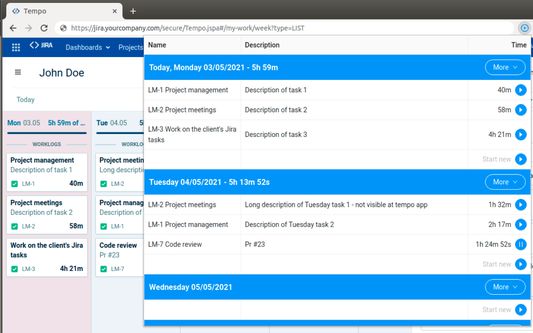
Extension scans the current tempo page and takes a currently browsed week’s worklogs. The worklogs are presented as easy to access list. Normally, the native tempo app hides descriptions of tickets by default, but don’t worry - Jira Tempo Tracker provides all the important information about worklogs.
★ Continue tracking existing worklogs
Each currently logged worklog could be continued by clicking the play button. There is a built-in restriction that only one worklog could be tracked. If you will try to track two worklogs at the same time, the first one current progress will be stopped and synchronized with Tempo, then the second item will start counting.
★ Create new worklogs
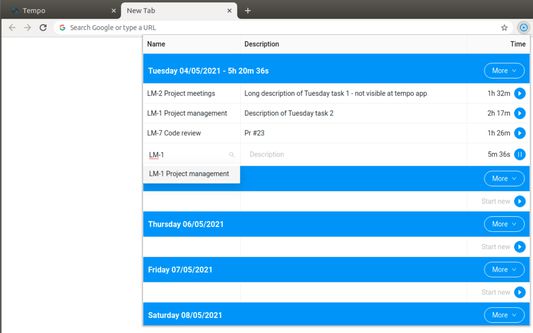
You can just start tracking a new worklog from scratch. Description and issue could be provided at any time. But both of them will be required while synchronizing with Tempo.
★ Log a provided amount of time proportionally
Ideal option to log your lunch or other kinds of break proportionally to each task of selected day. Just select the day and amount of minutes and the script will execute an update to each worklog. Each value is measured by comparing worklog time to summary day time logged so far.
★ Use in any tab
The extension could be activated in any chrome tab. Just make sure that the native Tempo app is opened in one of the tabs. In another case, you will be notified that the Tempo app has not been found.
In case of questions, suggestions, or bugs please let us know :)
★ Authorization free
The extension is 100% secure and does not require any Jira account credentials.
★ Browse worklogs
Extension scans the current tempo page and takes a currently browsed week’s worklogs. The worklogs are presented as easy to access list. Normally, the native tempo app hides descriptions of tickets by default, but don’t worry - Jira Tempo Tracker provides all the important information about worklogs.
★ Continue tracking existing worklogs
Each currently logged worklog could be continued by clicking the play button. There is a built-in restriction that only one worklog could be tracked. If you will try to track two worklogs at the same time, the first one current progress will be stopped and synchronized with Tempo, then the second item will start counting.
★ Create new worklogs
You can just start tracking a new worklog from scratch. Description and issue could be provided at any time. But both of them will be required while synchronizing with Tempo.
★ Log a provided amount of time proportionally
Ideal option to log your lunch or other kinds of break proportionally to each task of selected day. Just select the day and amount of minutes and the script will execute an update to each worklog. Each value is measured by comparing worklog time to summary day time logged so far.
★ Use in any tab
The extension could be activated in any chrome tab. Just make sure that the native Tempo app is opened in one of the tabs. In another case, you will be notified that the Tempo app has not been found.
In case of questions, suggestions, or bugs please let us know :)
Оцењено са 0 од стране 0 рецензената
Овлашћења и подаци
Више информација
- Везе додатка
- Издање
- 0.0.18
- Величина
- 680,82 KB
- Последњи пут ажурирано
- pre 4 godine (31. maj 2022.)
- Повезане категорије
- Дозвола
- Сва права су задржана
- Историјат издања
- Додај у збирку