
Task Management System од em_te
View your Microsoft Tasks in an offline interface that's both quick and efficient. Easily add, postpone and mark tasks as done. Free.
14 корисника14 корисника
Метаподаци додатка
Снимци екрана
О овом додатку
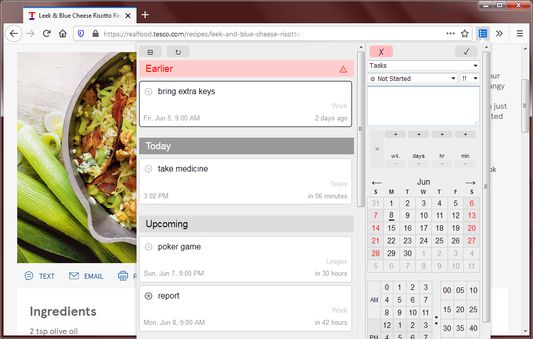
A lite task manager for your Outlook/Microsoft Tasks. Click on the toolbar icon to open the manager.
Features:
* Viewable even when you are offline
* Instantly viewable because tasks are saved on your computer
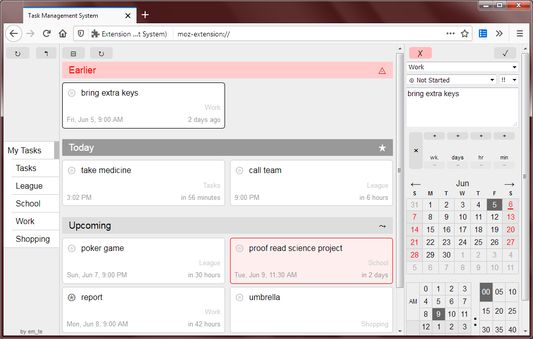
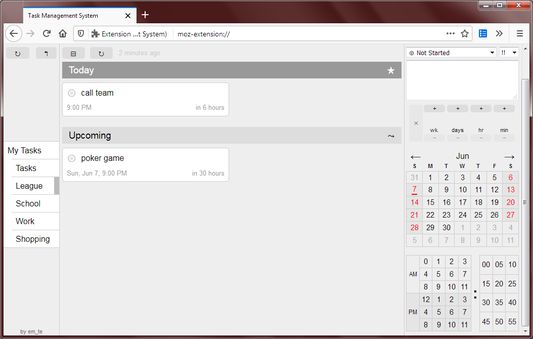
* Multiple column design to fit more todos in the viewer
* Tasks are grouped by date which reduces cognitive overload
* Easy to use calendar picker
* Easy to use relative time picker
Design:
Task Management System was designed based on 2 main requirements:
* Tasks should be saved on the computer so that they load instantly
* Creating tasks and setting due dates should require as few clicks as possible
Nowadays many task/todo list managers try to simplify their apps for the sake of attractiveness and modernity. The cost of this simplification is the loss of efficiency. After users enter a task they need to deliberately click to specify that it has a due date and then choose from a list of frequently used dates and times. The result is a user interface that looks clean and smart by taking the user on a step by step journey. But this way of doing things slows down the advanced user who just wants to select the exact date and be done with it.
Another common operation in task management, as popularized by GTD (Getting Things Done), is postponing tasks, which requires an efficient calendar selector which this extension aims to provide.
Nowadays many task/todo list managers don't save the data on the computer and instead download the data on demand in the guise of always having the most up-to-date data and they say latency is minimal because everyone is using high-speed internet anyways. But this is all smoke and mirrors and nothing beats being able to see your data immediately because it is saved locally.
These requirements led to the 3 panel design you see today. The folders panel can be collapsed as some users don't often change folders and the editor panel is always visible for editing and creating tasks.
The date and time picker is always visible on the editor so that users can set due dates without needing to open the date picker with extra clicks.
Audience:
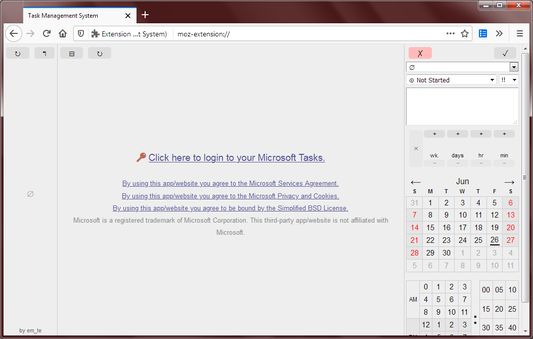
Users need a Microsoft, Office 365 or Outlook account to add and view tasks. Outlook accounts are free.
Tips:
* When editing a task, double-click on the calendar date or on the hours/minutes to immediately save the task. This skips needing to scroll up to click on the save button.
* Press tab while inside the text field to move the focus to the relative time text field.
* Press Ctrl+Enter while inside the text field to immediately save the task.
Legal:
This third-party extension is not affiliated with Microsoft. By using this extension you agree to the Microsoft Services Agreement and Privacy and Cookies.
Features:
* Viewable even when you are offline
* Instantly viewable because tasks are saved on your computer
* Multiple column design to fit more todos in the viewer
* Tasks are grouped by date which reduces cognitive overload
* Easy to use calendar picker
* Easy to use relative time picker
Design:
Task Management System was designed based on 2 main requirements:
* Tasks should be saved on the computer so that they load instantly
* Creating tasks and setting due dates should require as few clicks as possible
Nowadays many task/todo list managers try to simplify their apps for the sake of attractiveness and modernity. The cost of this simplification is the loss of efficiency. After users enter a task they need to deliberately click to specify that it has a due date and then choose from a list of frequently used dates and times. The result is a user interface that looks clean and smart by taking the user on a step by step journey. But this way of doing things slows down the advanced user who just wants to select the exact date and be done with it.
Another common operation in task management, as popularized by GTD (Getting Things Done), is postponing tasks, which requires an efficient calendar selector which this extension aims to provide.
Nowadays many task/todo list managers don't save the data on the computer and instead download the data on demand in the guise of always having the most up-to-date data and they say latency is minimal because everyone is using high-speed internet anyways. But this is all smoke and mirrors and nothing beats being able to see your data immediately because it is saved locally.
These requirements led to the 3 panel design you see today. The folders panel can be collapsed as some users don't often change folders and the editor panel is always visible for editing and creating tasks.
The date and time picker is always visible on the editor so that users can set due dates without needing to open the date picker with extra clicks.
Audience:
Users need a Microsoft, Office 365 or Outlook account to add and view tasks. Outlook accounts are free.
Tips:
* When editing a task, double-click on the calendar date or on the hours/minutes to immediately save the task. This skips needing to scroll up to click on the save button.
* Press tab while inside the text field to move the focus to the relative time text field.
* Press Ctrl+Enter while inside the text field to immediately save the task.
Legal:
This third-party extension is not affiliated with Microsoft. By using this extension you agree to the Microsoft Services Agreement and Privacy and Cookies.
Оцењено са 0 од стране 0 рецензената
Овлашћења и подаци
Потребна овлашћења:
- Приступ вашим подацима за graph.microsoft.com
- Приступ вашим подацима за login.microsoftonline.com
Више информација
- Везе додатка
- Издање
- 0.3.1
- Величина
- 52,52 KB
- Последњи пут ажурирано
- pre 6 godina (18. avg. 2020.)
- Повезане категорије
- Политика приватности
- Прочитајте политику приватности за овај додатак
- Споразум са крајњим корисником
- Прочитајте уговор дозволе за овај додатак
- Историјат издања
- Додај у збирку