Додаци за прегледач Firefox
  • Проширења
  • Теме
    • за Firefox
    • Речници и језички пакети
    • Странице других прегледача
    • Додаци за Android
Пријавите се
Преглед Tablet UI for Firefox

Tablet UI for Firefox од Petr

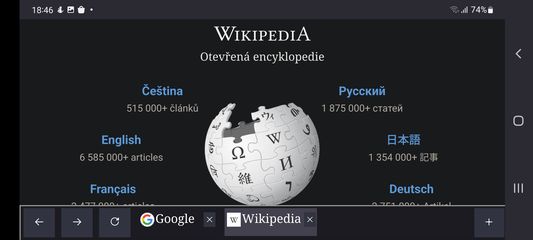
This add-on re-implements the tab bar from desktop we all love, on Android tablets, on Firefox. It has all the familiar buttons like back, forward, reload and new tab. You can scroll the list of your opened tabs, you can close or duplicate tabs

4.8 (15 рецензија)4.8 (15 рецензија)
85 корисника85 корисника
Преузмите Firefox и добијте додатак
Преузмите датотеку

Метаподаци додатка

Снимци екрана
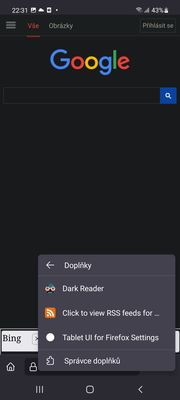
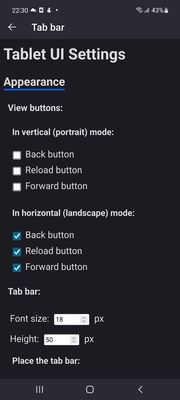
The tabs bar, reload, back and forward and new tab buttons, as they look while browsing WikipediaWikipedia with the tab bar position topThere are addon settings you can open. Press the three dots menu, select Addons and then you'll see this screen. Select Tablet UI for Firefox SettingsSelect which buttons you want to see, what font size, and where do you want to display the bar. Don't forgot to press Save options!The menu when you hold the new tab button: it allows you to shift the page up, so you can click the I agree button on cookie prompt on sites like this
О овом додатку
How to install:
Download Firefox Nightly or Firefox Beta from Google Play
Open Firefox Nightly or Firefox Beta settings, open About Firefox there
Tap the Firefox logo on that page 5 times, the advanced options appear
Go back to see all settings
Under Addons, select Your own Addon collection
Paste the following for user id: 15613358 and for collection name: Android-compatible-addons-by-J
Open the Addons menu in Firefox (three dots - Addons - Addons Manager)
There select the addon you'd like to install. There are currently two, this one and Get RSS Feed URL.

How to use: When you start the app, the tab bar will only see the tab which is loaded. To load more of your tabs, swipe right or left the adress bar or select them in the tab switcher: Due to Firefox restrictions, the addon only sees tabs loaded in memory.

There are also settings: you can set which buttons you want to see, the font size, show the bar on top or on bottom, the tab bar height, the search page used when you press the new tab button.

Sometimes when using the tab bar on top of the screen, cookies prompts may be pushed down: No worries, there is a menu for that (long press the new tab button, see screenshots)

There are some restrictions:
The new tab button can only open websites right now, it can't open the browser new tab: https://bugzilla.mozilla.org/show_bug.cgi?id=1782389
It will not work on protected pages like addons.mozilla.org

The project is open source: https://github.com/artisticfox8/Tablet-UI-For-Firefox-Android
Оцењено са 4,8 од стране 15 рецензената
Пријавите се да бисте оценили овај додатак
Још увек нема оцена

Оцена звездицама сачувана

5
12
4
3
3
0
2
0
1
0
Прочитајте свих 15 рецензија
Овлашћења и подаци

Потребна овлашћења:

  • Приступи језичцима прегледача
  • Приступи радњама прегледача приликом навигације
  • Приступ подацима за све веб странице
Сазнајте више
Више информација
Везе додатка
  • Копирај ИД додатка
Издање
2.5
Величина
37,63 KB
Последњи пут ажурирано
pre 3 godine (8. avg. 2023.)
Повезане категорије
  • Изглед
  • Друго
  • Језичци
Дозвола
Јавна дозвола Mozilla 2.0
Историјат издања
  • Погледајте сва издања
Додај у збирку
Пријави овај додатак
Идите на почетну страницу Mozilla-е

Додаци

  • O програму
  • Блог о додацима за Firefox
  • Радионица за додатке
  • Центар за програмере
  • Политике програмера
  • Блог заједнице
  • Форум
  • Пријавите грешку
  • Водич за оцењивање

Преузмите

  • Download Firefox
  • Windows
  • macOS
  • iOS
  • Android
  • Linux
  • All

Најновије градње

  • Nightly
  • Beta

Firefox за предузећа

  • Enterprise

Заједница

  • Connect
  • Contribute
  • Developer

Прати

  • Instagram
  • YouTube
  • TikTok
  • Bluesky
  • Podcast
  • Приватност
  • Колачићи
  • Права

Изузев тамо где је другачије наведено , садржај на овој страници је лиценциран под Creative Commons Attribution Share-Alike дозволом v3.0 или било којим каснијим издањем.