
Tab List Button Enhanced од ccdoub
Another button for tab lists with keyboard navigation, a search box, configurable buttons and a context menu for common actions.
110 корисника110 корисника
Метаподаци додатка
Снимци екрана
О овом додатку
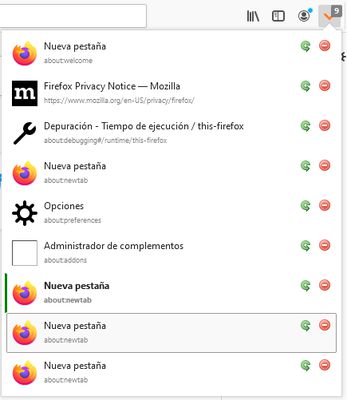
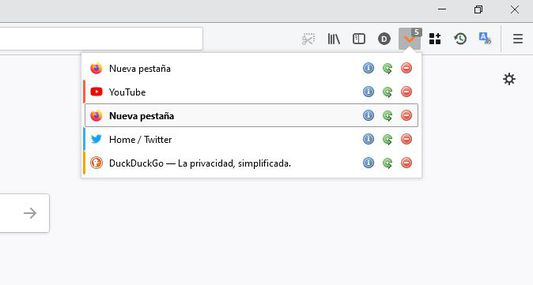
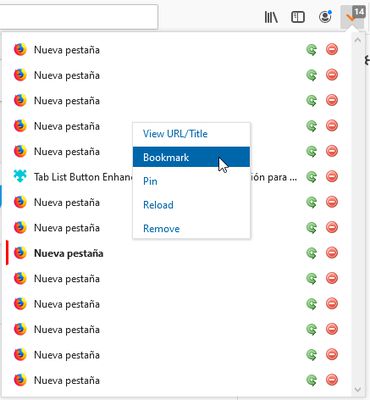
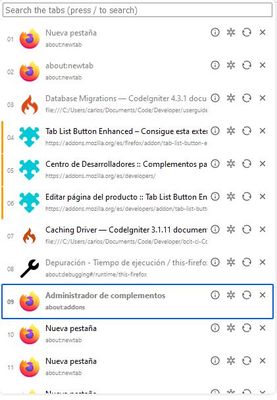
Tab List Button Enhanced is an extended version of Tab List Button by Button Guy. This extension adds four major things to the original addon: keyboard navigation, a search box, configurable buttons, and a context menu for common actions.
Firefox provides by default a button with a list of tabs that appears when the user has opened more than 16 tabs (for me at least) to make it easy to select among a large amount of tabs. This addon button is always present allowing to access a tab list with fewer tabs opened.
The five available functionalities for the tab list are: view URL/title, toggle bookmark, pin tab, reload tab and remove tab and can be used by keyboard shortcut, buttons or context menu.
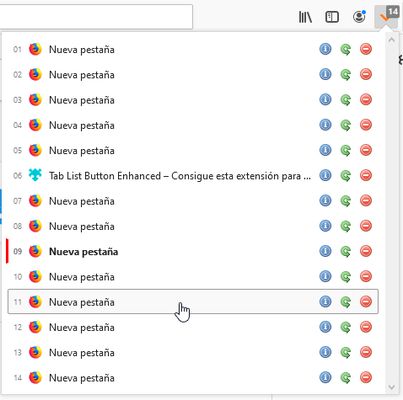
The buttons shown in the list of tabs can be customized from the options page. The default visible buttons are: view Title/URL, Reload and Remove. This is to not clutter the panel with all five buttons. There is also an option to add index numbers to each entry among other display options.
Note that the keyboard shortcuts works either if the button is present or not.
The keyboard shortcut to open the list is customizable (the selected keyboard shortcut has to be not previously assigned for it to work) in the options page. The default shortcut is “Ctrl+Shift+Y”.
Keyboard keys:
Firefox provides by default a button with a list of tabs that appears when the user has opened more than 16 tabs (for me at least) to make it easy to select among a large amount of tabs. This addon button is always present allowing to access a tab list with fewer tabs opened.
The five available functionalities for the tab list are: view URL/title, toggle bookmark, pin tab, reload tab and remove tab and can be used by keyboard shortcut, buttons or context menu.
The buttons shown in the list of tabs can be customized from the options page. The default visible buttons are: view Title/URL, Reload and Remove. This is to not clutter the panel with all five buttons. There is also an option to add index numbers to each entry among other display options.
Note that the keyboard shortcuts works either if the button is present or not.
The keyboard shortcut to open the list is customizable (the selected keyboard shortcut has to be not previously assigned for it to work) in the options page. The default shortcut is “Ctrl+Shift+Y”.
Keyboard keys:
- / (slash) to enter the search box
- Up/Down to select previous and next element
- Home/End to select first and last element
- Enter to open the selected tab
- Delete to remove the tab from the window
- Insert to reload the selected tab (the reload functionality bypasses cache)
- 1-9 to jump to specific tab
- D or d to discard a tab
- P or p to pin/unpin the tab
- B or b to add/remove a bookmark
- M or m to mute/unmute an audible tab
- Right/Left to view the URL or the tab title
- Ctrl+Shift+Y to open the panel (customizable)
Оцењено са 4,6 од стране 27 рецензената
Овлашћења и подаци
Више информација
- Везе додатка
- Издање
- 3.0.0
- Величина
- 60,88 KB
- Последњи пут ажурирано
- pre 4 godine (19. feb. 2023.)
- Повезане категорије
- Историјат издања
- Додај у збирку