
Tab Group Switch од TK
Save tab groups and switch between them.
151 корисник151 корисник
Метаподаци додатка
Снимци екрана

О овом додатку
Warning:When switching groups, this add-on will completely close and reload tabs instead of just hiding/showing them. Form data, scrolling position, and tab history will be lost.
This add-on was created as a sort of middle ground between bookmarks and the old Panorama tab groups in order to save resources but still get some of the functionality of tab groups.
-----------------------------------------------------------------------------------------------
Tab Group Switch saves open tabs into tab groups, which you can switch between and edit.
You can add new tabs to existing groups, update a group with currently open tabs, and export saved data to a local file.
Turn on the autosave feature to automatically save all open tabs every set interval, making the add-on act as a simple session manager.
------------------- HOW TO USE -------------------
Main Menu
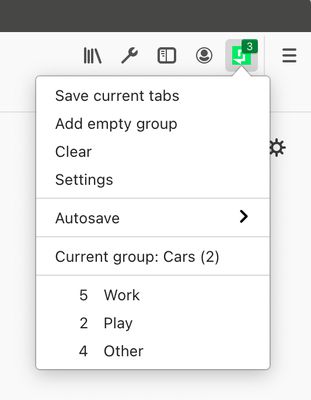
"Save current tabs" will save all the currently open tabs into a new group. By default, the group name will be the title of the of the active (focused) tab.
"Add empty group" will create a group named "No name" with zero tabs.
"Clear" will delete all saved groups in the main menu.
"Autosave" will open a menu that lists groups that have been saved automatically if you have the autosave setting turned on.
"Current group" indicates the name of the currently open group. The name can be changed by clicking on the item, typing in a new name, and then pressing Enter or clicking outside the textbox.
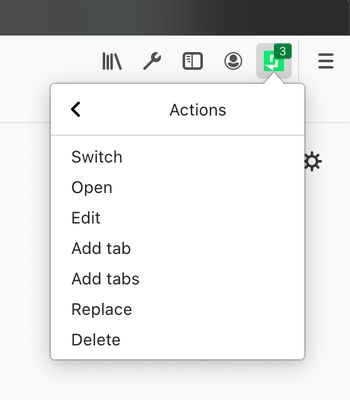
Click on a group to perform one of the following actions:
- Switch: Saves currently open tabs to a new group in the main menu (group name is set to the current group name), closes them, then opens the tabs of the selected group.
- Open: Opens the tabs of the selected group next to currently open tabs.
- Edit: Opens the group editor. You can modify the group name and the tabs within the group.
- Add tab: Adds the currently active (focused) tab to the selected group.
- Add tabs: Adds all open tabs to the selected group.
- Replace: Replaces the tabs in the selected group with currently open tabs.
- Delete: Deletes the selected group.
Edit Group
- The starred tab indicates the last focused tab when the group was saved to the group list or switched out. The starred tab is focused when you switch to that group the next time. The focused tab can be changed by double clicking on a cell underneath "Focused."
- The pinned tab indicates whether the tab will be pinned when you switch to that group the next time. The pinned status of a tab can be changed by double clicking on a cell underneath "Pinned."
Settings
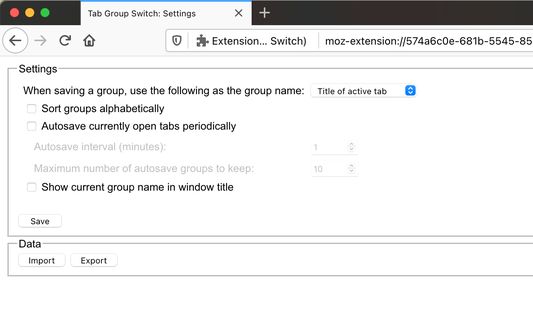
"Export" will save all saved groups to a local .tgs file.
"Import" will accept a previously exported .tgs file and append groups in the file to the main menu.
******** NOTE ********
Some URLs can be saved and viewed in the group editor, but not opened due to API restrictions. These include chrome:, javascript:, data:, file:, and some about: URLs. You will get an error notification if you try to open one.
---------------------------------------------------------------------------------------------
Known bugs:
- Does not work well with multiple windows. For now, tabs in all windows will be saved when you save a new group or switch groups, and the current group name will be the same across windows.
Necessary permissions
This add-on was created as a sort of middle ground between bookmarks and the old Panorama tab groups in order to save resources but still get some of the functionality of tab groups.
-----------------------------------------------------------------------------------------------
Tab Group Switch saves open tabs into tab groups, which you can switch between and edit.
You can add new tabs to existing groups, update a group with currently open tabs, and export saved data to a local file.
Turn on the autosave feature to automatically save all open tabs every set interval, making the add-on act as a simple session manager.
------------------- HOW TO USE -------------------
Main Menu
"Save current tabs" will save all the currently open tabs into a new group. By default, the group name will be the title of the of the active (focused) tab.
"Add empty group" will create a group named "No name" with zero tabs.
"Clear" will delete all saved groups in the main menu.
"Autosave" will open a menu that lists groups that have been saved automatically if you have the autosave setting turned on.
"Current group" indicates the name of the currently open group. The name can be changed by clicking on the item, typing in a new name, and then pressing Enter or clicking outside the textbox.
Click on a group to perform one of the following actions:
- Switch: Saves currently open tabs to a new group in the main menu (group name is set to the current group name), closes them, then opens the tabs of the selected group.
- Open: Opens the tabs of the selected group next to currently open tabs.
- Edit: Opens the group editor. You can modify the group name and the tabs within the group.
- Add tab: Adds the currently active (focused) tab to the selected group.
- Add tabs: Adds all open tabs to the selected group.
- Replace: Replaces the tabs in the selected group with currently open tabs.
- Delete: Deletes the selected group.
Edit Group
- The starred tab indicates the last focused tab when the group was saved to the group list or switched out. The starred tab is focused when you switch to that group the next time. The focused tab can be changed by double clicking on a cell underneath "Focused."
- The pinned tab indicates whether the tab will be pinned when you switch to that group the next time. The pinned status of a tab can be changed by double clicking on a cell underneath "Pinned."
Settings
"Export" will save all saved groups to a local .tgs file.
"Import" will accept a previously exported .tgs file and append groups in the file to the main menu.
******** NOTE ********
Some URLs can be saved and viewed in the group editor, but not opened due to API restrictions. These include chrome:, javascript:, data:, file:, and some about: URLs. You will get an error notification if you try to open one.
---------------------------------------------------------------------------------------------
Known bugs:
- Does not work well with multiple windows. For now, tabs in all windows will be saved when you save a new group or switch groups, and the current group name will be the same across windows.
Necessary permissions
- alarms: for autosaving tabs at set intervals
- downloads: to export backup file to disk
- notifications: to show a warning if a tab could not be opened
- storage: for storing tab data locally
- tabs: for tab handling
Please send bug reports and feature requests to tabgroupswitch@gmail.com. When sending bug reports, please include your Firefox version, a list of add-ons you're using, any error messages, and if possible a list of steps to reproduce the problem.
Оцењено са 3 од стране 48 рецензената
Овлашћења и подаци
Потребна овлашћења:
- Преузимање датотека, читање и измена историје преузимања
- Покажите обавештења
- Приступи језичцима прегледача
Више информација
- Везе додатка
- Издање
- 2.2.0
- Величина
- 33,09 KB
- Последњи пут ажурирано
- pre 6 godina (9. feb. 2021.)
- Дозвола
- Јавна дозвола Mozilla 2.0
- Историјат издања
- Додај у збирку