
Tab Butler од Mitchell Mark-George
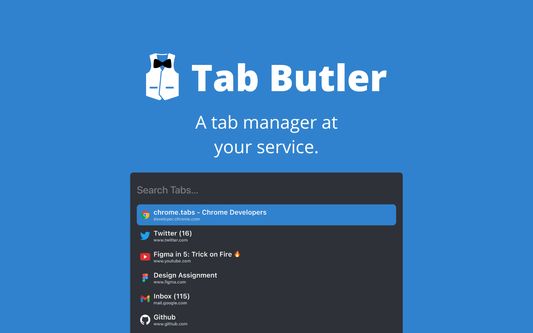
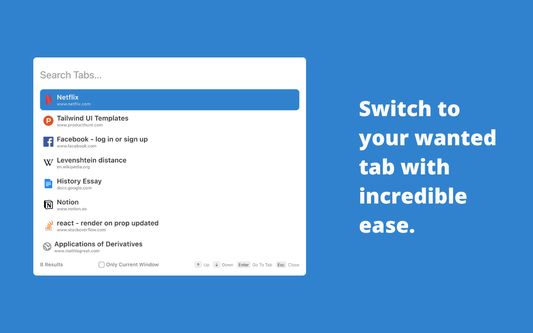
The purpose of Tab Butler is to allow users to switch to any tab they want with ease and to allow them to also execute multiple actions like creating a new tab and muting a tab from a single shortcut.
Метаподаци додатка
Снимци екрана
О овом додатку
Note: This is a beta release. The full product will be launched on October 3rd, 2022.
NEW FEATURE: Tab History Modal!
You can now press Ctrl + Shift + H to search through your most recent history from any tab!
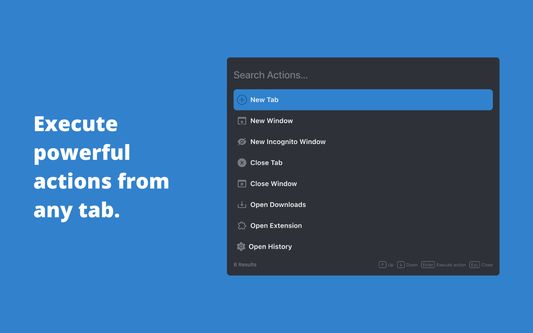
Meet Tab Butler - your all-in-one productivity assistant designed to improve the way you use your browser. With one shortcut, you can now search through all your open tabs with ease and switch to any of them with a single key press or click. You can also perform powerful actions from any tab, allowing you to remember only one easy shortcut instead of multiple difficult ones.
Tab Butler is designed to help you get the most out of your browser and increase your productivity to new levels like never before. With Tab Butler, you can transform your browsing experience for good and find what you want, when you want it.
FEATURES:
- Search and switch to your wanted tab with incredible ease
- Search through your most recent history like never before
- Pin, close, and mute your tabs right from any tab
- Filter tabs based on certain properties (muted, pinned, playing audio) for quicker access
- Perform various browser actions from any tab
COMING SOON:
- Updated UI
- Web Searching right from any tab
- Browse your history and bookmarks from any tab
- More powerful l and personalized actions
And so much more!
HOW TO USE TAB BUTLER:
- To toggle the Tab Search Modal to search your open tabs, press Cmd + Shift + Space (Ctrl + Shift + Space on Windows and Linux).
- To toggle the Tab Action Modal to execute actions, press Option + Shift + Space (Alt + Shift + K on Windows and Linux).
- To toggle the Tab History Modal to search through your recent history, press Ctrl + Shift + H.
- In the Tab Search Modal, type:
- “\pinned” to get all the pinned tab
- “\muted” to get all muted tabs
- “\audible” to get all tabs getting audio
If you would like to provide any feedback, report an issue, or request a feature, please feel free to leave us a review or use this form: https://forms.gle/LTXYy9XqbBYu6ZLQA
Tab Butler is a proud open-source project. If you would like to contribute to Tab Butler, please head over to https://github.com/MItchellMarkGeorge/TabButler
NEW FEATURE: Tab History Modal!
You can now press Ctrl + Shift + H to search through your most recent history from any tab!
Meet Tab Butler - your all-in-one productivity assistant designed to improve the way you use your browser. With one shortcut, you can now search through all your open tabs with ease and switch to any of them with a single key press or click. You can also perform powerful actions from any tab, allowing you to remember only one easy shortcut instead of multiple difficult ones.
Tab Butler is designed to help you get the most out of your browser and increase your productivity to new levels like never before. With Tab Butler, you can transform your browsing experience for good and find what you want, when you want it.
FEATURES:
- Search and switch to your wanted tab with incredible ease
- Search through your most recent history like never before
- Pin, close, and mute your tabs right from any tab
- Filter tabs based on certain properties (muted, pinned, playing audio) for quicker access
- Perform various browser actions from any tab
COMING SOON:
- Updated UI
- Web Searching right from any tab
- Browse your history and bookmarks from any tab
- More powerful l and personalized actions
And so much more!
HOW TO USE TAB BUTLER:
- To toggle the Tab Search Modal to search your open tabs, press Cmd + Shift + Space (Ctrl + Shift + Space on Windows and Linux).
- To toggle the Tab Action Modal to execute actions, press Option + Shift + Space (Alt + Shift + K on Windows and Linux).
- To toggle the Tab History Modal to search through your recent history, press Ctrl + Shift + H.
- In the Tab Search Modal, type:
- “\pinned” to get all the pinned tab
- “\muted” to get all muted tabs
- “\audible” to get all tabs getting audio
If you would like to provide any feedback, report an issue, or request a feature, please feel free to leave us a review or use this form: https://forms.gle/LTXYy9XqbBYu6ZLQA
Tab Butler is a proud open-source project. If you would like to contribute to Tab Butler, please head over to https://github.com/MItchellMarkGeorge/TabButler
Оцењено са 5 од стране 1 рецензента
Овлашћења и подаци
Потребна овлашћења:
- Приступи историји прегледања
- Приступи језичцима прегледача
- Приступ подацима за све веб странице
Више информација
- Издање
- 1.0.0.6
- Величина
- 80,48 KB
- Последњи пут ажурирано
- pre 4 godine (11. sep. 2022.)
- Повезане категорије
- Дозвола
- MIT дозвола
- Историјат издања
- Додај у збирку