
Synthetix Transcript Downloader (Unofficial) од HairyDuck
Download chat transcripts from Synthetix
Неке могућности могу захтевати плаћањеНеке могућности могу захтевати плаћање
1 корисник1 корисник
Метаподаци додатка
Снимци екрана
О овом додатку
⚠️ Important Disclaimer: This is an unofficial Chrome extension and is NOT affiliated with, supported, or endorsed by Synthetix. Use at your own risk. For official support, contact your Synthetix Account Manager.
This extension provides a convenient way for users with appropriate Synthetix API credentials to download chat transcripts for specific date ranges directly from their browser.
Key Features:
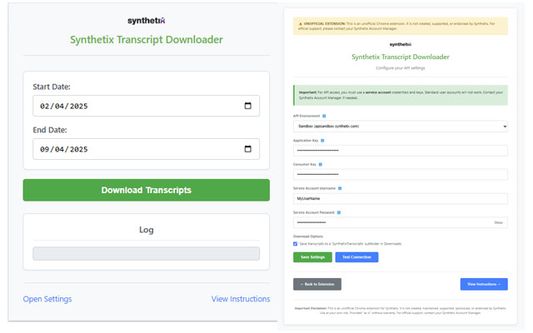
* Download transcripts by selecting start and end dates.
* Choose between Production, Staging, and Sandbox Synthetix API environments.
* Test your API connection directly from the settings page.
* Option to save downloads into a dedicated 'SynthetixTranscripts' subfolder.
* View progress and status messages clearly in the extension popup.
Requirements:
* You MUST obtain API keys (Application Key, Consumer Key) and Service Account credentials (Username, Password) from your Synthetix Account Manager. Standard user credentials will NOT work.
* Your keys must be authorized by Synthetix for the selected API environment.
How to Use:
1. Install the extension.
2. Open Settings (via the link in the popup, or by right-clicking the extension icon and selecting "Options").
3. Enter your API Environment, Keys, and Service Account details.
4. Use "Test Connection" to verify, then click "Save Settings".
5. Open the extension popup, select your desired dates, and click "Download Transcripts".
6. Monitor progress in the log area.
This extension provides a convenient way for users with appropriate Synthetix API credentials to download chat transcripts for specific date ranges directly from their browser.
Key Features:
* Download transcripts by selecting start and end dates.
* Choose between Production, Staging, and Sandbox Synthetix API environments.
* Test your API connection directly from the settings page.
* Option to save downloads into a dedicated 'SynthetixTranscripts' subfolder.
* View progress and status messages clearly in the extension popup.
Requirements:
* You MUST obtain API keys (Application Key, Consumer Key) and Service Account credentials (Username, Password) from your Synthetix Account Manager. Standard user credentials will NOT work.
* Your keys must be authorized by Synthetix for the selected API environment.
How to Use:
1. Install the extension.
2. Open Settings (via the link in the popup, or by right-clicking the extension icon and selecting "Options").
3. Enter your API Environment, Keys, and Service Account details.
4. Use "Test Connection" to verify, then click "Save Settings".
5. Open the extension popup, select your desired dates, and click "Download Transcripts".
6. Monitor progress in the log area.
Оцењено са 0 од стране 0 рецензената
Овлашћења и подаци
Потребна овлашћења:
- Преузимање датотека, читање и измена историје преузимања
- Приступи језичцима прегледача
- Приступ подацима за све веб странице
Више информација
- Издање
- 1.2
- Величина
- 271,5 KB
- Последњи пут ажурирано
- pre jedne godine (11. apr. 2025.)
- Повезане категорије
- Дозвола
- MIT дозвола
- Историјат издања
- Додај у збирку