
Swift Selection Search од Daniel Lobo
Swiftly access your search engines in a popup panel when you select text in a webpage. Context menu also included!
Метаподаци додатка
Снимци екрана


О овом додатку
Swift Selection Search (SSS) is an add-on for quickly searching for selected text using your favorite search engines.
Usage
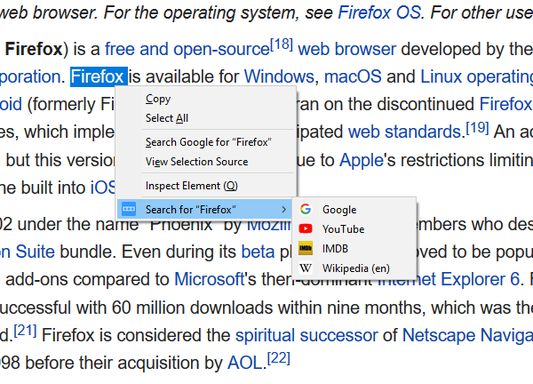
Select text on a webpage and a small popup will show up with multiple search engines. Press one to search for the selected text using that engine! Google, YouTube, Maps, Amazon... you name it.
Do you prefer using the right-click context menu? Your choice! :) And you can always disable this or the popup in the options menu (see below).
Personalization
SSS is very configurable. Open the "Extensions" menu on Firefox, find "Swift Selection Search" in the list, click the three dots on the corner, and finally click "Options" to explore all the settings.
You can add new search engines for the popup and context search, change the appearance of the icons, what happens when you click them, when/where the popup appears, whether to auto-copy text on selection, etc. Remember to follow the short instructions at the top!
ABOUT PERMISSIONS:
Among other arguably less intrusive permissions, SSS also requires permission to "Access your data for all websites". This is simply to fix a problem that caused the popup to not work in pages that use frames. SSS does not care about what sites you use and does not send your data anywhere. (Well, if you ask it, it can backup settings to Firefox Sync!)
------------------------------------------
SSS is an open source project made by Daniel Lobo with the collaboration of awesome people on GitHub. :)
Usage
Select text on a webpage and a small popup will show up with multiple search engines. Press one to search for the selected text using that engine! Google, YouTube, Maps, Amazon... you name it.
Do you prefer using the right-click context menu? Your choice! :) And you can always disable this or the popup in the options menu (see below).
Personalization
SSS is very configurable. Open the "Extensions" menu on Firefox, find "Swift Selection Search" in the list, click the three dots on the corner, and finally click "Options" to explore all the settings.
You can add new search engines for the popup and context search, change the appearance of the icons, what happens when you click them, when/where the popup appears, whether to auto-copy text on selection, etc. Remember to follow the short instructions at the top!
ABOUT PERMISSIONS:
Among other arguably less intrusive permissions, SSS also requires permission to "Access your data for all websites". This is simply to fix a problem that caused the popup to not work in pages that use frames. SSS does not care about what sites you use and does not send your data anywhere. (Well, if you ask it, it can backup settings to Firefox Sync!)
------------------------------------------
SSS is an open source project made by Daniel Lobo with the collaboration of awesome people on GitHub. :)
Оцењено са 4,7 од стране 706 рецензената
Овлашћења и подаци
Потребна овлашћења:
- Унос података у оставу
- Приступи радњама прегледача приликом навигације
- Приступ подацима за све веб странице
Необавезна овлашћења:
- Преузимање датотека, читање и измена историје преузимања
- Приступи језичцима прегледача
Више информација
- Издање
- 3.49.0
- Величина
- 305,16 KB
- Последњи пут ажурирано
- pre 2 godine (13. apr. 2025.)
- Повезане категорије
- Дозвола
- MIT дозвола
- Историјат издања
- Додај у збирку
You can still report severe bugs you find to the GitHub issues page https://github.com/CanisLupus/swift-selection-search/issues. Thanks!