Speak Dictionary од Aakash Pawar
Speak Dictionary displays the meaning/definition of any word selected by the user on any webpage and also speaks the meaning/definition of the selected word.
6 корисника6 корисника
Метаподаци додатка
Снимци екрана
О овом додатку
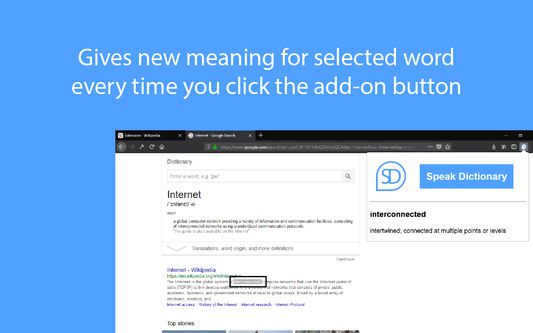
Speak Dictionary displays the meaning/definition of the word which you have selected on a webpage. It is displayed on popup window which opens when you click on the add-on button with Speak Dictionary icon which is on the top right corner of the screen. On the popup you will see the word which you have selected and the meaning/definition of the word below it.
And as the name suggests, it also speaks the meaning/definition of the word which is displayed. So, after you select the word what you have to do is, just click on the add-on button with Speak Dictionary logo or press Ctrl + Q to open the popup and you will see that as soon as the selected word and its definition is displayed, the speech also starts where the selected word is spoken first and then the meaning/definition of the word is spoken.
The Default Shortcut key to open the popup is Ctrl + Q.
And as the name suggests, it also speaks the meaning/definition of the word which is displayed. So, after you select the word what you have to do is, just click on the add-on button with Speak Dictionary logo or press Ctrl + Q to open the popup and you will see that as soon as the selected word and its definition is displayed, the speech also starts where the selected word is spoken first and then the meaning/definition of the word is spoken.
The Default Shortcut key to open the popup is Ctrl + Q.
Оцењено са 2,5 од стране 2 рецензената
Овлашћења и подаци
Више информација
- Везе додатка
- Издање
- 1.3resigned1
- Величина
- 28,13 KB
- Последњи пут ажурирано
- pre 2 godine (25. apr. 2024.)
- Повезане категорије
- Дозвола
- MIT дозвола
- Историјат издања
- Додај у збирку
Програмер овог додатка вас моли да помогнете у подршци за његов даљи развој тако што ћете дати мали допринос.