
Snooze Master од em_te
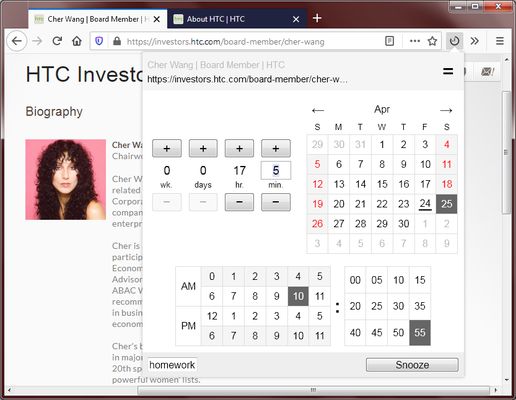
Snooze the selected tabs by clicking and selecting a wake up time. Specify a relative time or absolute time and enter a reminder message. The tab's history is restored too if the tab was recently closed.
32 корисника32 корисника
Метаподаци додатка
Снимци екрана

О овом додатку
To snooze the current tab, click on the toolbar icon and then select a wake up time. The tab will close itself and will reopen at the designated time.
Features:
Use cases:
Speed tips:
Features:
- Specify a relative wake up time (e.g. 1 hour later)
- Specify an absolute wake up time (e.g. 10:00 am)
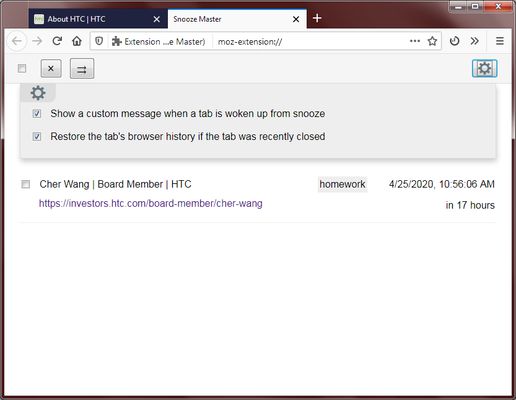
- Add a reminder message that appears when the tab wakes up
- Restores the tab's history if the tab was recently closed
- Snooze multiple tabs at once by ctrl+clicking on multiple tabs
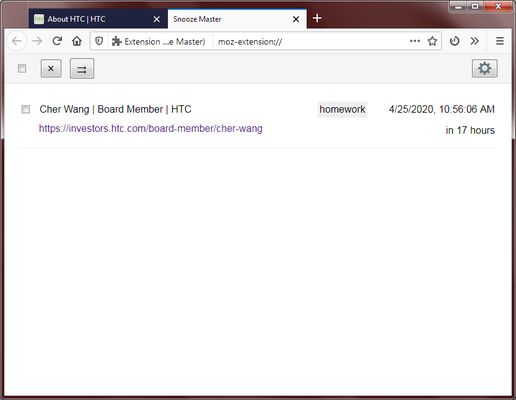
- View a list of all your snoozed tabs with their wake up times
- Quickly snooze a tab by right clicking on the toolbar icon (choose 1 hour later, 5 pm, 9 am tomorrow, or 1 week later)
- Restores incognito tabs and container tabs
- This extension requires very few permissions
Use cases:
- Remind yourself to view something in the future
- Avoid having too many tabs obscure your vision
- Turn tabs into a todo list
Speed tips:
- Double click on the calendar's selected date/time to confirm and quickly close the popup.
- If you select a time that is earlier than now, the date picker will automatically jump to tomorrow's date.
- If you type a number that is over 60 in the minutes box, it will automatically put the excess into the hours.
- Press the keyboard's Up/Down button while inside the minutes box to increase/decrease the minutes.
- If you are inside any text input box, press enter to confirm and close the popup.
- If you want to quickly select the last used snooze time, right click on the toolbar icon and select the option with the star.
- Use the keyboard shortcut Ctrl-Shift-1 to open the popup and immediately start typing minutes.
Оцењено са 3,4 од стране 9 рецензената
Овлашћења и подаци
Потребна овлашћења:
- Приступи недавно затвореним језичцима
Необавезна овлашћења:
- Покажите обавештења
- Приступи језичцима прегледача
Више информација
- Везе додатка
- Издање
- 0.2.9
- Величина
- 47,22 KB
- Последњи пут ажурирано
- pre 6 godina (13. maj 2020.)
- Повезане категорије
- Историјат издања
- Додај у збирку