
Awesome Screenshot & Screen Recorder од Diigo Inc.
Full page screen capture and screen recorder 2 in 1. Share screencast video instantly.
Метаподаци додатка
Снимци екрана


О овом додатку
Capture your screen with Awesome Screenshot & Screen Recorder, a powerful tool for screen sharing. Save screen recordings & screenshots to awesomescreenshot.com and share your videos and images instantly with unique shareable links.
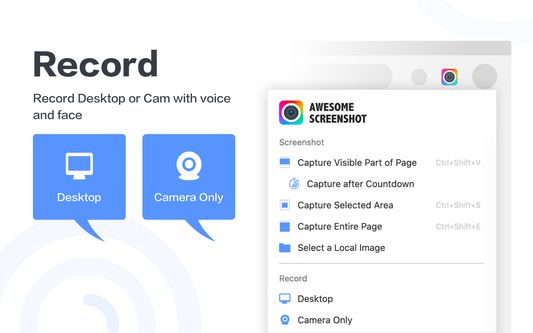
The popup menu allows you to use screen recording and screen capture easily.
Want to share your screen for cases like reporting technical issues, making product demo, or how-to tutorials? Start recording whenever needed.
Record
- Record your Desktop or Camera only
- Include your voice in recording with Microphone option on
Save & Share Recording
- Instantly get a shareable link of a video after finishing recording.
- Easily share a recording video to Jira, Slack, Trello, Asana, GitHub. (Premium)
- Download uploaded videos in MP4 format. (Premium)
Prefer to screenshot web pages as images? No problem.
Screen Capture
- Capture a screenshot of the page you visit, full-page, selected area or visible part
- Capture a screenshot of your entire screen or a specific application window
- Capture visible part after a delay
Annotate Screenshot
- Resize or crop a screenshot to the size you need
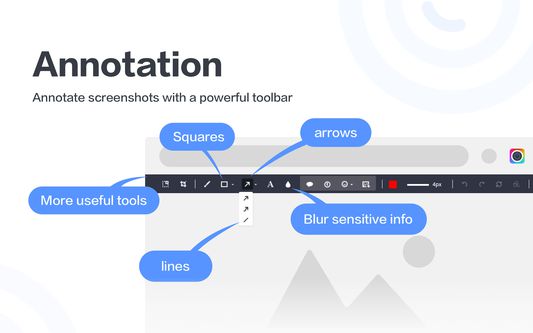
- Annotate your screenshot with rectangle, circles, arrows, lines, etc.
- Add text to your screenshot with or without background color, change text font and font size
- Blur sensitive information on your screenshot
- Highlight important part on your screenshot
- Select a local image or paste a copied image from your clipboard to annotate
Save & Share Screenshot
- Save screenshot as image in PNG or JPG format, or download screenshot as PDF
- One-click to save screenshot to your Awesome Screenshot account and get a shareable link. (limited access)
- Send a screenshot to a destination in Jira, Slack, Trello, Asana, GitHub. (Premium)
- Copy a screenshot directly when capturing selected area for quick pasting
Contact us
If you have any questions, suggestions or feature requests, feel free to submit a report by clicking the Feedback button in the extension’s popup menu.
You can also send a message to care@awesomescreenshot.com anytime. Let us know your thoughts! Thank you.
Pricing & Policy
Pricing: <a href="https://awesomescreenshot.com/pricing">https://www.awesomescreenshot.com/pricing</a>
Privacy Policy: <a href="https://www.awesomescreenshot.com/privacy/">https://www.awesomescreenshot.com/privacy-firefox/</a>
Only basic data such as your registered email address, your browser type and version, and the pages of our Service that you visit will be collected. All of your screenshot and video content is set to private by default. Only the account owner can view the content unless the owner chooses to share it.
The popup menu allows you to use screen recording and screen capture easily.
Want to share your screen for cases like reporting technical issues, making product demo, or how-to tutorials? Start recording whenever needed.
Record
- Record your Desktop or Camera only
- Include your voice in recording with Microphone option on
Save & Share Recording
- Instantly get a shareable link of a video after finishing recording.
- Easily share a recording video to Jira, Slack, Trello, Asana, GitHub. (Premium)
- Download uploaded videos in MP4 format. (Premium)
Prefer to screenshot web pages as images? No problem.
Screen Capture
- Capture a screenshot of the page you visit, full-page, selected area or visible part
- Capture a screenshot of your entire screen or a specific application window
- Capture visible part after a delay
Annotate Screenshot
- Resize or crop a screenshot to the size you need
- Annotate your screenshot with rectangle, circles, arrows, lines, etc.
- Add text to your screenshot with or without background color, change text font and font size
- Blur sensitive information on your screenshot
- Highlight important part on your screenshot
- Select a local image or paste a copied image from your clipboard to annotate
Save & Share Screenshot
- Save screenshot as image in PNG or JPG format, or download screenshot as PDF
- One-click to save screenshot to your Awesome Screenshot account and get a shareable link. (limited access)
- Send a screenshot to a destination in Jira, Slack, Trello, Asana, GitHub. (Premium)
- Copy a screenshot directly when capturing selected area for quick pasting
Contact us
If you have any questions, suggestions or feature requests, feel free to submit a report by clicking the Feedback button in the extension’s popup menu.
You can also send a message to care@awesomescreenshot.com anytime. Let us know your thoughts! Thank you.
Pricing & Policy
Pricing: <a href="https://awesomescreenshot.com/pricing">https://www.awesomescreenshot.com/pricing</a>
Privacy Policy: <a href="https://www.awesomescreenshot.com/privacy/">https://www.awesomescreenshot.com/privacy-firefox/</a>
Only basic data such as your registered email address, your browser type and version, and the pages of our Service that you visit will be collected. All of your screenshot and video content is set to private by default. Only the account owner can view the content unless the owner chooses to share it.
Due to the accelerated upgrade cycles of Firefox, this extension may at times become incompatible with the latest version of Firefox. Please rest assured that we are actively monitor the compatibility issue and will update the extension timely.
Оцењено са 4,4 од стране 1.578 рецензената
Овлашћења и подаци
Потребна овлашћења:
- Унос података у оставу
- Преузимање датотека, читање и измена историје преузимања
- Приступи језичцима прегледача
- Приступ подацима за све веб странице
Необавезна овлашћења:
- Преузимање датотека, читање и измена историје преузимања
Више информација
- Издање
- 4.3.7.21
- Величина
- 4,89 MB
- Последњи пут ажурирано
- pre jedne godine (19. nov. 2025.)
- Повезане категорије
- Дозвола
- Јавна дозвола Mozilla 2.0
- Политика приватности
- Прочитајте политику приватности за овај додатак
- Историјат издања
- Додај у збирку