Додаци за прегледач Firefox
  • Проширења
  • Теме
    • за Firefox
    • Речници и језички пакети
    • Странице других прегледача
    • Додаци за Android
Пријавите се
Преглед Remove/Crop-to Selection

Remove/Crop-to Selection од Nikos Asimakis

Remove or crop-to selection from context menu so that you can print or save only the parts you need. Additionally you can remove clicked elements and also remove ads, videos or other third-party content from web pages.

4 (15 рецензија)4 (15 рецензија)
437 корисника437 корисника
Преузмите Firefox и добијте додатак
Преузмите датотеку

Метаподаци додатка

Снимци екрана
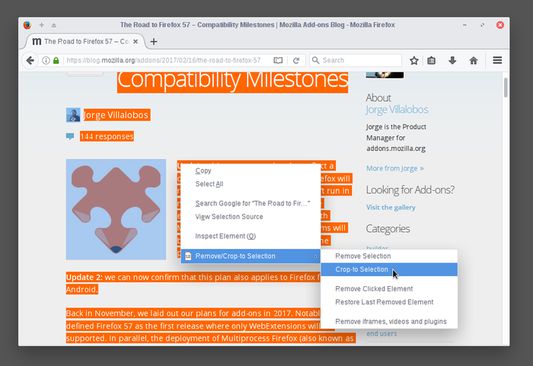
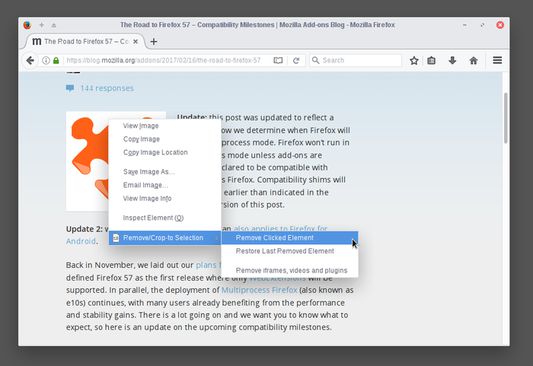
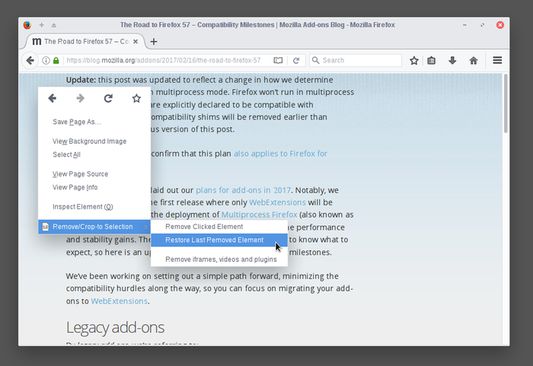
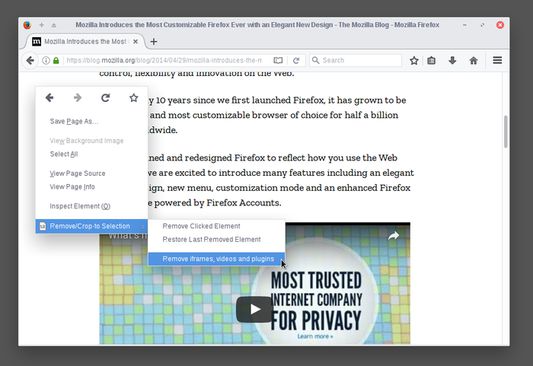
Select a part of a web page, right click and select "Crop-to Selection" to keep only your selection and remove everything else.Right click any element you don't need (images, buttons, widgets) and select "Remove Clicked Element" to remove it.If by mistake you remove something you want (like the article title) right click anywhere on the page and select "Restore Last Removed Element" to restore it. Alternatively, you can reload the page to undo all your changes.To remove ads, videos or other third-party content from the web page, right click anywhere and select "Remove iframes, videos & plugins".By combining everything you can print (or save) only the parts of the web page you want, saving paper and ink.
О овом додатку
Sometimes you may want to print or save only a part of a web page.

With this add-on you can select a part of a web page (text, images, etc), right click on the selection and:
  • click "Remove Selection" from the context menu to remove the selection, or
  • click "Crop-to Selection" to keep only the selection and remove everything else.

Now you can print or save only the parts of a web page you want.

All your changes are local and non permanent and by reloading the web page all your changes are gone.

Additionally, you can right click any element (image, paragraph, title, etc) on the web page and click "Remove Clicked Element" to remove it. To undo your last edit right click and select "Restore Last Removed Element" or simply reload the web page like before.

If your web page contains third party content (like ads, iframes, etc) or multimedia content (like videos, plugins, etc) right click on an empty part of the web page and select "Remove iframes, videos & plugins". This way you can remove annoyances and make sure that they are not included when you print or save the page.
Оцењено са 4 од стране 15 рецензената
Пријавите се да бисте оценили овај додатак
Још увек нема оцена

Оцена звездицама сачувана

5
10
4
1
3
1
2
0
1
3
Прочитајте свих 15 рецензија
Овлашћења и подаци

Потребна овлашћења:

  • Приступ подацима за све веб странице
Сазнајте више
Више информација
Везе додатка
  • Копирај ИД додатка
Издање
0.3resigned1
Величина
17,12 KB
Последњи пут ажурирано
pre 2 godine (25. apr. 2024.)
Повезане категорије
  • Веб програмирање
  • Изглед
Дозвола
Јавна дозвола Mozilla 2.0
Историјат издања
  • Погледајте сва издања
Додај у збирку
Пријави овај додатак
Идите на почетну страницу Mozilla-е

Додаци

  • O програму
  • Блог о додацима за Firefox
  • Радионица за додатке
  • Центар за програмере
  • Политике програмера
  • Блог заједнице
  • Форум
  • Пријавите грешку
  • Водич за оцењивање

Преузмите

  • Download Firefox
  • Windows
  • macOS
  • iOS
  • Android
  • Linux
  • All

Најновије градње

  • Nightly
  • Beta

Firefox за предузећа

  • Enterprise

Заједница

  • Connect
  • Contribute
  • Developer

Прати

  • Instagram
  • YouTube
  • TikTok
  • Bluesky
  • Podcast
  • Приватност
  • Колачићи
  • Права

Изузев тамо где је другачије наведено , садржај на овој страници је лиценциран под Creative Commons Attribution Share-Alike дозволом v3.0 или било којим каснијим издањем.