Додаци за прегледач Firefox
Проширења
Теме
Више…
за Firefox
Речници и језички пакети
Пријавите се
Претрага
Претрага
Quick Clone
од
Kartikay Bagla
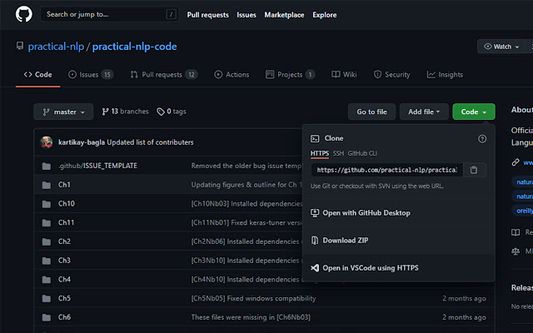
Quick Clone can open GitHub repositories in VS Code with one click.
Експериментално
Експериментално
0 (0 рецензија)
0 (0 рецензија)
26 корисника
26 корисника
Преузмите Firefox и добијте додатак
Преузмите датотеку
Метаподаци додатка
Снимци екрана
О овом додатку
How to use
Install the
VS Code extension
Install the corresponding browser extension
Navigate to a GitHub repository in your browser
Click on the green Code button and select "Open in VSCode"
Once VS Code opens, select the folder where the repository will be cloned
Once the cloning is complete, you can choose to open the cloned folder
Оцењено са 0 од стране 0 рецензената
Пријавите се да бисте оценили овај додатак
Још увек нема оцена
Оцена звездицама сачувана
5
0
4
0
3
0
2
0
1
0
Овлашћења и подаци
Потребна овлашћења:
Приступ вашим подацима за github.com
Више информација
Везе додатка
Почетна страница
Страница подршке
Е-пошта подршке
Копирај ИД додатка
Издање
1.0.1
Величина
15,79 KB
Последњи пут ажурирано
pre 5 godina (21. avg. 2021.)
Повезане категорије
Друго
Дозвола
GNU општа јавна дозвола само верзија 3.0
Историјат издања
Погледајте сва издања
Додај у збирку
Изаберите збирку…
Направи нову збирку
Пријави овај додатак