
Power Mouse X од Suricata Tech
Enhance mouse capabilities using gestures, combos, Quick search, Drag options and Next page predictions.
53 корисника53 корисника
Метаподаци додатка
Снимци екрана
О овом додатку
Enhance mouse capabilities using gestures, combos, Quick search, Drag options and Next page predictions.
Adds more functionality to your mouse buttons!
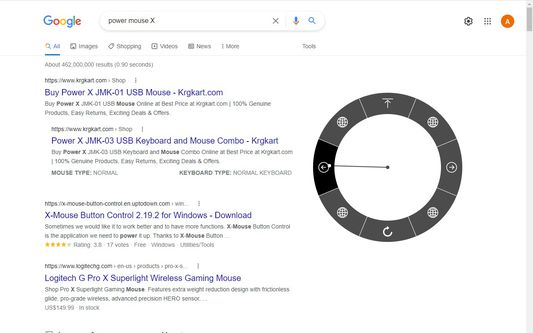
#Customizable Mouse gestures, with over 30 actions to choose from including:
Go to predefine site
Go to the previous page
Go super back (X7)
Go to the next page
Go to the top or bottom of the page
Paste a predefined text
Open new tab
Close tab
Refresh page
Mute \ Unmute tab
Minimize window
And many more...
To use mouse gestures just hold the mouse right button and drag the mouse to one of the eight directions.
#Combo buttons allow you to quickly:
Open new tab - left mouse click while holding the right button
Close tab - double click the right or middle mouse button
Go to the top / bottom of the page - press and scroll the mouse wheel
Zoom in / out - press and scroll the mouse wheel (require setting change)
Scroll the tabs - scroll the mouse wheel while holding the right mouse button
#Quick web search:
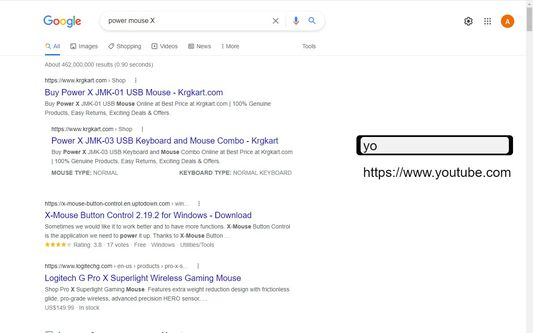
Press space bar while holding the right mouse button to open the search bar. Type the site name or search query just as you would on the URL bar. Press enter when the suggestion matches your search.
Get an even quicker search by typing while holding the right mouse button (without pressing the space bar before), now when you have a match just release the right button and it will go to the site \ search the query - No need to press enter.
Type + before the search in order to open the site in a new tab.
#Drag options:
Drag a link, selected text or an image to open the "drag options" menu.
You can use this menu to open links and images in a new tabs, search the web the selected text and more.
#Q&A
Q: Do you collect user data?
A: NO!
Q: Why the extension does not work on the starting page?
A: Firefox does not allow extensions to work on non URL pages such as startup page, setting page, PDF viewer and etc.
Q: Can I adjust the length of the mouse gestures?
A: You can and you probably should! go to settings to do that.
Q: Where can I learn how to use the extension?
A: https://PowerMouseX.com/how%20to.html
Adds more functionality to your mouse buttons!
#Customizable Mouse gestures, with over 30 actions to choose from including:
Go to predefine site
Go to the previous page
Go super back (X7)
Go to the next page
Go to the top or bottom of the page
Paste a predefined text
Open new tab
Close tab
Refresh page
Mute \ Unmute tab
Minimize window
And many more...
To use mouse gestures just hold the mouse right button and drag the mouse to one of the eight directions.
#Combo buttons allow you to quickly:
Open new tab - left mouse click while holding the right button
Close tab - double click the right or middle mouse button
Go to the top / bottom of the page - press and scroll the mouse wheel
Zoom in / out - press and scroll the mouse wheel (require setting change)
Scroll the tabs - scroll the mouse wheel while holding the right mouse button
#Quick web search:
Press space bar while holding the right mouse button to open the search bar. Type the site name or search query just as you would on the URL bar. Press enter when the suggestion matches your search.
Get an even quicker search by typing while holding the right mouse button (without pressing the space bar before), now when you have a match just release the right button and it will go to the site \ search the query - No need to press enter.
Type + before the search in order to open the site in a new tab.
#Drag options:
Drag a link, selected text or an image to open the "drag options" menu.
You can use this menu to open links and images in a new tabs, search the web the selected text and more.
#Q&A
Q: Do you collect user data?
A: NO!
Q: Why the extension does not work on the starting page?
A: Firefox does not allow extensions to work on non URL pages such as startup page, setting page, PDF viewer and etc.
Q: Can I adjust the length of the mouse gestures?
A: You can and you probably should! go to settings to do that.
Q: Where can I learn how to use the extension?
A: https://PowerMouseX.com/how%20to.html
Оцењено са 5 од стране 3 рецензената
Овлашћења и подаци
Потребна овлашћења:
- Преузимање датотека, читање и измена историје преузимања
- Приступи историји прегледања
- Надзор коришћења додатака и управљање темама
- Приступи недавно затвореним језичцима
- Приступи језичцима прегледача
- Приступи историји прегледања
- Приступ подацима за све веб странице
Необавезна овлашћења:
- Приступ подацима за све веб странице
Више информација
- Издање
- 2.9.23112
- Величина
- 298,89 KB
- Последњи пут ажурирано
- pre 2 godine (17. jul 2024.)
- Повезане категорије
- Дозвола
- Сва права су задржана
- Историјат издања
- Ознаке
- Додај у збирку