
Paranoia од GDR!
Check if your emails arrived TLS-encrypted (and which corporations were able to read it nevertheless)
3 корисника3 корисника
Метаподаци додатка
Снимци екрана

О овом додатку
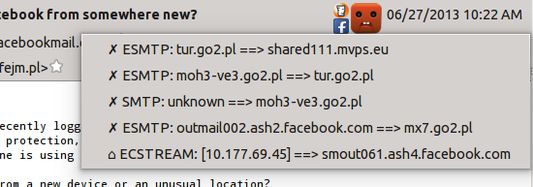
This extension shows two basic pieces of information in the incoming email header pane:
- Was the connection encrypted at all the time when this message was sent between servers?
- Which large corporations had a copy of this message and, theoretically, could read it?
- Yellow super-happy emoticon = connection encrypted at all times, and hasn't passed any known big corporations
- Yellow happy emoticon = connection encrypted on the public Internet
- Blue sad emoticon = 1 connection not encrypted
- Red terrified emoticon = message sent more than 1 time unencrypted, on the public network (internet)
- ✓ - encrypted
- ✗ - unencrypted
- ⌂ - unencrypted, but in a local network
Оцењено са 4,3 од стране 8 рецензената
Више информација
- Издање
- 0.3.0
- Величина
- 90,63 KB
- Последњи пут ажурирано
- pre 7 godina (7. okt. 2019.)
- Повезане категорије
- Историјат издања
- Додај у збирку