Page Saver WE screenshot capture tool од Kathleen Brade, Mark Smith
Quickly and easily capture an image of a web page. Options allow you to control output format (PNG or JPEG), file name and more.
6.427 корисника6.427 корисника
Метаподаци додатка
Снимци екрана
О овом додатку
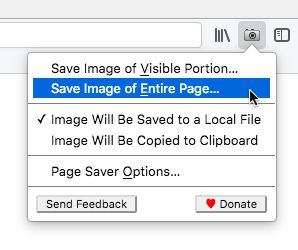
Page Saver WE lets you capture images of web pages and save them to a file in PNG or JPEG format, or to the system clipboard. Using Page Saver, you can capture a web page screenshot of an entire page or just the visible portion. To allow you to control the image capture process, a variety of options are provided including a file name pattern and support for an optional header and footer.
To begin using Page Saver WE, click the camera icon on your Firefox toolbar or press Alt+Shift+I (Linux and Windows) or ⌘+Shift+I (macOS).
Please Note: Due to restrictions Firefox imposes on extensions, Page Saver WE cannot capture images of internal Firefox pages such as about:addons or Mozilla hosted pages such as https://addons.mozilla.org/.
Questions? Contact the developers by sending email to support@pearlcrescent.com
To begin using Page Saver WE, click the camera icon on your Firefox toolbar or press Alt+Shift+I (Linux and Windows) or ⌘+Shift+I (macOS).
Please Note: Due to restrictions Firefox imposes on extensions, Page Saver WE cannot capture images of internal Firefox pages such as about:addons or Mozilla hosted pages such as https://addons.mozilla.org/.
Questions? Contact the developers by sending email to support@pearlcrescent.com
Оцењено са 4,4 од стране 90 рецензената
Овлашћења и подаци
Потребна овлашћења:
- Унос података у оставу
- Преузимање датотека, читање и измена историје преузимања
- Приступ подацима за све веб странице
Више информација
- Издање
- 0.8.2
- Величина
- 103,28 KB
- Последњи пут ажурирано
- pre 4 godine (27. jul 2022.)
- Повезане категорије
- Дозвола
- Page Saver License
- Историјат издања
- Додај у збирку
Програмери овог додатка вас моле да помогнете у подршци за његов даљи развој тако што ћете дати мали допринос.