
PageMark од PixelGiant
Make some highlights | Take some notes
160 корисника160 корисника
Метаподаци додатка
Снимци екрана


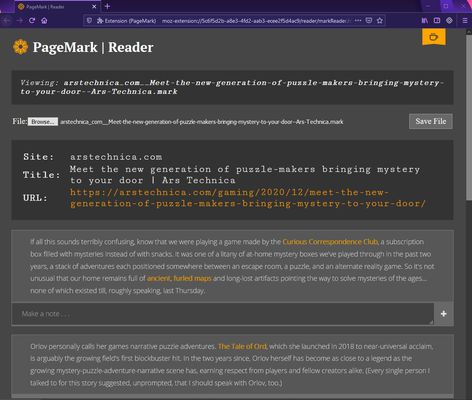
О овом додатку
PageMark lets you make highlights and take notes as you read. The included Notes app lets you save your highlights, edit your notes, and even tag, rate, and filter everything to keep useful information organized and top of mind. Useful for students, researchers, and active readers.
This add-on is under active development.
------------------------------------------------------
Mark a paragraph
<right-click> a paragraph and choose PageMark to drop a mark.
Mark will appear at beginning or end of paragraph based on click location.
Highlight a sentence, word, or paragraph
Select some text, <right-click> and choose PageMark.
Alternatively use Block-Marking Mode (below).
*NEW* Block-Marking Mode
[CTRL-ALT-M]: Quickly select blocks of page content. Selectable blocks appear with a dashed outline. Selected blocks comprise a single mark after toggling off.
Add a note
Hover cursor over mark to show "+". Click it to add a note!
Remove a mark
Click a mark to remove it.
Scan between marks
Click PageMark browser button to scroll between markers.
Alternatively use keyboard shortcuts (below).
*NEW* Scan with shortcuts
Scroll to next mark: [CTRL-ALT-DOWN]
Scroll to previous mark: [CTRL-ALT-UP]
Save highlights & notes
Firefox: Tools > PageMark > Save to File
*NEW* Revisit highlights & edit notes
Firefox: Tools > PageMark > Launch Notes
*NEW* Rate, tag, and filter notes
Organize and prioritize notes by tag and star rating
*Marks may be saved to file but are not preserved on page after tab close.
**Only image links are saved to file—not actual images. Changes to hosted image will appear in your local files.
***PageMark is usable on most sites but will auto-disable on certain sites (Gmail, Facebook, Twitter) for compatibility reasons.
Full manual here
This add-on is under active development.
------------------------------------------------------
Mark a paragraph
<right-click> a paragraph and choose PageMark to drop a mark.
Mark will appear at beginning or end of paragraph based on click location.
Highlight a sentence, word, or paragraph
Select some text, <right-click> and choose PageMark.
Alternatively use Block-Marking Mode (below).
*NEW* Block-Marking Mode
[CTRL-ALT-M]: Quickly select blocks of page content. Selectable blocks appear with a dashed outline. Selected blocks comprise a single mark after toggling off.
Add a note
Hover cursor over mark to show "+". Click it to add a note!
Remove a mark
Click a mark to remove it.
Scan between marks
Click PageMark browser button to scroll between markers.
Alternatively use keyboard shortcuts (below).
*NEW* Scan with shortcuts
Scroll to next mark: [CTRL-ALT-DOWN]
Scroll to previous mark: [CTRL-ALT-UP]
Save highlights & notes
Firefox: Tools > PageMark > Save to File
*NEW* Revisit highlights & edit notes
Firefox: Tools > PageMark > Launch Notes
*NEW* Rate, tag, and filter notes
Organize and prioritize notes by tag and star rating
*Marks may be saved to file but are not preserved on page after tab close.
**Only image links are saved to file—not actual images. Changes to hosted image will appear in your local files.
***PageMark is usable on most sites but will auto-disable on certain sites (Gmail, Facebook, Twitter) for compatibility reasons.
Full manual here
- To save your work to file: Tools > PageMark > Save to File
- To view saved files: Tools > PageMark > Launch Notes
Оцењено са 4,1 од стране 14 рецензената
Овлашћења и подаци
Потребна овлашћења:
- Преузимање датотека, читање и измена историје преузимања
- Приступи језичцима прегледача
- Приступ подацима за све веб странице
Више информација
- Везе додатка
- Издање
- 1.4.4
- Величина
- 45,41 KB
- Последњи пут ажурирано
- pre 5 godina (17. apr. 2021.)
- Повезане категорије
- Дозвола
- Сва права су задржана
- Историјат издања
- Додај у збирку
Програмер овог додатка вас моли да помогнете у подршци за његов даљи развој тако што ћете дати мали допринос.