
Page Structure од Nicholas Hoyt
Utilize the Firefox Sidebar to display the structural labels on a web page, including its page title, headings, and landmarks, for web accessibility evaluation.
114 корисника114 корисника
Метаподаци додатка
Снимци екрана
О овом додатку
The Page Structure add-on can help you determine whether a web page meets the accessibility requirements for Page Structure, as defined in the Web Content Accessibility Guidelines (WCAG) 2.1 and Accessible Rich Internet Applications (WAI-ARIA) 1.2 specifications. It provides the information you need to answer the following accessibility-related questions:
Why use the Page Structure add-on?
Users of screen reader software, such as people who are blind or with low vision, rely on the heading and landmark navigation it provides to (a) get an overview of how the content on the page is structured, and (b) quickly and efficiently move to one of these headings or landmark regions.
For example, at the user's request, screen reader software will sequentially read through a list of headings, indicating the heading level of each, and enable the user to select one of these to navigate to. Likewise with landmarks, the software will list all of the available landmark regions on the page, from which the user may choose.
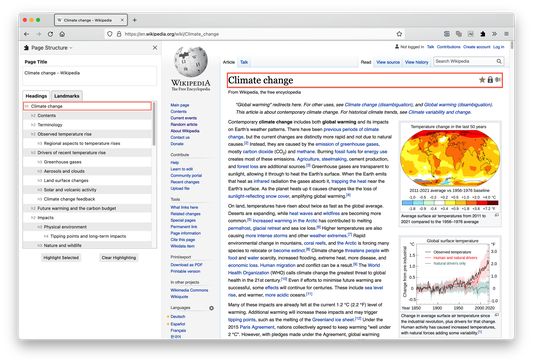
What makes Page Structure useful? By collecting all of the headings and landmarks available on a page into their respective lists and displaying these in the sidebar, you are provided a perspective that is much closer to what a screen reader user will have.
This allows you, the developer or author of the page, to fine tune and scrutinize the wording and labeling choices of headings and landmarks to ensure that when they are extracted from the page and presented as a list to a screen reader user, they make sense in that context.
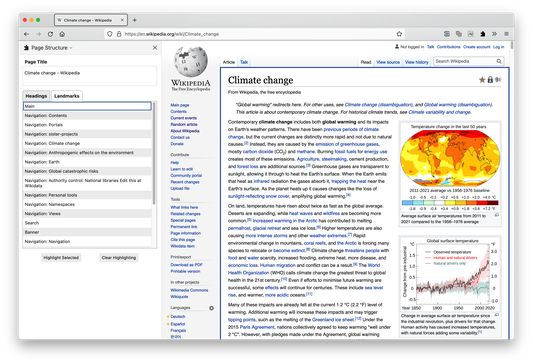
When you select a heading or landmark in the sidebar, Page Structure can highlight and scroll into view the selected item on the page. Headings are highlighted with an orange outline, and landmarks use a dark blue outline.
- Page Title: Does the title adequately describe the purpose or main content of the page?
- Headings: Are HTML headings used (h1 ... h6) to break down the content into sections and subsections? Do they properly indicate the hierarchical structure of the content? Does each heading accurately describe the section or subsection that follows?
- Landmarks: Are ARIA landmarks used to indicate functional regions on the page such as main, navigation, banner (header), contentinfo (footer) and complementary (aside)? When there are multiple occurrences of the same type of landmark region, does each one have a unique descriptive label?
Why use the Page Structure add-on?
Users of screen reader software, such as people who are blind or with low vision, rely on the heading and landmark navigation it provides to (a) get an overview of how the content on the page is structured, and (b) quickly and efficiently move to one of these headings or landmark regions.
For example, at the user's request, screen reader software will sequentially read through a list of headings, indicating the heading level of each, and enable the user to select one of these to navigate to. Likewise with landmarks, the software will list all of the available landmark regions on the page, from which the user may choose.
What makes Page Structure useful? By collecting all of the headings and landmarks available on a page into their respective lists and displaying these in the sidebar, you are provided a perspective that is much closer to what a screen reader user will have.
This allows you, the developer or author of the page, to fine tune and scrutinize the wording and labeling choices of headings and landmarks to ensure that when they are extracted from the page and presented as a list to a screen reader user, they make sense in that context.
When you select a heading or landmark in the sidebar, Page Structure can highlight and scroll into view the selected item on the page. Headings are highlighted with an orange outline, and landmarks use a dark blue outline.
Оцењено са 5 од стране 1 рецензента
Овлашћења и подаци
Потребна овлашћења:
- Прочитајте текст из свих отворених језичака
- Приступи језичцима прегледача
- Приступ подацима за све веб странице
Више информација
- Везе додатка
- Издање
- 0.12.1
- Величина
- 29,9 KB
- Последњи пут ажурирано
- pre 3 godine (27. apr. 2023.)
- Повезане категорије
- Дозвола
- Јавна дозвола Mozilla 2.0
- Историјат издања
- Додај у збирку