
Other Window од Nick
Open or send a tab to a different window with the click of a button. Creates both a menu button and a context menu (right click on links) to send a tab or open a link in a different window.
151 корисник151 корисник
Метаподаци додатка
Снимци екрана
О овом додатку
Other Window caters to two different workflows:
1. A user who typically has only two windows.
2. A user who typically has more than 2 windows.
Two Windows
For a user that only has two windows, the main usage centers around using the menu button to quickly send tabs between windows with a single click.
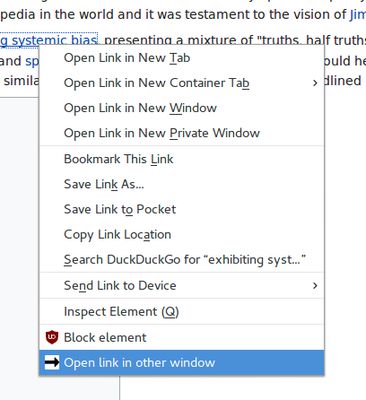
Additionally, in the context menu there is an option called `Open link in other window` which will open the link in the other window.
Three+ Windows
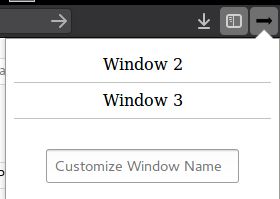
When a user has more than two windows, the menu button will instead open a popup that will show you a list of the other windows to choose from.
Different mouse clicks will perform different actions when selected:
- Left click: move tab, focus the new window
- Middle Click: move tab, no focus change
- Right Click: do not move tab, instead just focus the new window
Options
There are a few settings that can be changed in the options page.
These include:
- Disabling the right-click context menu
- Disabling the context menu bringing focus to other windows
- Swapping middle and left click actions, to change which brings focus to other windows
- Enabling prefixing the window title with the window name
If you have more than two windows open at a given time, you have the option of giving a name to individual windows (as opposed to the usual naming convention of 'Window 1', 'Window 2'...). This feature is available in the menu button. Simply type in a name and hit 'enter'.
Windows will appear in the popup sorted in the following order:
1. Windows that have been given a name, sorted alphabetically.
2. Windows that have not been given a name, sorted in the order created.
1. A user who typically has only two windows.
2. A user who typically has more than 2 windows.
Two Windows
For a user that only has two windows, the main usage centers around using the menu button to quickly send tabs between windows with a single click.
Additionally, in the context menu there is an option called `Open link in other window` which will open the link in the other window.
Three+ Windows
When a user has more than two windows, the menu button will instead open a popup that will show you a list of the other windows to choose from.
Different mouse clicks will perform different actions when selected:
- Left click: move tab, focus the new window
- Middle Click: move tab, no focus change
- Right Click: do not move tab, instead just focus the new window
Options
There are a few settings that can be changed in the options page.
These include:
- Disabling the right-click context menu
- Disabling the context menu bringing focus to other windows
- Swapping middle and left click actions, to change which brings focus to other windows
- Enabling prefixing the window title with the window name
If you have more than two windows open at a given time, you have the option of giving a name to individual windows (as opposed to the usual naming convention of 'Window 1', 'Window 2'...). This feature is available in the menu button. Simply type in a name and hit 'enter'.
Windows will appear in the popup sorted in the following order:
1. Windows that have been given a name, sorted alphabetically.
2. Windows that have not been given a name, sorted in the order created.
Оцењено са 4,6 од стране 17 рецензената
Овлашћења и подаци
Више информација
- Издање
- 5.1.0
- Величина
- 64,59 KB
- Последњи пут ажурирано
- pre jedne godine (10. sep. 2025.)
- Историјат издања
- Додај у збирку