
Mercator Studio for Google Meet од Xing
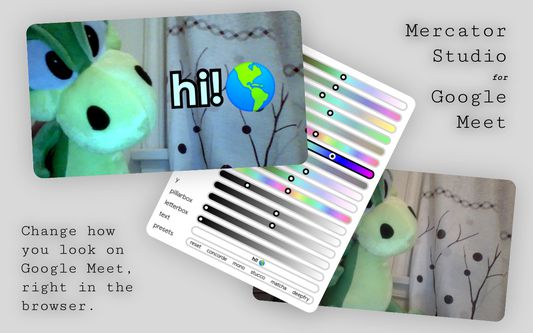
Change how you look on Google Meet with adjustable exposure, blur, vignette, and more!
464 корисника464 корисника
Метаподаци додатка
Снимци екрана
О овом додатку
Mercator Studio gives you fine control over your appearance on Google Meet.
Precisely adjust lighting and colors:
· Exposure & Contrast
· Temperature & Tint
· Hue & Saturation
· Sepia & Blur
· Fade & Vignette
Move the focus to where you want it:
· Rotate, Scale, Mirror & Flip
· Horizontal & Vertical Translate
· Pillarbox & Letterbox Crop
Write text & emoji in front of your face:
· Auto-adjusts size to fit any length of text onto the screen.
· Auto-converts \sqrt to √, \times to ×, \cdot to ·, \pm to ±, ^number to ¹², and _number to ₄₂.
Somewhat nice presets:
· Concorde
· Mono
· Matcha
· Deepfry
Scroll, drag, or use arrow keys on the sliders to adjust; Right click or press 0 on them to reset; And hold down Ctrl or Shift for finer steps.
Ctrl + M to open/close the interface. Ctrl + Shift + M to minimize it.
Translated for português, español, italiano, français, & 中文.
Changelog:
· 2.2 Translate from EN into PT, ES, IT, FR, and ZH.
· 2.1 Improve keyboard navigation.
· 2.0 Redesign for Google Meet’s new look.
· 1.19 Add mirroring; Dark mode support.
· 1.18 Make textbox auto-resize; Ctrl or Shift for finer steps.
· 1.17 Fix flickering and window-focus issues.
· 1.16 Add freeze feature (thanks @napsav).
· 1.15 Add toggle to super tiny mode.
· 1.14 Add math auto-convert.
· 1.13 Preserve values across sessions.
· 1.12 Luminance-preserving temperature & tint.
· 1.11 Multiline text input; Rebranded as Mercator Studio for Google Meet.
· 1.10 Sync camera; Capture scroll; Right-click reset; Firefox support.
· 1.9 Add text & emoji input.
· 1.8 Add presets; Matched UI with material design.
· 1.7 Add color balance tools and refined UI.
· 1.6 Add fog.
· 1.5 Add vignettes.
· 1.4 Converted to Chrome extension.
· 1.3 Fix the blur slider's range.
· 1.2 Add cropping.
· 1.1 Add a way to reset everything.
· 1.0 Hello world!
Source code: https://github.com/FlyOrBoom/mercator.
Available for other browsers: https://x-ing.space/mercator.
Unfortunately, temperature & tint filters don't work in Firefox.
(C) Xing Liu 2020–2021, MIT License.
Check out other things I’ve made at https://x-ing.space.
Precisely adjust lighting and colors:
· Exposure & Contrast
· Temperature & Tint
· Hue & Saturation
· Sepia & Blur
· Fade & Vignette
Move the focus to where you want it:
· Rotate, Scale, Mirror & Flip
· Horizontal & Vertical Translate
· Pillarbox & Letterbox Crop
Write text & emoji in front of your face:
· Auto-adjusts size to fit any length of text onto the screen.
· Auto-converts \sqrt to √, \times to ×, \cdot to ·, \pm to ±, ^number to ¹², and _number to ₄₂.
Somewhat nice presets:
· Concorde
· Mono
· Matcha
· Deepfry
Scroll, drag, or use arrow keys on the sliders to adjust; Right click or press 0 on them to reset; And hold down Ctrl or Shift for finer steps.
Ctrl + M to open/close the interface. Ctrl + Shift + M to minimize it.
Translated for português, español, italiano, français, & 中文.
Changelog:
· 2.2 Translate from EN into PT, ES, IT, FR, and ZH.
· 2.1 Improve keyboard navigation.
· 2.0 Redesign for Google Meet’s new look.
· 1.19 Add mirroring; Dark mode support.
· 1.18 Make textbox auto-resize; Ctrl or Shift for finer steps.
· 1.17 Fix flickering and window-focus issues.
· 1.16 Add freeze feature (thanks @napsav).
· 1.15 Add toggle to super tiny mode.
· 1.14 Add math auto-convert.
· 1.13 Preserve values across sessions.
· 1.12 Luminance-preserving temperature & tint.
· 1.11 Multiline text input; Rebranded as Mercator Studio for Google Meet.
· 1.10 Sync camera; Capture scroll; Right-click reset; Firefox support.
· 1.9 Add text & emoji input.
· 1.8 Add presets; Matched UI with material design.
· 1.7 Add color balance tools and refined UI.
· 1.6 Add fog.
· 1.5 Add vignettes.
· 1.4 Converted to Chrome extension.
· 1.3 Fix the blur slider's range.
· 1.2 Add cropping.
· 1.1 Add a way to reset everything.
· 1.0 Hello world!
Source code: https://github.com/FlyOrBoom/mercator.
Available for other browsers: https://x-ing.space/mercator.
Unfortunately, temperature & tint filters don't work in Firefox.
(C) Xing Liu 2020–2021, MIT License.
Check out other things I’ve made at https://x-ing.space.
Оцењено са 4,6 од стране 25 рецензената
Овлашћења и подаци
Више информација
- Издање
- 2.2.1
- Величина
- 20,23 KB
- Последњи пут ажурирано
- pre 5 godina (30. maj 2021.)
- Повезане категорије
- Дозвола
- MIT дозвола
- Историјат издања
- Додај у збирку