Додаци за прегледач Firefox
  • Проширења
  • Теме
    • за Firefox
    • Речници и језички пакети
    • Странице других прегледача
    • Додаци за Android
Пријавите се
Преглед Lightshot (screenshot tool)

Lightshot (screenshot tool) од Serg at SkillBrains, Andrej at SkillBrains

Easy and convenient screenshot tool. Allows you to make screenshots of any selected area (video and flash too), edit and upload it to server.

4 (209 рецензија)4 (209 рецензија)
27.054 корисника27.054 корисника
Преузмите Firefox и добијте додатак
Преузмите датотеку

Метаподаци додатка

Снимци екрана
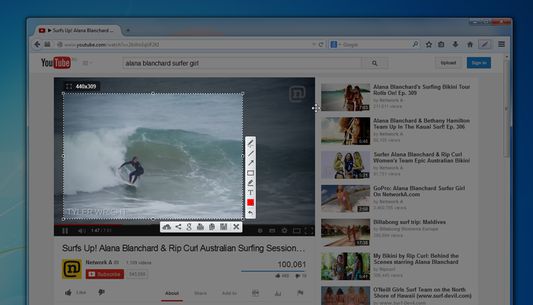
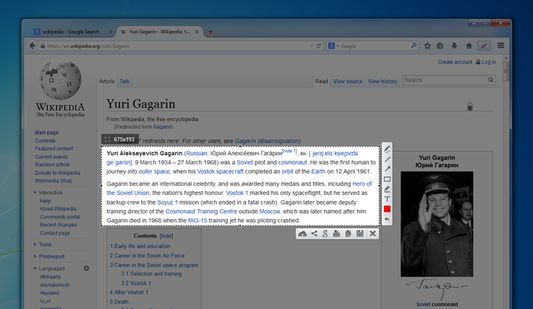
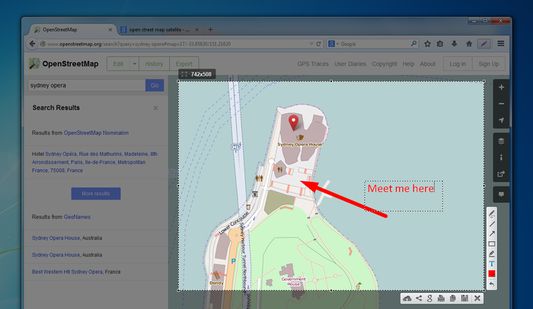
Lightshot toolbar buttonYou can take a screenshot of video/flash/javaSelect areaEdit your screenshots
О овом додатку
Lightshot is a tool allowing you to easily make screenshots of any selected area in a browser tab. You just hit Lightshot icon on the toolbar or status bar, then select area you want to make a screenshot from and click “Save” or “Upload to server". In case of uploading you instantly get link to a screenshot you’ve just uploaded.
It is possible to resize and move selection area right in a browser tab without opening any additional applications. That makes the process very simple and easy. You also can edit your screenshots (add text, draw lines and more other functions).
Програмерске напомене
Test picture: http://prntscr.com/3hjkmh

We will be adding new interesting features to make the screenshoting better and easier.

Frequently asked questions about LightShot:

Q: Can I copy screenshot to the windows clipboard?
A: Yes, you can! Just select a region for shooting and press Ctrl+C.

Q: How can I make a screenshot faster?
A: You can press Ctrl before selecting a region and the addon will copy your screenshot to the clipboard as soon as you release the mouse button.

Q: Can your addon run on Linux or Mac?
A: No, but maybe one shiny day ;)

Q: What image formats do you support?
A: Currently it is .png, .bmp, and .jpg

Q: What server do you use to host uploaded screenshots?
A: Imageshack

Q: I found some issues in LightShot. How can it be solved?
A: Please make sure you are using the latest build, and if its still there contact us on support@skillbrains.com

Q: I have something to tell you about the LightShot how can I contact you?
A: The best way is to contact us by messaging us through Facebook page or sending e-mail.

Q: What hotkeys does LightShot have?
A: Check the hotkey list page on our site to get further information.
Оцењено са 4 од стране 209 рецензената
Пријавите се да бисте оценили овај додатак
Још увек нема оцена

Оцена звездицама сачувана

5
134
4
19
3
9
2
11
1
36
Прочитајте свих 209 рецензија
Овлашћења и подаци

Потребна овлашћења:

  • Унос података у оставу
  • Преузимање датотека, читање и измена историје преузимања
  • Покажите обавештења
  • Приступи језичцима прегледача
  • Приступ подацима за све веб странице
Сазнајте више
Више информација
Везе додатка
  • Почетна страница
  • Страница подршке
  • Е-пошта подршке
  • Копирај ИД додатка
Издање
6.2.5resigned1
Величина
691,06 KB
Последњи пут ажурирано
pre 2 godine (25. apr. 2024.)
Повезане категорије
  • Фотографије, музика и видео снимци
  • Друштвено и комуникација
Дозвола
Custom License
Историјат издања
  • Погледајте сва издања
Додај у збирку
Пријави овај додатак
Идите на почетну страницу Mozilla-е

Додаци

  • O програму
  • Блог о додацима за Firefox
  • Радионица за додатке
  • Центар за програмере
  • Политике програмера
  • Блог заједнице
  • Форум
  • Пријавите грешку
  • Водич за оцењивање

Преузмите

  • Download Firefox
  • Windows
  • macOS
  • iOS
  • Android
  • Linux
  • All

Најновије градње

  • Nightly
  • Beta

Firefox за предузећа

  • Enterprise

Заједница

  • Connect
  • Contribute
  • Developer

Прати

  • Instagram
  • YouTube
  • TikTok
  • Bluesky
  • Podcast
  • Приватност
  • Колачићи
  • Права

Изузев тамо где је другачије наведено , садржај на овој страници је лиценциран под Creative Commons Attribution Share-Alike дозволом v3.0 или било којим каснијим издањем.