Додаци за прегледач Firefox
  • Проширења
  • Теме
    • за Firefox
    • Речници и језички пакети
    • Странице других прегледача
    • Додаци за Android
Пријавите се
Преглед HTML Tag Changer

HTML Tag Changer од Kai Grunert

Select HTML elements and change their tag names. You can select elements with a CSS selector and specify the intended new tag name. You can also hide or remove the elements. E.g. this can be useful to include specific elements in the Reader View.

0 (0 рецензија)0 (0 рецензија)
1 корисник1 корисник
Преузмите Firefox и добијте додатак
Преузмите датотеку

Метаподаци додатка

Снимци екрана
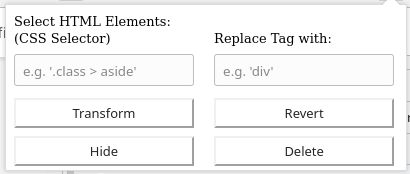
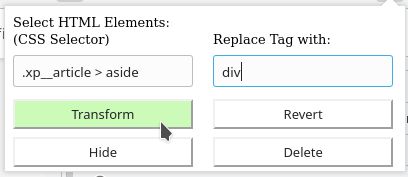
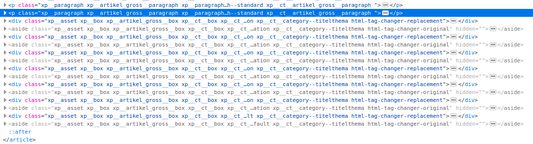
Default display if you open the add-onSelect the HTML elements with a CSS selector and type the new tag nameThe original source code before the transformationThe new source code after the transformation
О овом додатку
This browser add-on can change the HTML element tag names on a web page into another tag name. You can select the HTML elements that should be replaced with a CSS selector and state the new tag names.

Furthermore you can hide or delete the selected elements from the web page. The former is usually preferred, because you will be able to revert the changes afterwards. If you use delete, you need to reload the complete page to revert the changes.

Example: The Reader View of Firefox includes and presents only a selection of HTML elements like <p>. But if the web page contains important hint or content boxes in <aside> elements, you will not see them in the Reader View. You can use this add-on to change all <aside> elements in appropriate elements before you turn on the Reader.

There is a Revert button - if it doesn't work correctly, just reload the complete page.

Hints:
  • Due to a lack of API support, the event listeners for an element can not be copied into the new element
  • Pay attention to the structure of a web page: some elements (often inline elements) don't allow to include other elements. E.g. if you want to change all <aside> elements into <p> elements, this can lead to unpredictable behavior if the <aside> element contains further block elements, because <p> is not allowed to contain block elements.
  • If the replacement contains web components, this can also lead to some side effects

Details:

The add-on does not delete the original elements, but it hides them. Therefore the actions can be reverted.
Оцењено са 0 од стране 0 рецензената
Пријавите се да бисте оценили овај додатак
Још увек нема оцена

Оцена звездицама сачувана

5
0
4
0
3
0
2
0
1
0
Још увек нема рецензија
Више информација
Везе додатка
  • Почетна страница
  • Страница подршке
  • Копирај ИД додатка
Издање
1.0
Величина
29,6 KB
Последњи пут ажурирано
pre 6 godina (2. maj 2020.)
Повезане категорије
  • Веб програмирање
  • Изглед
Дозвола
Произвољна дозвола
Историјат издања
  • Погледајте сва издања
Додај у збирку
Пријави овај додатак
Идите на почетну страницу Mozilla-е

Додаци

  • O програму
  • Блог о додацима за Firefox
  • Радионица за додатке
  • Центар за програмере
  • Политике програмера
  • Блог заједнице
  • Форум
  • Пријавите грешку
  • Водич за оцењивање

Преузмите

  • Download Firefox
  • Windows
  • macOS
  • iOS
  • Android
  • Linux
  • All

Најновије градње

  • Nightly
  • Beta

Firefox за предузећа

  • Enterprise

Заједница

  • Connect
  • Contribute
  • Developer

Прати

  • Instagram
  • YouTube
  • TikTok
  • Bluesky
  • Podcast
  • Приватност
  • Колачићи
  • Права

Изузев тамо где је другачије наведено , садржај на овој страници је лиценциран под Creative Commons Attribution Share-Alike дозволом v3.0 или било којим каснијим издањем.