Додаци за прегледач Firefox
  • Проширења
  • Теме
    • за Firefox
    • Речници и језички пакети
    • Странице других прегледача
    • Додаци за Android
Пријавите се
Преглед GPTemail

GPTemail од andersonbcdefg

Use large language models (like OpenAI's GPT-3) to suggest e-mail replies for you. Currently works on Gmail, Yahoo, Outlook, and limited support for Hey. Detailed usage instructions here: https://github.com/andersonbcdefg/gptemail

0 (0 рецензија)0 (0 рецензија)
Нема корисникаНема корисника
Преузмите Firefox и добијте додатак
Преузмите датотеку

Метаподаци додатка

Снимци екрана
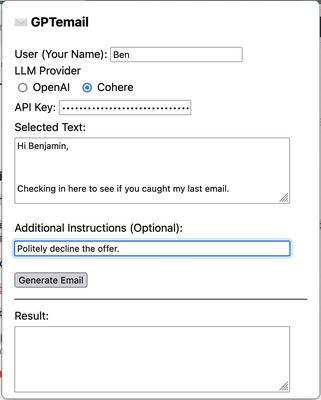
GPTemail popup. After entering my name and authentication for the large language model provider, I capture the text of the email I want to reply to, and provide instructions to generate a reply.
О овом додатку
GPTemail allows you to capture information from your email client, and sent it to a large language model (like OpenAI's GPT3) to suggest a reply for you. Works on multiple e-mail clients, and allows you to choose between Cohere and OpenAI as the provider for the language model.
Програмерске напомене
Detailed Description:
GPTemail is designed to be flexible, lightweight, and unobtrusive. Rather than deeply integrating with a particular e-mail client, GPTemail just reads the text you select with your cursor, or the text you paste into the extension popup. Here's how to use it:
  1. First, you need an API key so that GPTemail can talk to the language model. You can get one for free from OpenAI or Cohere. Create an OpenAI account here, or a Cohere account here and generate an API key. You'll probably want to stash it somewhere safe so that you can paste it in again if you ever need to. GPTemail stores your API key in local storage, so it never leaves your computer. It will persist across requests, but it might get forgotten when you restart the browser or clear its data. New OpenAI signups get some free usage, and after that runs out, each request costs ≤ $0.02. Cohere is totally free to use at the "Trial" level.
  2. After creating the API key, navigate to your e-mail website, and select the text you want to compose a response to. Click on the toolbar icon, or press ⌘ + Shift + E to open the GPTemail popup. If this is your first use, you'll have to enter your preferred name to sign your e-mails with (in the User field), and your OpenAI or Cohere API key, and select your preferred model (OpenAI or Cohere).
  3. The text you selected will show up in the "Selected Text" field. (If it doesn't, this means your e-mail client is an evil nightmare website with iframes and/or Shadow DOMs, and you should write them an angry letter! In this case, you can just paste in the text yourself.)
  4. GPTemail already understands that it should write a reply (from you) to this selected text. If there's any special instructions ("Decline the request", "Use a professional tone", "Wish them happy holidays"), add those in the optional instructions field.
  5. Click "Generate Email", and the reply will appear in the "Results" field, and will also be copied to the clipboard. If you don't like the result, you can always try again (generated e-mails are non-deterministic), and change your instructions to get a result more in line with what you want.
Оцењено са 0 од стране 0 рецензената
Пријавите се да бисте оценили овај додатак
Још увек нема оцена

Оцена звездицама сачувана

5
0
4
0
3
0
2
0
1
0
Још увек нема рецензија
Овлашћења и подаци

Потребна овлашћења:

  • Унос података у оставу
  • Приступ вашим подацима за mail.google.com
  • Приступ вашим подацима за mail.yahoo.com
  • Приступ вашим подацима за outlook.live.com
  • Приступ вашим подацима за app.hey.com
Сазнајте више
Више информација
Везе додатка
  • Страница подршке
  • Копирај ИД додатка
Издање
1.0
Величина
152,07 KB
Последњи пут ажурирано
pre 4 godine (23. dec. 2022.)
Повезане категорије
  • Језичка подршка
  • Друштвено и комуникација
Дозвола
Apache 2.0
Политика приватности
Прочитајте политику приватности за овај додатак
Историјат издања
  • Погледајте сва издања
Додај у збирку
Пријави овај додатак
Идите на почетну страницу Mozilla-е

Додаци

  • O програму
  • Блог о додацима за Firefox
  • Радионица за додатке
  • Центар за програмере
  • Политике програмера
  • Блог заједнице
  • Форум
  • Пријавите грешку
  • Водич за оцењивање

Преузмите

  • Download Firefox
  • Windows
  • macOS
  • iOS
  • Android
  • Linux
  • All

Најновије градње

  • Nightly
  • Beta

Firefox за предузећа

  • Enterprise

Заједница

  • Connect
  • Contribute
  • Developer

Прати

  • Instagram
  • YouTube
  • TikTok
  • Bluesky
  • Podcast
  • Приватност
  • Колачићи
  • Права

Изузев тамо где је другачије наведено , садржај на овој страници је лиценциран под Creative Commons Attribution Share-Alike дозволом v3.0 или било којим каснијим издањем.