
GitZip од KinoLien
It can make the sub-directories and files of github repository as zip and download it.
2.957 корисника2.957 корисника
Метаподаци додатка
Снимци екрана


О овом додатку
Why GitZip:
- You DO NOT have to download the whole project just for those few files/folders you need.
Usage:
1. Browse any Github repository page.
2. Two ways to download:
2.1. Choose the items:
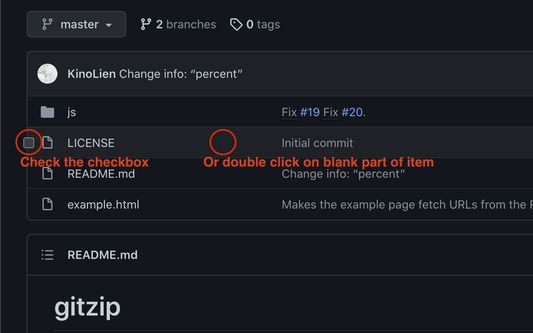
2.1.1. In default, you can double click on items or check the checkbox on the front of items.
2.1.2. Click download button at the bottom-right of the page.
2.2. In context menu:
2.2.1. Click "GitZip Download" > "Whole Repository" or "Current Folder".
2.2.2. Move the mouse cursor on the item and click "GitZip Download" > "Selected Folder/File".
2.2.3. Click "GitZip Download" > "Checked Items" after doing 2-1-1.
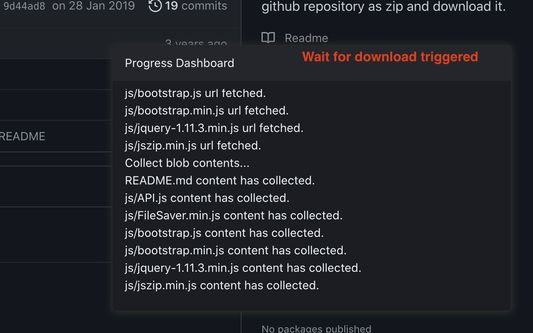
3. See the progress dashboard and wait for browser trigger download.
4. Get the ZIP file.
Options:
"How to select" for item selecting behaviour and "theme" for dark or light themes.
Get Token:
- If you see the "Rate Limit" warning message on progress dashboard, you should get the Github API access token for upgrade rate limit. GitZip provide a convenient way for it:
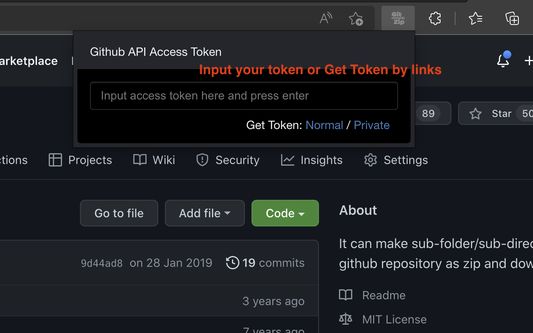
1. Click GitZip Extension icon on your browser.
2. Click "Normal" or "Private" link beside "Get Token".
3. Authorize GitZip permission on Github auth page.
4. Back to repo page automatically.
5. Continue to use.
Support Us by donate:
https://www.buymeacoffee.com/gitzip
- You DO NOT have to download the whole project just for those few files/folders you need.
Usage:
1. Browse any Github repository page.
2. Two ways to download:
2.1. Choose the items:
2.1.1. In default, you can double click on items or check the checkbox on the front of items.
2.1.2. Click download button at the bottom-right of the page.
2.2. In context menu:
2.2.1. Click "GitZip Download" > "Whole Repository" or "Current Folder".
2.2.2. Move the mouse cursor on the item and click "GitZip Download" > "Selected Folder/File".
2.2.3. Click "GitZip Download" > "Checked Items" after doing 2-1-1.
3. See the progress dashboard and wait for browser trigger download.
4. Get the ZIP file.
Options:
"How to select" for item selecting behaviour and "theme" for dark or light themes.
Get Token:
- If you see the "Rate Limit" warning message on progress dashboard, you should get the Github API access token for upgrade rate limit. GitZip provide a convenient way for it:
1. Click GitZip Extension icon on your browser.
2. Click "Normal" or "Private" link beside "Get Token".
3. Authorize GitZip permission on Github auth page.
4. Back to repo page automatically.
5. Continue to use.
Support Us by donate:
https://www.buymeacoffee.com/gitzip
Оцењено са 4,4 од стране 55 рецензената
Овлашћења и подаци
Потребна овлашћења:
- Приступ вашим подацима за github.com
- Приступ вашим подацима за api.github.com
- Приступ вашим подацима за kinolien.github.io
- Приступ вашим подацима за gitzip.org
Више информација
- Издање
- 1.0.2
- Величина
- 355,93 KB
- Последњи пут ажурирано
- pre 3 godine (21. avg. 2023.)
- Повезане категорије
- Историјат издања
- Додај у збирку