
Export Memrise Progress од neoncube
Export your Memrise community course's progress.
47 корисника47 корисника
Метаподаци додатка
Снимци екрана
О овом додатку
This extension lets you save your Memrise community course's progress, so that you can import it into another site, such as mylittlewordland.com
To download your progress:
1. Go to https://community-courses.memrise.com
2. Open a course. You should now be on the course's overview page.
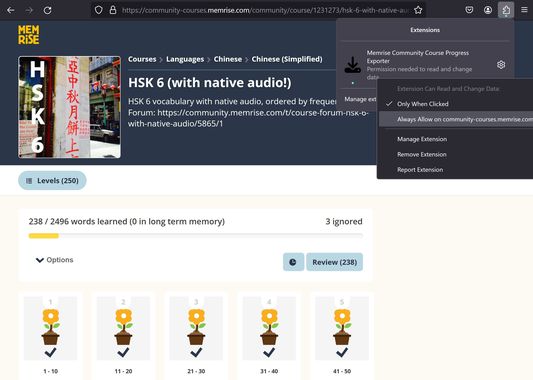
3. Click the Firefox extensions icon, right click the Memrise Community Course Progress Exporter extension, and select "Always Allow on community-courses.memrise.com" (See screenshot).
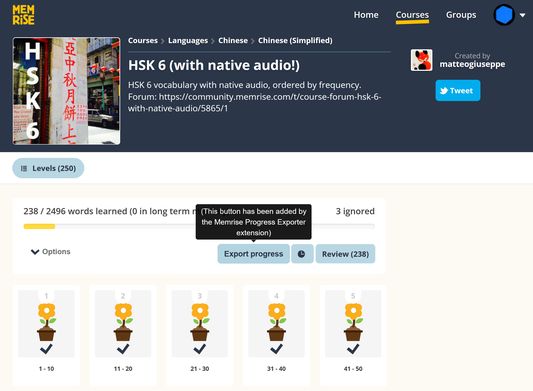
4. Click the blue "Export progress" button.
To download your progress:
1. Go to https://community-courses.memrise.com
2. Open a course. You should now be on the course's overview page.
3. Click the Firefox extensions icon, right click the Memrise Community Course Progress Exporter extension, and select "Always Allow on community-courses.memrise.com" (See screenshot).
4. Click the blue "Export progress" button.
Оцењено са 0 од стране 0 рецензената
Овлашћења и подаци
Потребна овлашћења:
- Приступ вашим подацима за community-courses.memrise.com
- Приступ вашим подацима за app.memrise.com
Необавезна овлашћења:
- Приступ вашим подацима за community-courses.memrise.com
- Приступ вашим подацима за app.memrise.com
Више информација
- Везе додатка
- Издање
- 1.13
- Величина
- 24,21 KB
- Последњи пут ажурирано
- pre 5 meseci (29. maj 2026.)
- Повезане категорије
- Дозвола
- Сва права су задржана
- Историјат издања
- Додај у збирку