
Edit with Sublime Text од Joe Ertaba
Edit an HTML element with Sublime Text editor with real-time updates
39 корисника39 корисника
Метаподаци додатка
Снимци екрана
О овом додатку
With this extension, the content of an HTML node element can be edited in Sublime Text with real-time updates upon saving of the generated temporary file. It is also possible to use this extension to edit textarea and input[type=text] elements.
There are two methods to send an HTML node to the Sublime Editor
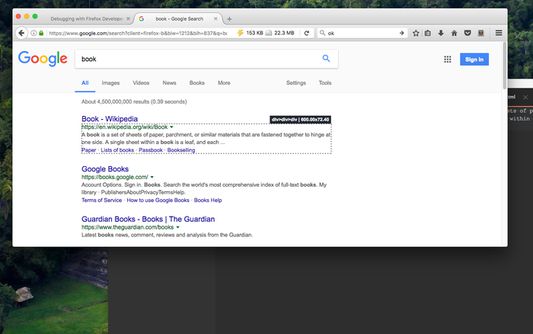
1. Use the toolbar button to activate the simple inspector. Then click on the HTML node. To cancel the operation, press the Esc key.
2. Use the dev tools "Elements" panel. A new sub-pane is added to this panel. Select "Edit as HTML", then select an HTML node. When you are ready, press the button to open the content in the Sublime Text editor.
Note: You can edit multiple nodes simultaneously with this extension
Note: Files are stored in the OS temporary directory, so there is no need to delete them manually
Note: As of version 0.1.3, it is possible to use the external editor to edit editable input and textarea elements. This is useful if the built-in editor is not suitable or it is not resizable
Note: You can use the devtools panel to convert an external script or an external CSS resource to an internal equivalent. This way you can send the content to the external editor.
The following extensions are used when a temporary resource is created:
1. HTML -> if innerHTML or outerHTML content is sent to the external editor
2. JS -> if an inline script is being edited
3. TXT -> If an editable area is being edited
For more info please visit:
http://add0n.com/edit-as-html.html
For bug reports use:
https://github.com/belaviyo/edit-as-html/issues
There are two methods to send an HTML node to the Sublime Editor
1. Use the toolbar button to activate the simple inspector. Then click on the HTML node. To cancel the operation, press the Esc key.
2. Use the dev tools "Elements" panel. A new sub-pane is added to this panel. Select "Edit as HTML", then select an HTML node. When you are ready, press the button to open the content in the Sublime Text editor.
Note: You can edit multiple nodes simultaneously with this extension
Note: Files are stored in the OS temporary directory, so there is no need to delete them manually
Note: As of version 0.1.3, it is possible to use the external editor to edit editable input and textarea elements. This is useful if the built-in editor is not suitable or it is not resizable
Note: You can use the devtools panel to convert an external script or an external CSS resource to an internal equivalent. This way you can send the content to the external editor.
The following extensions are used when a temporary resource is created:
1. HTML -> if innerHTML or outerHTML content is sent to the external editor
2. JS -> if an inline script is being edited
3. TXT -> If an editable area is being edited
For more info please visit:
http://add0n.com/edit-as-html.html
For bug reports use:
https://github.com/belaviyo/edit-as-html/issues
Оцењено са 4 од стране 4 рецензената
Овлашћења и подаци
Потребна овлашћења:
- Размена порука са програмима који нису Firefox
- Покажите обавештења
Необавезна овлашћења:
- Преузимање датотека, читање и измена историје преузимања
- Приступ подацима за све веб странице
Више информација
- Издање
- 0.1.5
- Величина
- 143,74 KB
- Последњи пут ажурирано
- pre 7 godina (14. mar. 2020.)
- Повезане категорије
- Дозвола
- Јавна дозвола Mozilla 2.0
- Политика приватности
- Прочитајте политику приватности за овај додатак
- Историјат издања
- Додај у збирку
Програмер овог додатка вас моли да помогнете у подршци за његов даљи развој тако што ћете дати мали допринос.