
Tabs manager од François Gueguen
With this extension handle your opened tabs, order them by title or url, find duplicated ones matching the same urls.
131 корисник131 корисник
Метаподаци додатка
Снимци екрана


О овом додатку
Have you ever been overwhelmed by the number of opened tabs in your Firefox browser ? I do. Sometimes I just don't know how I got there, how is it I ended up with hundred of tabs opened ? Then Firefox lags because it can't handle it and I just can't enjoy web browsing anymore. I feel miserable, my life is a failure.
But I made this add-on to solve a problem here. I believe it is a pramatic and simple solution to find potential duplicates between the opened tabs, allowing you to close those and more.
How this add-on looks for duplicates ?
This add-on estimates duplicated tabs based on their urls and their title. If the url matches exactly the one of another tab, then the two tabs are considered as "trusted" duplicates. If there are differencies in the urls, like an extra parameter or an anchor, the tabs are considered as "untrusted" duplicates. They may be duplicates or not, depending on how the corresponding site deals with this extra parameter or anchor.
For example on a tube site you may add a parameter "&t=72" to start a video at a specific frame. Technically the page is the same than another one without this parameter. But what if the extra parameter is something like an id ? Then it's two different pages.
So untrusted duplicates may or may be not real duplicates, this add-on provides a way to find those but you'd have to check it yourself.
How to use it ?
It is quite simple, basically this add-on comes with a toolbar icon. If potential duplicates are found between your opened tabs, it will display a badge with the number of duplicated urls found.
Note that the color of this badge changes according to these cases:
- if the active tab you're on is a duplicate, the badge is blue
- if there is at least one trusted duplicate, the badge is red
- else if all the duplicated tabs found are untrusted, the badge is orange
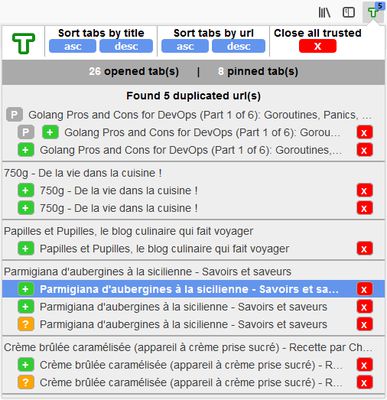
Click on the toolbar icon to open a popup showing you first a summary indicating the total number of opened tabs plus the number of pinned tabs, and second the list of the duplicated tabs found.
This list shows indicators for each duplicates:
- if the duplicated tab is a pinned one, a grey indicator P is showned
- if the duplicated tab is a trusted one, a green indicator + is showned
- if the duplicated tab is an untrusted one, an orange indicator ? is showned
Available actions
In the list click on a duplicate's title to activate its tab
In the list you may close a particular duplicate with the red X action
On top of the popup there is also several global actions available:
- you may close all the trusted duplicates with the "Close all trusted" button. This leaves the untrusted duplicates, easing the manual checking that you may do
- there is several buttons allowing you to reorganize your tabs based on their urls or title, in ascending or descending sort (Sort tabs by url/Sort tabs by title)
Notes
The sorting has no effect on pinned tabs. If you use a sorting button, the list in the popup will always display the pinned tabs and their duplicates first.
But I made this add-on to solve a problem here. I believe it is a pramatic and simple solution to find potential duplicates between the opened tabs, allowing you to close those and more.
How this add-on looks for duplicates ?
This add-on estimates duplicated tabs based on their urls and their title. If the url matches exactly the one of another tab, then the two tabs are considered as "trusted" duplicates. If there are differencies in the urls, like an extra parameter or an anchor, the tabs are considered as "untrusted" duplicates. They may be duplicates or not, depending on how the corresponding site deals with this extra parameter or anchor.
For example on a tube site you may add a parameter "&t=72" to start a video at a specific frame. Technically the page is the same than another one without this parameter. But what if the extra parameter is something like an id ? Then it's two different pages.
So untrusted duplicates may or may be not real duplicates, this add-on provides a way to find those but you'd have to check it yourself.
How to use it ?
It is quite simple, basically this add-on comes with a toolbar icon. If potential duplicates are found between your opened tabs, it will display a badge with the number of duplicated urls found.
Note that the color of this badge changes according to these cases:
- if the active tab you're on is a duplicate, the badge is blue
- if there is at least one trusted duplicate, the badge is red
- else if all the duplicated tabs found are untrusted, the badge is orange
Click on the toolbar icon to open a popup showing you first a summary indicating the total number of opened tabs plus the number of pinned tabs, and second the list of the duplicated tabs found.
This list shows indicators for each duplicates:
- if the duplicated tab is a pinned one, a grey indicator P is showned
- if the duplicated tab is a trusted one, a green indicator + is showned
- if the duplicated tab is an untrusted one, an orange indicator ? is showned
Available actions
In the list click on a duplicate's title to activate its tab
In the list you may close a particular duplicate with the red X action
On top of the popup there is also several global actions available:
- you may close all the trusted duplicates with the "Close all trusted" button. This leaves the untrusted duplicates, easing the manual checking that you may do
- there is several buttons allowing you to reorganize your tabs based on their urls or title, in ascending or descending sort (Sort tabs by url/Sort tabs by title)
Notes
The sorting has no effect on pinned tabs. If you use a sorting button, the list in the popup will always display the pinned tabs and their duplicates first.
Оцењено са 3,8 од стране 14 рецензената
Овлашћења и подаци
Више информација
- Везе додатка
- Издање
- 1.8
- Величина
- 41,13 KB
- Последњи пут ажурирано
- pre 6 godina (27. maj 2020.)
- Дозвола
- MIT дозвола
- Историјат издања
- Додај у збирку