
devtools-highlighter од Patrick Brosset
Find and highlight elements on the page with this DevTools panel, using CSS styles and selectors.
77 корисника77 корисника
Метаподаци додатка
Снимци екрана
О овом додатку
There are 2 ways to find elements using the panel:
- By using computed style queries.
- Or by using CSS selectors.
Using computed style queries
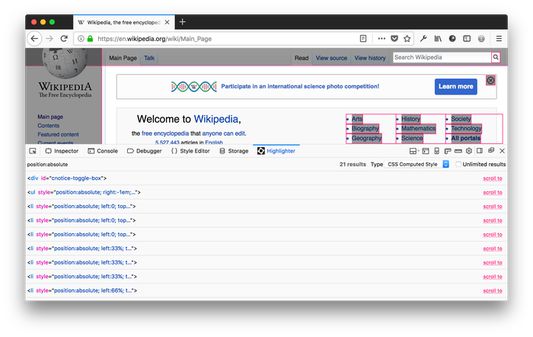
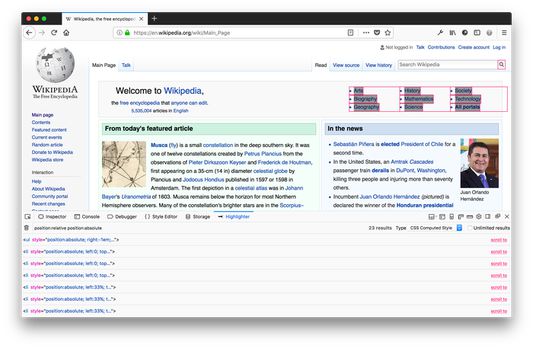
This is the main feature of this extension. It is very useful for finding elements on a page that have certain CSS computed styles.
For example, say you want to list all of the CSS grids on a page. You can use this query to do this display:grid.
The extension will simply loop through all elements on the page and only display the ones that do have their CSS computed display value set to grid.
You can also use a couple of operators to make searching more useful:
display:!block will find all elements that have a display value other than block.
display:~flex will find all elements that have a display value that includes the substring flex. So it will match elements that have it set to inline-flex and flex.
The extension also supports descendant queries. That means you can find elements that have a given style and that are descendant of elements that have another given style.
For instance display:flex align-self:start will find all elements with align-self set to start and that are descendants of a display:flex element.
Using CSS selector queries
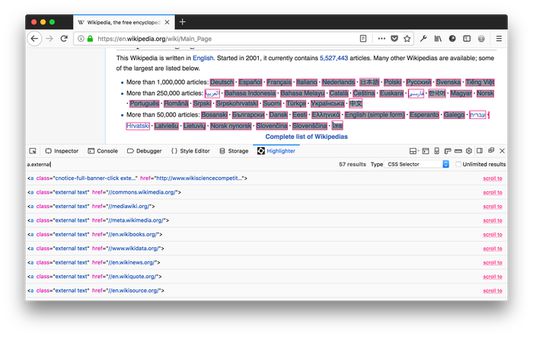
This is a more traditional way to search for elements in the page but can be useful too.
With this feature, you can simply type any CSS selector that would work with document.querySelectorAll and the matching elements will be listed and highlighted.
Browsing the results
Once a search has returned results, they are displayed in the panel and they are all highlighted in the page too.
Hovering over a single result will highlight only the corresponding element.
It is also possible to scroll an element into view by clicking on the corresponding link in the panel.
Finally, you can also select any of the displayed elements in the inspector panel by clicking on the select link in the panel.
- By using computed style queries.
- Or by using CSS selectors.
Using computed style queries
This is the main feature of this extension. It is very useful for finding elements on a page that have certain CSS computed styles.
For example, say you want to list all of the CSS grids on a page. You can use this query to do this display:grid.
The extension will simply loop through all elements on the page and only display the ones that do have their CSS computed display value set to grid.
You can also use a couple of operators to make searching more useful:
display:!block will find all elements that have a display value other than block.
display:~flex will find all elements that have a display value that includes the substring flex. So it will match elements that have it set to inline-flex and flex.
The extension also supports descendant queries. That means you can find elements that have a given style and that are descendant of elements that have another given style.
For instance display:flex align-self:start will find all elements with align-self set to start and that are descendants of a display:flex element.
Using CSS selector queries
This is a more traditional way to search for elements in the page but can be useful too.
With this feature, you can simply type any CSS selector that would work with document.querySelectorAll and the matching elements will be listed and highlighted.
Browsing the results
Once a search has returned results, they are displayed in the panel and they are all highlighted in the page too.
Hovering over a single result will highlight only the corresponding element.
It is also possible to scroll an element into view by clicking on the corresponding link in the panel.
Finally, you can also select any of the displayed elements in the inspector panel by clicking on the select link in the panel.
Оцењено са 4,8 од стране 6 рецензената
Овлашћења и подаци
Потребна овлашћења:
- Омогући програмерским алаткама приступ вашим подацима у отвореним језичцима
- Приступ подацима за све веб странице
Више информација
- Издање
- 1.2.1resigned1
- Величина
- 19,81 KB
- Последњи пут ажурирано
- pre 2 godine (25. apr. 2024.)
- Повезане категорије
- Дозвола
- Јавна дозвола Mozilla 2.0
- Историјат издања
- Додај у збирку
And let me know what you think in the comments!