
Containers Helper од Containers Helper
Helps improve container management by providing container searching, deleting, modifying, duplicating, and default URLs on a per-container or bulk basis. Complements the multi-account containers addon.
566 корисника566 корисника
Метаподаци додатка
Снимци екрана


О овом додатку
Firefox multi-account containers are for power users. So is this extension. This extension adds bulk container interactivity features missing from the Mozilla Multi-Account Containers extension.
This extension is intended to augment the Multi-Account Containers extension in Firefox.
This readme contains extensive information about the extension and it aims to bootstrap new users into using the extension effectively.
If you're like me and you care deeply about your web browsing privacy, you may be creating a large amount of containers for your browsing, even multiple containers for the same sites.
If this is you, and if you've also struggled to scroll through your long list of containers without reprieve or do other bulk interactions with the multi-account containers extension, then this extension is for you. It will enable you to quickly filter all of your containers and open a new one quickly, or do other things (continue reading).
Features
For a list of all features, screengrabs/examples, and other information, visit the GitHub home page for this extension: https://codeberg.org/firefox-containers-helper/firefox-containers-helper
This extension is intended to augment the Multi-Account Containers extension in Firefox.
This readme contains extensive information about the extension and it aims to bootstrap new users into using the extension effectively.
If you're like me and you care deeply about your web browsing privacy, you may be creating a large amount of containers for your browsing, even multiple containers for the same sites.
If this is you, and if you've also struggled to scroll through your long list of containers without reprieve or do other bulk interactions with the multi-account containers extension, then this extension is for you. It will enable you to quickly filter all of your containers and open a new one quickly, or do other things (continue reading).
Features
- Container search capability - filters your containers as you type.
- Press
enterto open the first result in the list (or the only result, if just one result remains). - Simultaneously press
ctrland eitherclickorenterto open the result(s) in a pinned state. (cmd key on mac) - Combine above shortcuts with
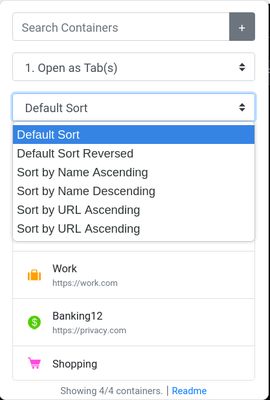
shiftto open all filtered containers at once. - Sort the list of containers shown in the extension popup by their name, default URL, or the default sort order.
- Press
- Set a Default URL for containers - Any time you use this extension to open a tab, you can configure the tab to open a specific URL by default.
- The URL settings are stored as part of the extension itself, and are independent of the Multi-Account Containers addon. It will not affect any existing settings, and will not change the behavior of which URLs are opened in which containers by default.
- Similar to above, press
shiftto bulk-set-default URLs for the current query.
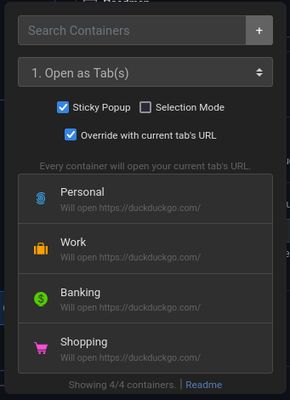
- Sticky Popup - If you want, you can check this box to keep the extension open while you click on different results (to open many containers) for your search. This mode feels very powerful to use.
- Set Name/Icon/Color mode - Allows you to quickly set one or more containers' icon, color, or name quickly.
- Find and Replace mode - Allows you to perform a find and replace on container names or default URLs.
- Duplication mode - Allows you to duplicate one or more containers returned by a search query.
- Note: Duplication mode currently does not copy the default open-in-URL capability for multi-account containers, but it does duplicate default URLs defined for containers within this extension. (This extension currently does not have the capability to access information about default open-in-URLs for containers, which is stored in the extension settings for the multi-account containers extension storage in your browser's settings)
- Deletion mode - When checked, you can click on a container to delete it. This method of deletion is a bit quicker than the multi-account containers extension. You will be prompted for deletion more than once.
- Caution: This can delete all of your containers if you're not careful.
- Similar to above, press
shiftto bulk-delete containers returned by a query.
- Refresh mode - Quickly allows you to delete & re-create any or all of your containers at once, which allows you to quickly purge cookies and other site data for your favorite containers.
- Keyboard shortcut to open the popup window is
alt+shift+D(configurable). It will immediately focus the search box, so you can quickly filter for a container, press enter, and go. - Dark and Light mode respects your system's dark/light mode setting.
- Select Mode - Like you'd intuitively expect, you can enable Select Mode, press
Ctrl+Click(cmd key on mac) to specifically select a couple results from the list, as well asCtrl+Shift+Click(cmd+shift key on mac) to traverse a range of containers. - Container Quick-Add - Allows you to quickly add a new container based on what you have typed into the filter text box. Defaults to a circle icon and the toolbar color.
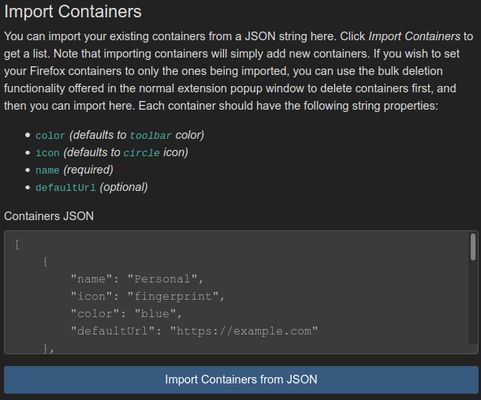
- Container Import/Export - Using the Preferences section, you can use JSON to import and export containers, and set default URLs for them. This can make your life easier if you're migrating between devices and want to carry over all of your containers, for example.
- Quickly Open Current Page in Other Containers - Disabled by default - enable this in the addon settings page. You can automatically open the current page in other containers whose domains/hosts/origins match your current tab's URL's domain/host/origin. Read more in the addon settings page.
- Open the current tab's page in all containers - Allows you to check a box and open the current URL in every filtered container, if you'd like.
For a list of all features, screengrabs/examples, and other information, visit the GitHub home page for this extension: https://codeberg.org/firefox-containers-helper/firefox-containers-helper
Оцењено са 4,7 од стране 29 рецензената
Овлашћења и подаци
Више информација
- Издање
- 0.1.4
- Величина
- 230,13 KB
- Последњи пут ажурирано
- pre 3 godine (4. mar. 2023.)
- Повезане категорије
- Историјат издања
- Додај у збирку