
Bookmark2Toolbar од Darv
Add a bookmark to the toolbar
13 корисника13 корисника
Метаподаци додатка
Снимци екрана


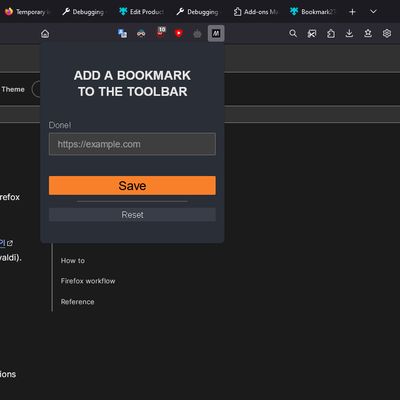


О овом додатку
You can bookmark your favorite site in the toolbar:
1. Install this web extension;
2. Right-click on the extension icon;
3. Click Add current page;
OR
2. Left-click on the extension icon;
3. Add and save your favorite URL address;
4. The yellow star icon will be replaced with the favicon of the added site;
5. The next click on the icon will open your favorite site in a new tab.
Enjoy it ;)
1. Install this web extension;
2. Right-click on the extension icon;
3. Click Add current page;
OR
2. Left-click on the extension icon;
3. Add and save your favorite URL address;
4. The yellow star icon will be replaced with the favicon of the added site;
5. The next click on the icon will open your favorite site in a new tab.
Enjoy it ;)
This is the first extension out of 3 possible. So you can bookmark more different sites to the toolbar.
Оцењено са 5 од стране 3 рецензената
Више информација
- Издање
- 1.3.1
- Величина
- 17,25 KB
- Последњи пут ажурирано
- pre 2 godine (24. jul 2024.)
- Повезане категорије
- Дозвола
- MIT дозвола
- Историјат издања
- Додај у збирку