
AI Chat Broadcaster од Ruslanlap
AI Chat Broadcaster is a browser extension enabling users to send identical prompts to multiple AI chat platforms simultaneously. Key features include: Multi-platform broadcasting (ChatGPT, Claude, Grok, DeepSeek, Mistral). Selective sending
1 корисник1 корисник
Метаподаци додатка
Снимци екрана
О овом додатку
AI Chat Broadcaster
Send messages to multiple AI assistants simultaneously
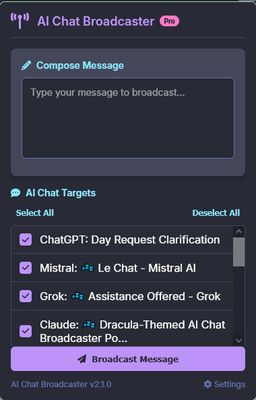
AI Chat Broadcaster is a browser extension that allows you to send the same message to multiple AI chat platforms with a single click. Save time and get diverse responses by broadcasting your prompts across different AI assistants.
Key Features:
• Multi-platform Broadcasting: Send the same prompt to multiple AI assistants with one click, saving time and ensuring consistent responses across platforms.
• Selective Sending: Choose which AI chats receive your message with simple checkboxes for maximum flexibility.
• Status Feedback: Get clear feedback on message delivery success with visual indicators for each chat.
• Multilingual Support: Available in English and Ukrainian with an easy language switcher.
• User-friendly Interface: Clean, intuitive design that's easy to use.
Supported Platforms:
• ChatGPT (chat.openai.com)
• Claude (claude.ai)
• Grok (grok.com)
• DeepSeek (chat.deepseek.com)
• Mistral (chat.mistral.ai)
How to Use:
Pro Tips:
- For complex prompts, prepare your text in a text editor first
- Use the "Select All" button to quickly check all open chats
- Monitor the status messages to ensure successful delivery
Privacy & Permissions:
This extension only interacts with the supported AI chat websites. It does not collect or transmit any of your data to external servers. The extension requires permissions to access tabs and inject content scripts only on the supported AI chat platforms.
Version: 0.0.2
Developer: ruslanlap
Send messages to multiple AI assistants simultaneously
AI Chat Broadcaster is a browser extension that allows you to send the same message to multiple AI chat platforms with a single click. Save time and get diverse responses by broadcasting your prompts across different AI assistants.
Key Features:
• Multi-platform Broadcasting: Send the same prompt to multiple AI assistants with one click, saving time and ensuring consistent responses across platforms.
• Selective Sending: Choose which AI chats receive your message with simple checkboxes for maximum flexibility.
• Status Feedback: Get clear feedback on message delivery success with visual indicators for each chat.
• Multilingual Support: Available in English and Ukrainian with an easy language switcher.
• User-friendly Interface: Clean, intuitive design that's easy to use.
Supported Platforms:
• ChatGPT (chat.openai.com)
• Claude (claude.ai)
• Grok (grok.com)
• DeepSeek (chat.deepseek.com)
• Mistral (chat.mistral.ai)
How to Use:
- Open AI Chats: Log into your accounts on supported platforms and open them in separate tabs
- Click the Extension Icon: Click on the AI Chat Broadcaster icon in your browser toolbar
- Enter Your Message: Type the text you want to send to all chats
- Select Chats: Check the AI chats you want to send your message to
- Send: Click the "Send to all selected chats" button
Pro Tips:
- For complex prompts, prepare your text in a text editor first
- Use the "Select All" button to quickly check all open chats
- Monitor the status messages to ensure successful delivery
Privacy & Permissions:
This extension only interacts with the supported AI chat websites. It does not collect or transmit any of your data to external servers. The extension requires permissions to access tabs and inject content scripts only on the supported AI chat platforms.
Version: 0.0.2
Developer: ruslanlap
Оцењено са 0 од стране 0 рецензената
Овлашћења и подаци
Више информација
- Издање
- 0.0.2
- Величина
- 348,12 KB
- Последњи пут ажурирано
- pre jedne godine (12. mar. 2025.)
- Повезане категорије
- Дозвола
- Јавна дозвола Mozilla 2.0
- Историјат издања
- Додај у збирку